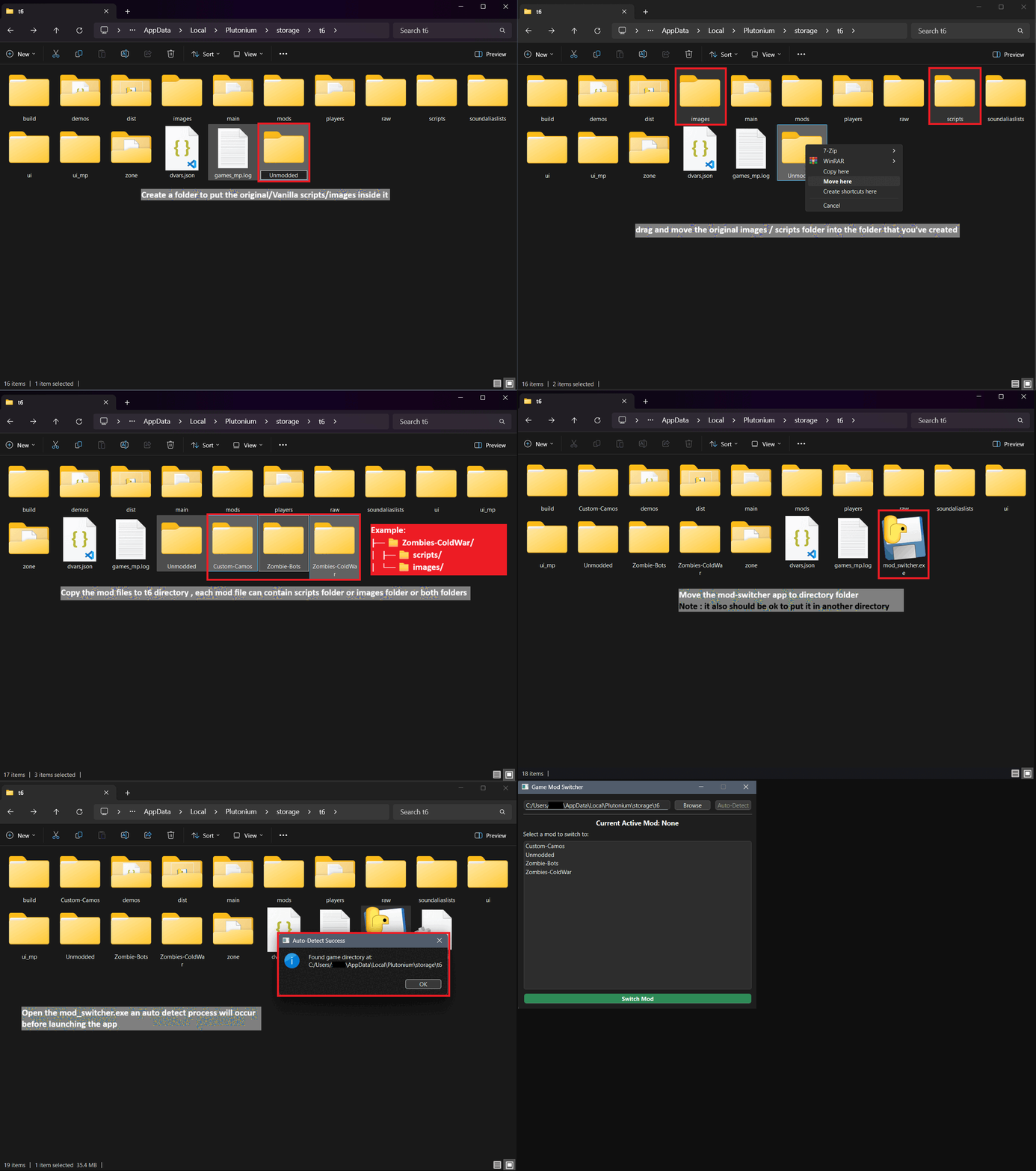
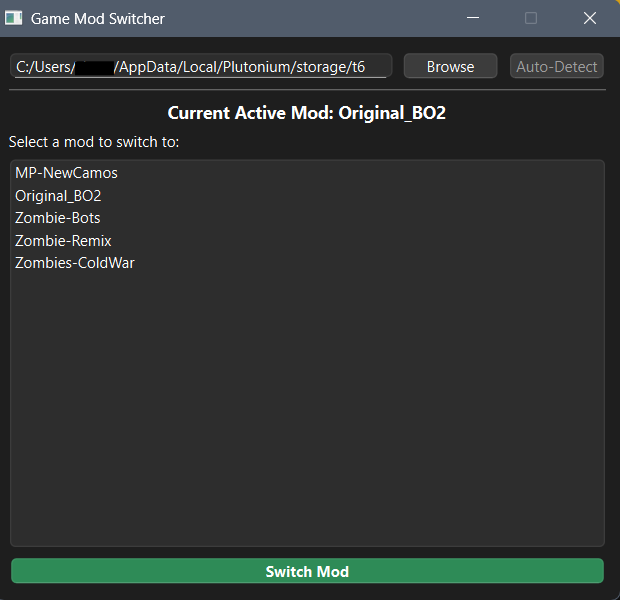
[RELEASE] BO2 Mod Switcher v1.0 - End Scripts Conflicts
-
 ZYLO_X96 referenced this topic on
-
ZYLO_X96 referenced this topic on
-
GAH DAHYEM dude your the goated one this is the best!


-
Why not create the correct folder structure so you can switch mods through the mod menu instead of having a llm write this utility?
Xerxes
Hello, ️
️
This tool addresses a different problem than the in-game mod switcher.The Issue i faced: Scripts/images in t6 folder often conflict with mods from the mods menu ( mods from in game mod changer).
For example:
•ZM ColdWar scripts/images conflict with Nuketown Revamped 2025 (mods folder)
So to play Nuketown Revamped, you must manually delete all custom scripts/images first•Switching between script-based mods (ColdWar → ZM Remix) requires manual file management

My app function provides One-click switching between script/image sets without manual copying/deleting.

Regarding LLM: I only used AI to help create the GUI interface since i only create console python apps without GUI and console apps may not be comfortable for normal users.
The core functionality and logic are my own work. There's no shame in using tools to improve productivity.
i made this tool for myself and i wanted to share it to help the community.

This fills a real gap that the in game switcher doesn't address.
-
Aight, fyi mods from your scripts / images subfolders in t6 can be loaded through the ingame mod menu if you create a folder for them and move the files. I know this won't help with custom textures you want to use on servers but for scripts it certainly is a solution.
-
Aight, fyi mods from your scripts / images subfolders in t6 can be loaded through the ingame mod menu if you create a folder for them and move the files. I know this won't help with custom textures you want to use on servers but for scripts it certainly is a solution.
Xerxes
Thanks for the information.i tried the method you mentioned before but unfortunately some modes got broken or they were missing some features which depends on custom textures.
anyway i hope this app doesn't conflict with plutonium community standards.
It's just an open source tool i made to switch between mods with custom scripts and images without writing / overwriting / backup files every time i want to play.
-
Thanks for that, goat.
-
hello
the link from github it give a 404 page not found -
hello
the link from github it give a 404 page not foundFreespider65 github link is down i think. i just move my mods to docs folder everytime i wanna switch out. that includes the images file too. but i always move the mods and images out before placing new ones in. works fine


Hello! It looks like you're interested in this conversation, but you don't have an account yet.
Getting fed up of having to scroll through the same posts each visit? When you register for an account, you'll always come back to exactly where you were before, and choose to be notified of new replies (either via email, or push notification). You'll also be able to save bookmarks and upvote posts to show your appreciation to other community members.
With your input, this post could be even better 💗
Register Login