- DARK SOLDIER BACKGROUND - MW3
-

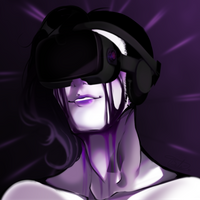
CUSTOM BACKGROUND IMAGE FOR MW3/IW5
I made this background image a while ago for my IW5 main menu, which I liked the result and wanted to share it.
BG IMAGES DOWNLOAD LINK:
background_image_blur_less.iwi
--------------------------------------STEPS (in list from top to bottom)---------------------------------------
-
Install the background images (both blur and blurless).
-
Install or have WinRAR or 7ZIP.
-
Copy this file directory "%localappdata%\Plutonium\storage\iw5", press Win + R to open Run, insert the directory, press OK/Enter and right click your images file (you have 2 situations, 1) it already exists. 2) there's no images folder, in this case create one and name it images) and turn the folder via WinRAR or 7ZIP into a .ZIP file.
-
Open the .ZIP file you created with WinRAR or 7ZIP and delete the existing background images (both go by the starting name of "background_image", and move the custom background images (already in .IWI) into the file inside WinRAR or 7ZIP, after placing them close your WinRAR or 7ZIP window.
-
Go back to the "%localappdata%\Plutonium\storage\iw5" file, search for the .ZIP, and change the file type to .IWD (Windows will/could throw a notification about the file becoming useless, but just continue, it will be read)
-
Open your Plutonium IW5 client, in case you've done everything correctly, you should have the custom background images set!
------------------------------------------------INGAME LOOK------------------------------------------------

-
-
Always prefer sticking to the vanilla background, but yours do look professionally made. Good job.
-
Always prefer sticking to the vanilla background, but yours do look professionally made. Good job.
P_McNewHold I really love the vanilla background Plutonium has, but I made it since I changed my main menu soundtrack and I wanted a background that matched it the best posible
-
CUSTOM BACKGROUND IMAGE FOR MW3/IW5
I made this background image a while ago for my IW5 main menu, which I liked the result and wanted to share it.
BG IMAGES DOWNLOAD LINK:
background_image_blur_less.iwi
--------------------------------------STEPS (in list from top to bottom)---------------------------------------
-
Install the background images (both blur and blurless).
-
Install or have WinRAR or 7ZIP.
-
Copy this file directory "%localappdata%\Plutonium\storage\iw5", press Win + R to open Run, insert the directory, press OK/Enter and right click your images file (you have 2 situations, 1) it already exists. 2) there's no images folder, in this case create one and name it images) and turn the folder via WinRAR or 7ZIP into a .ZIP file.
-
Open the .ZIP file you created with WinRAR or 7ZIP and delete the existing background images (both go by the starting name of "background_image", and move the custom background images (already in .IWI) into the file inside WinRAR or 7ZIP, after placing them close your WinRAR or 7ZIP window.
-
Go back to the "%localappdata%\Plutonium\storage\iw5" file, search for the .ZIP, and change the file type to .IWD (Windows will/could throw a notification about the file becoming useless, but just continue, it will be read)
-
Open your Plutonium IW5 client, in case you've done everything correctly, you should have the custom background images set!
------------------------------------------------INGAME LOOK------------------------------------------------
-
-
Hey! I really love the background you made for IW5 and I have been trying to get it working, but unfortunately the game keeps loading the original background.
I followed your installation instructions exactly. I made a compressed 7-Zip copy of the existing images folder from:
%localappdata%\Plutonium\storage\iw5
I opened the ZIP, removed the two original background image files, and replaced them with your background_image.iwi and background_image_blur_less.iwi files. I then changed the ZIP extension to .iwd and placed it back in the IW5 folder.
However, when I launch Plutonium, the original background still appears.
I also tried placing the IWI files directly into the images folder, but that did not work either.
I have a 4K display, so I was wondering if the IWI files might have been created for a different resolution or texture format. Have you tested these files recently on the current version of Plutonium IW5?
Any ideas would be greatly appreciated because I really love this background and would like to get it working. Thanks!
-
Hey! I really love the background you made for IW5 and I have been trying to get it working, but unfortunately the game keeps loading the original background.
I followed your installation instructions exactly. I made a compressed 7-Zip copy of the existing images folder from:
%localappdata%\Plutonium\storage\iw5
I opened the ZIP, removed the two original background image files, and replaced them with your background_image.iwi and background_image_blur_less.iwi files. I then changed the ZIP extension to .iwd and placed it back in the IW5 folder.
However, when I launch Plutonium, the original background still appears.
I also tried placing the IWI files directly into the images folder, but that did not work either.
I have a 4K display, so I was wondering if the IWI files might have been created for a different resolution or texture format. Have you tested these files recently on the current version of Plutonium IW5?
Any ideas would be greatly appreciated because I really love this background and would like to get it working. Thanks!
-
danik882010 Can you send me screenshots of the situation so i can have a better look if posible?



Hello! It looks like you're interested in this conversation, but you don't have an account yet.
Getting fed up of having to scroll through the same posts each visit? When you register for an account, you'll always come back to exactly where you were before, and choose to be notified of new replies (either via email, or push notification). You'll also be able to save bookmarks and upvote posts to show your appreciation to other community members.
With your input, this post could be even better 💗
Register Login