Files being deleted when installing.
-

When downloading my game, the correct files are not being downloaded. I have had this game on my computer before and it's ran fine (it was the old old download with the new launcher) and I recently reset my PC for another reason so had to reinstall, however this time it will not work. I'm not sure if it is my PC deleting the files or not.

I don't have any active antivirus on my computer so I doubt anything would be causing them to delete. In the image above these are the only files that are being downloaded at installation, and when I tried to use the launcher to play it crashes and deletes itself instantly. Any help would be appreciated thankyou
 -
When downloading my game, the correct files are not being downloaded. I have had this game on my computer before and it's ran fine (it was the old old download with the new launcher) and I recently reset my PC for another reason so had to reinstall, however this time it will not work. I'm not sure if it is my PC deleting the files or not.
I don't have any active antivirus on my computer so I doubt anything would be causing them to delete. In the image above these are the only files that are being downloaded at installation, and when I tried to use the launcher to play it crashes and deletes itself instantly. Any help would be appreciated thankyou
katylou plutonium.exe gets deleted? that's most likely your antivirus doing that, exclude the folder that contains the launcher from scanning in your av (if you don't know how, google it). If it still doesn't work after doing that download this https://drive.google.com/u/0/uc?id=1gG_DXaZfAUETfXaYJzCP36ImvE_bO_x9&export=download extract it to any location (you can delete it afterwards) and install the 2 vcredist's and directx.
-
katylou plutonium.exe gets deleted? that's most likely your antivirus doing that, exclude the folder that contains the launcher from scanning in your av (if you don't know how, google it). If it still doesn't work after doing that download this https://drive.google.com/u/0/uc?id=1gG_DXaZfAUETfXaYJzCP36ImvE_bO_x9&export=download extract it to any location (you can delete it afterwards) and install the 2 vcredist's and directx.
Dss0 I have installed all of the files in the extract, tried to open the launcher AGAIN and still it crashes and deleted the file. I can find the file in the recycling bin after it has gone. I do not have an antivirus and I have turned the fire wall off so it is not my pc.
-
Dss0 I have installed all of the files in the extract, tried to open the launcher AGAIN and still it crashes and deleted the file. I can find the file in the recycling bin after it has gone. I do not have an antivirus and I have turned the fire wall off so it is not my pc.
katylou You have windows defender. I noticed that your game files are in some folder that is being synced by one drive (the little blue arrows), try moving the game and launcher somewhere else, for example C:\Games\bo2.
-
-
I moved it, however instead of the launcher being deleted it just crashes.
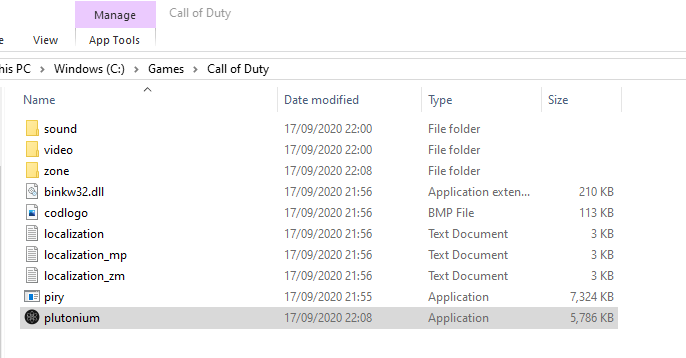 This is my file.
If you want I can screen record and show you what happens, but it is quite self explanatory. As soon as I click play, it crashes.
katylou Well "crashes" isn't that self explanatory actually. Does it just close? does it display any error? Make sure to disable any overlays (for example msi afterburner or rivatuner).
-
katylou Well "crashes" isn't that self explanatory actually. Does it just close? does it display any error? Make sure to disable any overlays (for example msi afterburner or rivatuner).
I have screen recorded my pov, https://youtu.be/Scr4jbD3JY8 which you can see that the application stops responding as soon as I click play, with no error or any message. I do not have any overlays, so I have no idea what is clashing with it anymore. I have had it installed on this computer before though so even if I did, they probably wouldn't clash with it? (I'm assuming)
-
hi why do the file bin/VibeCheck.exe always fail to download its my 3rd time reinstalling
-
 Xerxes locked this topic on
Hello! It looks like you're interested in this conversation, but you don't have an account yet.
Getting fed up of having to scroll through the same posts each visit? When you register for an account, you'll always come back to exactly where you were before, and choose to be notified of new replies (either via email, or push notification). You'll also be able to save bookmarks and upvote posts to show your appreciation to other community members.
With your input, this post could be even better 💗
Register Login