Skip to content
  • 0 Unread 0
  • Recent
  • Tags
  • Popular
  • Users
  • Groups
  • Donate
Collapse

Plutonium

  1. Home
  2. MW3 Client Support
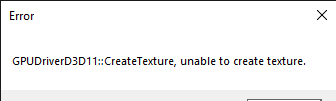
  3. Plutonium Launcher GPUDrivers D3D11 Errors

Plutonium Launcher GPUDrivers D3D11 Errors

Scheduled Pinned Locked Moved MW3 Client Support
46 Posts 13 Posters 13.1k Views 3 Watching
  • Oldest to Newest
  • Newest to Oldest
  • Most Votes
Reply
  • Reply as topic
Log in to reply
This topic has been deleted. Only users with topic management privileges can see it.
  • jerryx778 Offline
    jerryx778 Offline
    jerryx778
    wrote on last edited by
    #31

    Error 12_09_2020 11_05_09 p.m..png

    1 Reply Last reply
    0
    • HannesC Offline
      HannesC Offline
      HannesC
      Plutonium Staff
      wrote on last edited by Dss0
      #32

      jerryx778 This should fix it, however you may encounter crashes at random times
      Download this file https://drive.google.com/file/d/1fTzQtshdqhoUziaHpwxUY7gN0BidStnR/view?usp=sharing
      Run it
      Click "Edit List..."
      Click the three dots right of the "enter a process or folder name" field and select "plutonium-launcher-win32.exe" located in "C:\Users\al\AppData\Local\Plutonium\bin"
      tick the "force warp" checkbox and select "11_0" from the "feature level limit" dropdown menu
      hit ok and try launching the plutonium launcher

      jerryx778 gaksenpai DefiantObey 4 Replies Last reply
      10
      • HannesC HannesC

        jerryx778 This should fix it, however you may encounter crashes at random times
        Download this file https://drive.google.com/file/d/1fTzQtshdqhoUziaHpwxUY7gN0BidStnR/view?usp=sharing
        Run it
        Click "Edit List..."
        Click the three dots right of the "enter a process or folder name" field and select "plutonium-launcher-win32.exe" located in "C:\Users\al\AppData\Local\Plutonium\bin"
        tick the "force warp" checkbox and select "11_0" from the "feature level limit" dropdown menu
        hit ok and try launching the plutonium launcher

        jerryx778 Offline
        jerryx778 Offline
        jerryx778
        wrote on last edited by
        #33

        HannesC ok thanks you

        1 Reply Last reply
        0
        • HannesC HannesC

          jerryx778 This should fix it, however you may encounter crashes at random times
          Download this file https://drive.google.com/file/d/1fTzQtshdqhoUziaHpwxUY7gN0BidStnR/view?usp=sharing
          Run it
          Click "Edit List..."
          Click the three dots right of the "enter a process or folder name" field and select "plutonium-launcher-win32.exe" located in "C:\Users\al\AppData\Local\Plutonium\bin"
          tick the "force warp" checkbox and select "11_0" from the "feature level limit" dropdown menu
          hit ok and try launching the plutonium launcher

          jerryx778 Offline
          jerryx778 Offline
          jerryx778
          wrote on last edited by
          #34

          HannesC it worked for me

          1 Reply Last reply
          0
          • HannesC HannesC

            jerryx778 This should fix it, however you may encounter crashes at random times
            Download this file https://drive.google.com/file/d/1fTzQtshdqhoUziaHpwxUY7gN0BidStnR/view?usp=sharing
            Run it
            Click "Edit List..."
            Click the three dots right of the "enter a process or folder name" field and select "plutonium-launcher-win32.exe" located in "C:\Users\al\AppData\Local\Plutonium\bin"
            tick the "force warp" checkbox and select "11_0" from the "feature level limit" dropdown menu
            hit ok and try launching the plutonium launcher

            gaksenpai Offline
            gaksenpai Offline
            gaksenpai
            wrote on last edited by
            #35

            HannesC wey me sale todo en ingles como pongo lo ultimo eso de menú despegable

            1 Reply Last reply
            0
            • HannesC Offline
              HannesC Offline
              HannesC
              Plutonium Staff
              wrote on last edited by
              #36

              gaksenpai You just click the box of feature level, and select 11_0

              1 Reply Last reply
              0
              • HannesC HannesC

                jerryx778 This should fix it, however you may encounter crashes at random times
                Download this file https://drive.google.com/file/d/1fTzQtshdqhoUziaHpwxUY7gN0BidStnR/view?usp=sharing
                Run it
                Click "Edit List..."
                Click the three dots right of the "enter a process or folder name" field and select "plutonium-launcher-win32.exe" located in "C:\Users\al\AppData\Local\Plutonium\bin"
                tick the "force warp" checkbox and select "11_0" from the "feature level limit" dropdown menu
                hit ok and try launching the plutonium launcher

                DefiantObey Offline
                DefiantObey Offline
                DefiantObey
                wrote on last edited by
                #37

                HannesC it still gives me the error and i dont have a app data folder

                Dss0 1 Reply Last reply
                0
                • DefiantObey DefiantObey

                  HannesC it still gives me the error and i dont have a app data folder

                  Dss0 Offline
                  Dss0 Offline
                  Dss0
                  Plutonium Staff
                  wrote on last edited by
                  #38

                  DefiantObey You do but it's hidden by default, you need to enable "show hidden files and folders" in the windows explorer options.

                  DefiantObey 1 Reply Last reply
                  0
                  • Dss0 Dss0

                    DefiantObey You do but it's hidden by default, you need to enable "show hidden files and folders" in the windows explorer options.

                    DefiantObey Offline
                    DefiantObey Offline
                    DefiantObey
                    wrote on last edited by
                    #39

                    Dss0 i know see that but plutonium is not there just windows and temp

                    Dss0 1 Reply Last reply
                    0
                    • DefiantObey DefiantObey

                      Dss0 i know see that but plutonium is not there just windows and temp

                      Dss0 Offline
                      Dss0 Offline
                      Dss0
                      Plutonium Staff
                      wrote on last edited by
                      #40

                      DefiantObey You're in the wrong folder. AppData/Local contains alot more than that even without any programs installed on your pc.

                      DefiantObey 1 Reply Last reply
                      0
                      • Dss0 Dss0

                        DefiantObey You're in the wrong folder. AppData/Local contains alot more than that even without any programs installed on your pc.

                        DefiantObey Offline
                        DefiantObey Offline
                        DefiantObey
                        wrote on last edited by
                        #41

                        Dss0 i went into local then app data and thats all i see

                        Dss0 1 Reply Last reply
                        0
                        • DefiantObey DefiantObey

                          Dss0 i went into local then app data and thats all i see

                          Dss0 Offline
                          Dss0 Offline
                          Dss0
                          Plutonium Staff
                          wrote on last edited by
                          #42

                          DefiantObey not local then appdata, appdata then local. Post a screenshot of the windows explorer window.

                          DefiantObey 2 Replies Last reply
                          0
                          • Dss0 Dss0

                            DefiantObey not local then appdata, appdata then local. Post a screenshot of the windows explorer window.

                            DefiantObey Offline
                            DefiantObey Offline
                            DefiantObey
                            wrote on last edited by
                            #43

                            Dss0 i can stream to adiscord channel if that makes itn easier

                            1 Reply Last reply
                            0
                            • Dss0 Dss0

                              DefiantObey not local then appdata, appdata then local. Post a screenshot of the windows explorer window.

                              DefiantObey Offline
                              DefiantObey Offline
                              DefiantObey
                              wrote on last edited by
                              #44

                              Dss0 but once im in app data it says windows and temp
                              and nothin else so i have no clue

                              Dss0 1 Reply Last reply
                              0
                              • DefiantObey DefiantObey

                                Dss0 but once im in app data it says windows and temp
                                and nothin else so i have no clue

                                Dss0 Offline
                                Dss0 Offline
                                Dss0
                                Plutonium Staff
                                wrote on last edited by
                                #45

                                DefiantObey you're probably in Users/Default/AppData but you need to be in Users/YOURUSERNAME/AppData

                                DefiantObey 1 Reply Last reply
                                0
                                • Dss0 Dss0

                                  DefiantObey you're probably in Users/Default/AppData but you need to be in Users/YOURUSERNAME/AppData

                                  DefiantObey Offline
                                  DefiantObey Offline
                                  DefiantObey
                                  wrote on last edited by
                                  #46

                                  Dss0 oh ill now try to launch ty

                                  1 Reply Last reply
                                  0

                                  Hello! It looks like you're interested in this conversation, but you don't have an account yet.

                                  Getting fed up of having to scroll through the same posts each visit? When you register for an account, you'll always come back to exactly where you were before, and choose to be notified of new replies (either via email, or push notification). You'll also be able to save bookmarks and upvote posts to show your appreciation to other community members.

                                  With your input, this post could be even better 💗

                                  Register Login
                                  Reply
                                  • Reply as topic
                                  Log in to reply
                                  • Oldest to Newest
                                  • Newest to Oldest
                                  • Most Votes


                                  • 1
                                  • 2
                                  • 3
                                  • Login

                                  • Don't have an account? Register

                                  • Login or register to search.
                                  • First post
                                    Last post
                                  0
                                  • Unread 0
                                  • Recent
                                  • Tags
                                  • Popular
                                  • Users
                                  • Groups
                                  • Donate