Skip to content
  • Recent
  • Tags
  • Popular
  • Users
  • Groups
Collapse

Plutonium

  1. Home
  2. BO2 Client Support
  3. BO2 Will Not Launch

BO2 Will Not Launch

Scheduled Pinned Locked Moved BO2 Client Support
12 Posts 6 Posters 942 Views
  • Oldest to Newest
  • Newest to Oldest
  • Most Votes
Reply
  • Reply as topic
Log in to reply
This topic has been deleted. Only users with topic management privileges can see it.
  • HannesCundefined Offline
    HannesCundefined Offline
    HannesC
    Plutonium Staff
    wrote on last edited by
    #3

    Considering you're on windows 10, try this https://www.microsoft.com/en-us/download/details.aspx?id=35

    1 Reply Last reply
    1
    • Dancingbaconsundefined Offline
      Dancingbaconsundefined Offline
      Dancingbacons
      wrote on last edited by
      #4

      Are you on Windows 7?

      1 Reply Last reply
      1
      • KingKJCundefined Offline
        KingKJCundefined Offline
        KingKJC
        wrote on last edited by KingKJC
        #5

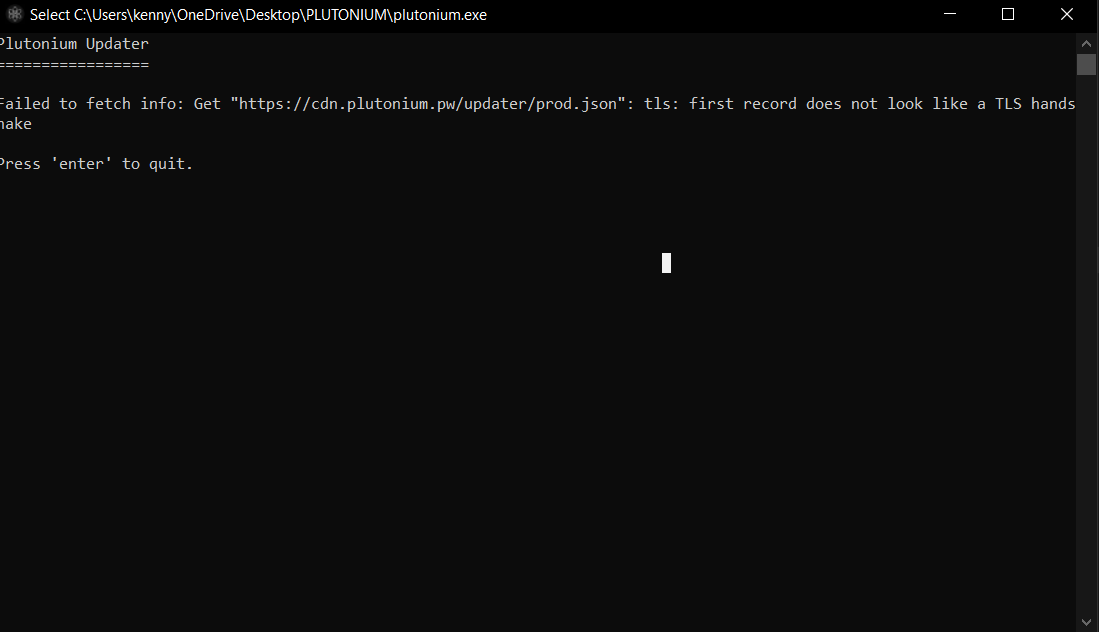
        I am on windows 10. I also downloaded DirectX. What should DirectX do to help?
        7c2c7d50-ff31-47a5-af44-7ac5d3234832-image.png
        This is an error that sometimes prevents the launcher from even starting.

        1 Reply Last reply
        0
        • HannesCundefined Offline
          HannesCundefined Offline
          HannesC
          Plutonium Staff
          wrote on last edited by
          #6

          Make sure firewall isn't blocking pluto, try changing dns to 1.1.1.1 or try a vpn

          1 Reply Last reply
          1
          • KingKJCundefined Offline
            KingKJCundefined Offline
            KingKJC
            wrote on last edited by KingKJC
            #7

            I've used a VPN and it seems to have no effect. However sometimes I still can launch the launcher but upon clicking on Bo2 it shuts down. Would you mind sharing a screenshot of the documents in your plutonium folder? Maybe I'm missing some.
            cdb9e6b1-0896-4489-b690-98ca56d82e75-image.png

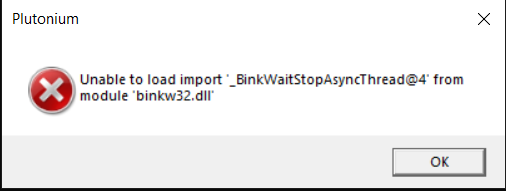
            This is what it often says after I try to play Bo2:
            d7bd0d2f-8c06-4cdc-92d2-842044983fad-image.png

            1 Reply Last reply
            0
            • KingKJCundefined Offline
              KingKJCundefined Offline
              KingKJC
              wrote on last edited by
              #8

              Turns out that I had a bit of a directory issue and have since resolved the problem. Thank you so much for all of your help. :)))

              1 Reply Last reply
              0
              • aydneundefined Offline
                aydneundefined Offline
                aydne
                wrote on last edited by
                #9

                how do i fix it because ive been having the same problem, i can into the launcher but when clicking upon the game it kicks me out with the "bink32.dll" error code

                1 Reply Last reply
                1
                • HannesCundefined Offline
                  HannesCundefined Offline
                  HannesC
                  Plutonium Staff
                  wrote on last edited by
                  #10

                  Yes you click the settings icon beside play, and choose your bo2 basegame folder(which has binķw32.dll in it)

                  xSneakyDirtxundefined 1 Reply Last reply
                  1
                  • HannesCundefined HannesC

                    Yes you click the settings icon beside play, and choose your bo2 basegame folder(which has binķw32.dll in it)

                    xSneakyDirtxundefined Offline
                    xSneakyDirtxundefined Offline
                    xSneakyDirtx
                    wrote on last edited by
                    #11

                    HannesC I've done this but Bo2 just doesn't ever load, Please Help!

                    Infamousundefined 1 Reply Last reply
                    0
                    • xSneakyDirtxundefined xSneakyDirtx

                      HannesC I've done this but Bo2 just doesn't ever load, Please Help!

                      Infamousundefined Offline
                      Infamousundefined Offline
                      Infamous
                      wrote on last edited by
                      #12

                      xSneakyDirtx Please create a new topic including information such as the problem, things you've tried so far to fix it and your system specs.

                      Topic locked
                      1 Reply Last reply
                      0

                      Hello! It looks like you're interested in this conversation, but you don't have an account yet.

                      Getting fed up of having to scroll through the same posts each visit? When you register for an account, you'll always come back to exactly where you were before, and choose to be notified of new replies (either via email, or push notification). You'll also be able to save bookmarks and upvote posts to show your appreciation to other community members.

                      With your input, this post could be even better 💗

                      Register Login
                      Reply
                      • Reply as topic
                      Log in to reply
                      • Oldest to Newest
                      • Newest to Oldest
                      • Most Votes


                      • Login

                      • Don't have an account? Register

                      • Login or register to search.
                      • First post
                        Last post
                      0
                      • Recent
                      • Tags
                      • Popular
                      • Users
                      • Groups