[Semi-Resolved] Issues With Sound (Windows 10) - Zombies & Multiplayer
-

Previously this had worked fine on a different system/setup, but on my new one, not so much.
So to quickly summarize, when I first started the Zombies mode, I was in 800x600 resolution with the wrong audio device selected. Not a problem, I switched all of my settings and voila, I had audio and could see properly.
I then played a couple of rounds to test out my dedicated server and everything was working great. I could alt-tab and come back in and audio still worked.**Problem you are having:**Next time I went to start it, I no longer had any audio in game. I went into my settings and realized everything was exactly as it was, with the correct audio device selected.
**What have you tried to do already?**- Toggling what audio device back and forth
- Changing what audio device is selected at close/startup and then toggling to the correct one (tried starting with both the correct device and incorrect)
- Confirmed directly seems OK and all files there (nothing changed from last launch, but figured I'd check)
- Restarting computer (of course, but figured it was worth a shot)
- Restarting/unplugging re-plugging audio device (SteelSeries Arctis 7)
- Confirmed latest drivers installed for audio device (in this case the SteelSeries Engine)
- Looked up forum history to see many of these issues but none with seemingly any merit (many low-effort just stating an issue with no resolution or debug steps)
- Changed audio device settings to no longer allow any application exclusive audio control, as well as disabling all 'enhancements'
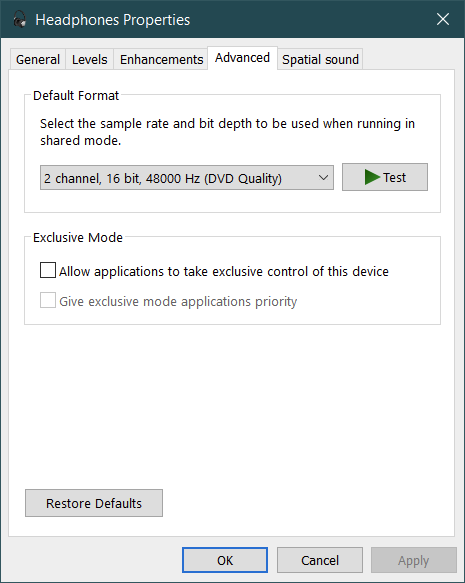
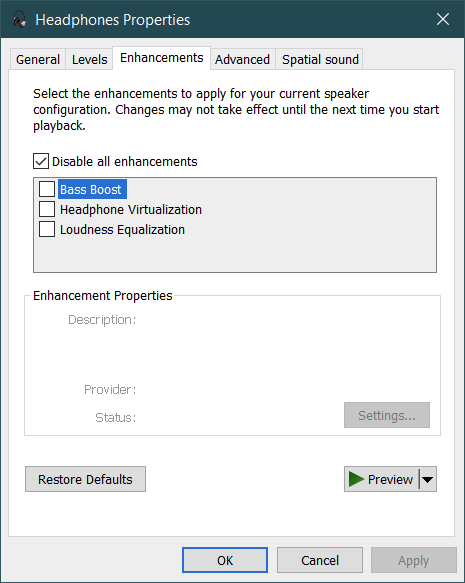
- This one actually made a difference, and I could get back the audio every time I alt-tabbed from the game, but I'd have to go to the main menu for that. "Usable" now though, as I actually have game audio.
- Just went to test it and now it seems to work all of the time. Seemingly resolved, but definitely bug-worthy as those steps shouldn't be necessary and many other users seem to be having the same problem (though they may not have tried this workaround).
.
.This weird space is so that the headings go back to normal, ignore this**Noteworthy:**I am only able to selected the
Arctis 7 Gameas an option in-game, despite any other Windows application giving me the option of bothArctis 7 GameandArctis 7 Chat. Not sure this is an issue as that's technically the correct behaviour, but this is very annoying nonetheless.Specs are:
- Windows 10 Pro (64-bit) 19042
- SteelSeries Engine 3.18.8
- SteelSeries Arctis 7
- PlutoT6 r950, Launcher 2.2.1
.
**When did you start having the problem?**After restarting the game the first time
**Screenshot the error you get if possible. A video is even better.**N/A
**Screenshot your Black Ops 2 folder - this lets people helping you spot any file problems.**Figured you didn't want every possible screenshot since that would be many many, but let me know if you need/want others!
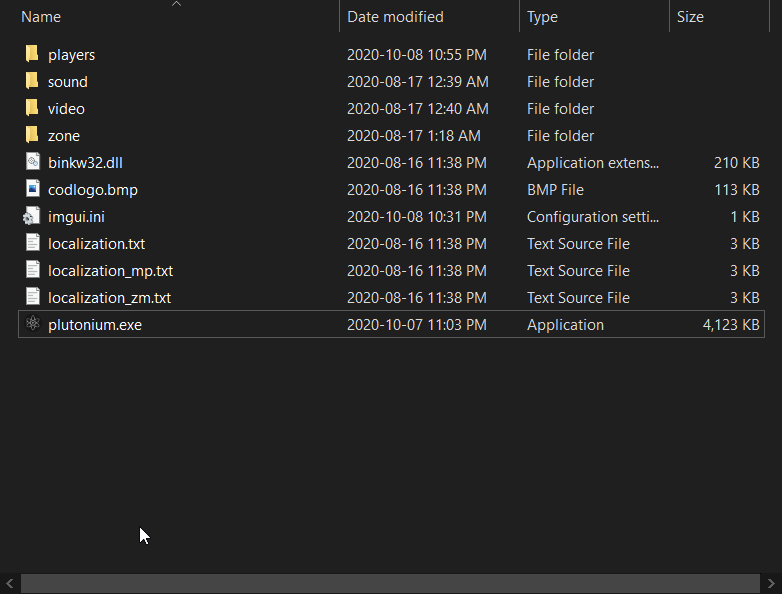
Minor bug that these forums don't seem to recover / end lists well and you need weird lines after
-
Hello! It looks like you're interested in this conversation, but you don't have an account yet.
Getting fed up of having to scroll through the same posts each visit? When you register for an account, you'll always come back to exactly where you were before, and choose to be notified of new replies (either via email, or push notification). You'll also be able to save bookmarks and upvote posts to show your appreciation to other community members.
With your input, this post could be even better 💗
Register Login