Skip to content
  • 0 Unread 0
  • Recent
  • Popular
  • Users
  • Donate
Collapse
Home Docs Stats Discord Donate
Download
  1. Home
  2. Launcher Support
  3. Launcher crash : fetching update info

Launcher crash : fetching update info

Scheduled Pinned Locked Moved Launcher Support
5 Posts 5 Posters 518 Views
  • Oldest to Newest
  • Newest to Oldest
  • Most Votes
Reply
  • Reply as topic
Log in to reply
This topic has been deleted. Only users with topic management privileges can see it.
  • Twentyy
    Twentyy
    Twentyy
    wrote on last edited by
    #1

    Hello how are you? Try everything, install all the files in the redist folder, disable my windows defender, add plutonium.exe to exclusions, also add the folder to exclusions, uninstall 2 times and reinstall the entire folder the game but nothing works. I would appreciate the help! Thank you!
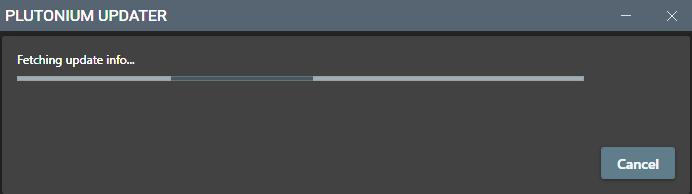
    3.PNG

    My folder: carpet.PNG

    1 Reply Last reply
    1
    • MoonIsHere
      MoonIsHere
      MoonIsHere
      wrote on last edited by
      #2

      i have the same problem

      1 Reply Last reply
      1
      • Samux550
        Samux550
        Samux550
        wrote on last edited by
        #3

        i have the same problem too, we only wait for a admin response i think, i intalled the game yesterday

        1 Reply Last reply
        1
        • HannesC
          HannesC
          HannesC
          Plutonium Staff
          wrote on last edited by
          #4

          Did you add %localappdata%/Plutonium to exclusions as well? Also are you sure you don't have any other AV on your PC besides defender?

          1 Reply Last reply
          1
          • Ricky.I2P
            Ricky.I2P
            Ricky.I2P
            wrote last edited by
            #5

            Issue happened for me today. I had the downloaded plutonium.exe file from the internet placed in my \AppData\Local\Plutonium folder after I first installed it for personal convenience. I placed that file to another directory and then ran the plutonium.exe file from there and it worked. Maybe new updates cause issues if you put the plutonium.exe file within the launcher's created \AppData\Local\Plutonium directory?

            1 Reply Last reply
            0

            Hello! It looks like you're interested in this conversation, but you don't have an account yet.

            Getting fed up of having to scroll through the same posts each visit? When you register for an account, you'll always come back to exactly where you were before, and choose to be notified of new replies (either via email, or push notification). You'll also be able to save bookmarks and upvote posts to show your appreciation to other community members.

            With your input, this post could be even better 💗

            Register Login
            Reply
            • Reply as topic
            Log in to reply
            • Oldest to Newest
            • Newest to Oldest
            • Most Votes


            • Login

            • Don't have an account? Register

            • Login or register to search.
            • First post
              Last post
            0
            • Unread 0
            • Recent
            • Popular
            • Users
            • Donate
