Skip to content
  • 0 Unread 0
  • Recent
  • Tags
  • Popular
  • Users
  • Groups
Collapse

Plutonium

  1. Home
  2. BO2 Client Support
  3. Game Crashes While Launching!

Game Crashes While Launching!

Scheduled Pinned Locked Moved BO2 Client Support
11 Posts 6 Posters 698 Views 1 Watching
  • Oldest to Newest
  • Newest to Oldest
  • Most Votes
Reply
  • Reply as topic
Log in to reply
This topic has been deleted. Only users with topic management privileges can see it.
  • anavrinundefined Offline
    anavrinundefined Offline
    anavrin
    wrote on last edited by
    #1

    My game crashes when i launch Black Ops 2.

    • i have ran the plutonium file as administrator
    • i have deleted plutonium launcher and redownloaded the newest version
      -i have deleted plutonium as a whole, and redownloaded using qBittorrent
      -i have disabled all anti-virus and overlays that could be effecting the launch

    Here is a video to show what happens: https://youtu.be/d3rJAvAeJd0

    (if links arent allowed im sorry, i dont know how else to show the error)

    1 Reply Last reply
    0
    • Monark2555undefined Offline
      Monark2555undefined Offline
      Monark2555
      wrote on last edited by
      #2

      hi bro
      i have everything installed from the redist folder, try it
      though im still not able to play it
      any solutions PLUTONIUM????

      anavrinundefined 1 Reply Last reply
      0
      • Monark2555undefined Monark2555

        hi bro
        i have everything installed from the redist folder, try it
        though im still not able to play it
        any solutions PLUTONIUM????

        anavrinundefined Offline
        anavrinundefined Offline
        anavrin
        wrote on last edited by
        #3

        Monark2555 please create your own forum.

        Dss0undefined 1 Reply Last reply
        0
        • anavrinundefined anavrin

          Monark2555 please create your own forum.

          Dss0undefined Offline
          Dss0undefined Offline
          Dss0
          Plutonium Staff
          wrote on last edited by
          #4

          anavrin so your AV is just defender right, you don't have mcafee or anything like that? Don't entirely disable it, follow this video guide instead https://streamable.com/5giauo.
          Could also try this:

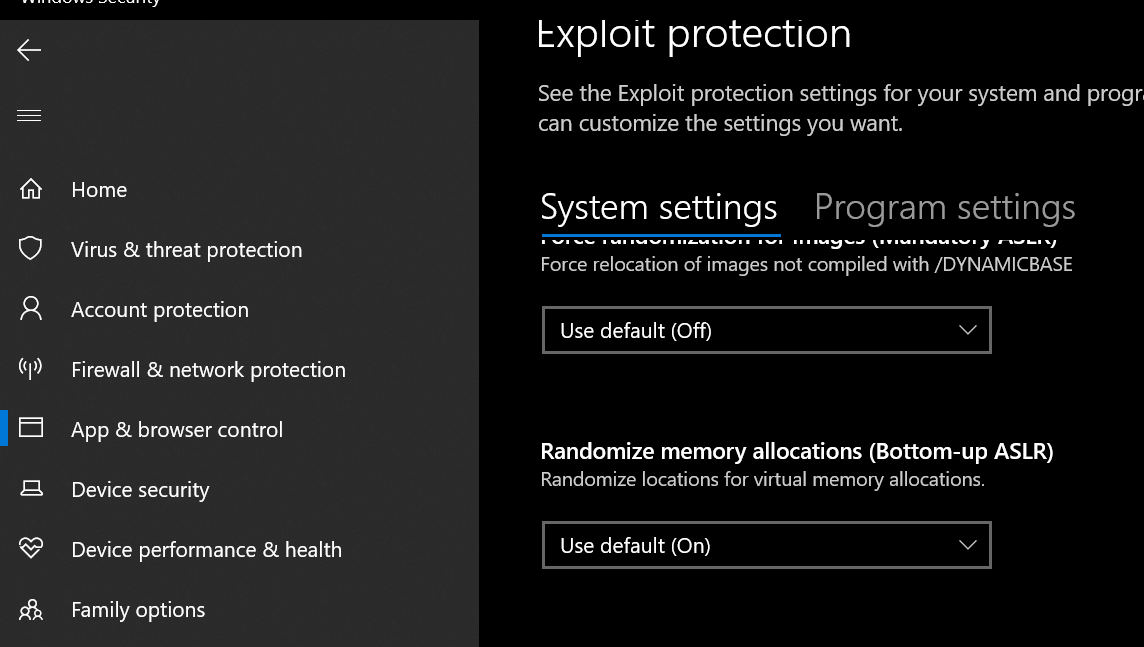
          • go to windows security -> app & browser control -> exploit protection -> exploit protection settings
          • turn off "randomize memory allocations (Bottom-up ASLR)"
          alt text

          1 Reply Last reply
          0
          • anavrinundefined Offline
            anavrinundefined Offline
            anavrin
            wrote on last edited by
            #5

            followed both, the streamable link, and the turning off bottom up ASLR. still receiving the same issue

            anavrinundefined 1 Reply Last reply
            0
            • anavrinundefined anavrin

              followed both, the streamable link, and the turning off bottom up ASLR. still receiving the same issue

              anavrinundefined Offline
              anavrinundefined Offline
              anavrin
              wrote on last edited by
              #6

              anavrin also to note, i have no other AV installed at this point in time. just windows defender

              1 Reply Last reply
              0
              • anavrinundefined Offline
                anavrinundefined Offline
                anavrin
                wrote on last edited by
                #7

                /close

                Dss0undefined 1 Reply Last reply
                0
                • anavrinundefined anavrin

                  /close

                  Dss0undefined Offline
                  Dss0undefined Offline
                  Dss0
                  Plutonium Staff
                  wrote on last edited by
                  #8

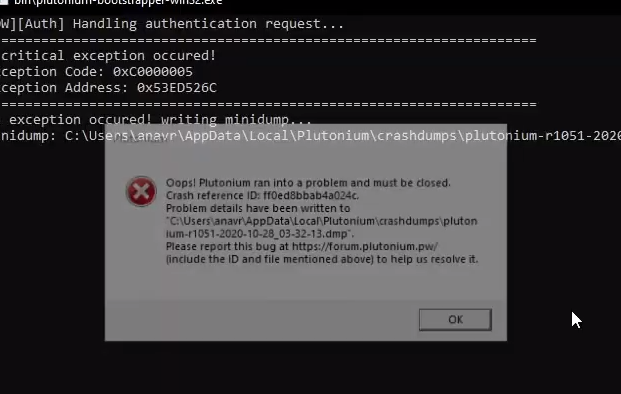
                  anavrin just rewatched your video and noticed this
                  alt text

                  Only showed for like <1s so didn't notice it before.
                  This error can (doesn't have to be related to that but it is for many people) be caused by overlays such as nvidia shadowplay/rtx voice or msi afterburner/rivatuner so if you have any of those enabled, try disabling them.

                  1 Reply Last reply
                  0
                  • AdrX003undefined Offline
                    AdrX003undefined Offline
                    AdrX003
                    wrote on last edited by AdrX003
                    #9

                    Got a friend with the exact same problem, will test everything related to that with him and update info here on any progress.

                    -it also seems that the OP disabled the overlays as he said in the post...

                    1 Reply Last reply
                    0
                    • Tenzo57undefined Offline
                      Tenzo57undefined Offline
                      Tenzo57
                      wrote on last edited by
                      #10

                      same problem here, need some help

                      Astrenundefined 1 Reply Last reply
                      0
                      • Tenzo57undefined Tenzo57

                        same problem here, need some help

                        Astrenundefined Offline
                        Astrenundefined Offline
                        Astren
                        wrote on last edited by Astren
                        #11

                        Tenzo57 AdrX003, Try installing "NET FRAMEWORK," "VC-REDIST," and "DIRECT X." After that, you can try relaunching plutonium.exe and starting your game. Make sure to check the version of your game; it should be "r3613."

                        1 Reply Last reply
                        0

                        Hello! It looks like you're interested in this conversation, but you don't have an account yet.

                        Getting fed up of having to scroll through the same posts each visit? When you register for an account, you'll always come back to exactly where you were before, and choose to be notified of new replies (either via email, or push notification). You'll also be able to save bookmarks and upvote posts to show your appreciation to other community members.

                        With your input, this post could be even better 💗

                        Register Login
                        Reply
                        • Reply as topic
                        Log in to reply
                        • Oldest to Newest
                        • Newest to Oldest
                        • Most Votes


                        • Login

                        • Don't have an account? Register

                        • Login or register to search.
                        • First post
                          Last post
                        0
                        • Unread 0
                        • Recent
                        • Tags
                        • Popular
                        • Users
                        • Groups