The plutonium runs only in lan mode
-
Nickolas-Gr13 did you try deleting plutonium.exe in your game folder and re-downloading it from here? https://cdn.plutonium.pw/updater/plutonium.exe
also run it as admin. -
Nickolas-Gr13 did you try deleting plutonium.exe in your game folder and re-downloading it from here? https://cdn.plutonium.pw/updater/plutonium.exe
also run it as admin. -
Dss0 shall i delete only the launcher exe or all the folder?
-
Nickolas-Gr13 the launcher exe
-
Nickolas-Gr13 the launcher exe
-
Nickolas-Gr13 the launcher exe
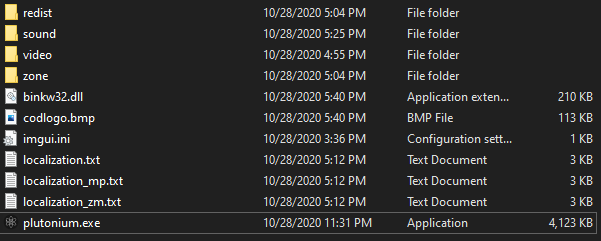
Dss0 here you can see all of my files
-
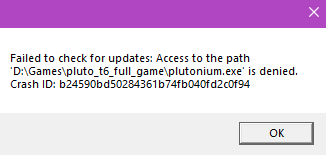
Dss0 now its running but when i pressed bo2 zombies button it blacked screened in bad resolution and an error popped up which is in backround and i cant see it
Nickolas-Gr13 can you try alt-tabbing so the error is visible? yea game folder looks fine from here.
-
Nickolas-Gr13 can you try alt-tabbing so the error is visible? yea game folder looks fine from here.
Dss0 ill try it again
-
Nickolas-Gr13 can you try alt-tabbing so the error is visible? yea game folder looks fine from here.
-
Dss0 now it is just black screen and it doesnt play. no error sound
Nickolas-Gr13 you running plutonium.exe as admin? I noticed there is no players folder in your game folder which is normally created automatically by the game, could point to a permission issue.
Also follow this video guide https://streamable.com/5giauo -
i have seen this video before and it didnt work for me. And yes i always run it as admin
-
Nickolas-Gr13 you running plutonium.exe as admin? I noticed there is no players folder in your game folder which is normally created automatically by the game, could point to a permission issue.
Also follow this video guide https://streamable.com/5giauo -
Dss0 but what about the players folder?
Nickolas-Gr13 can you post a screenshot of your defender exclusion settings?
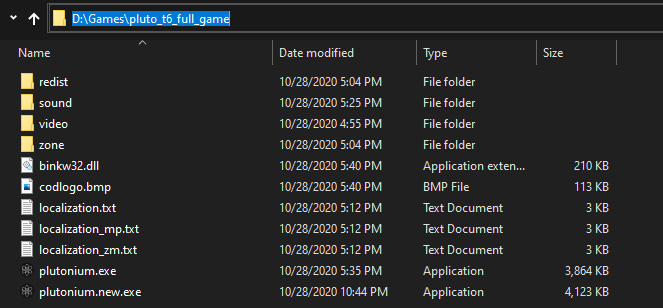
Also can you post the entire filepath to your bo2 folder? (e.g. C:\Games\bo2)
Just saying that it should auto-create the players folder which stores your configs and stuff but it doesn't in your case. -
Nickolas-Gr13 can you post a screenshot of your defender exclusion settings?
Also can you post the entire filepath to your bo2 folder? (e.g. C:\Games\bo2)
Just saying that it should auto-create the players folder which stores your configs and stuff but it doesn't in your case. -
Nickolas-Gr13 can you post a screenshot of your defender exclusion settings?
Also can you post the entire filepath to your bo2 folder? (e.g. C:\Games\bo2)
Just saying that it should auto-create the players folder which stores your configs and stuff but it doesn't in your case. -
Nickolas-Gr13 uh.. is that from right now? you are running plutonium.new.exe right?
-
Nickolas-Gr13 uh.. is that from right now? you are running plutonium.new.exe right?
Dss0 yes and it just made the error sound again and i cant see it
-
Nickolas-Gr13 uh.. is that from right now? you are running plutonium.new.exe right?
-
Dss0 now the plutonium new disappeared
Nickolas-Gr13 try installing everything that's inside the "redist" folder in your game folder including directx (dxsetup.exe in the directx folder).
-
Nickolas-Gr13 try installing everything that's inside the "redist" folder in your game folder including directx (dxsetup.exe in the directx folder).



Hello! It looks like you're interested in this conversation, but you don't have an account yet.
Getting fed up of having to scroll through the same posts each visit? When you register for an account, you'll always come back to exactly where you were before, and choose to be notified of new replies (either via email, or push notification). You'll also be able to save bookmarks and upvote posts to show your appreciation to other community members.
With your input, this post could be even better 💗
Register Login