Skip to content
  • 0 Unread 0
  • Recent
  • Tags
  • Popular
  • Users
  • Groups
  • Donate
Collapse

Plutonium

  1. Home
  2. BO2 Server Hosting Support
  3. everything looks ok but i don't find the server

everything looks ok but i don't find the server

Scheduled Pinned Locked Moved BO2 Server Hosting Support
11 Posts 2 Posters 1.3k Views 1 Watching
  • Oldest to Newest
  • Newest to Oldest
  • Most Votes
Reply
  • Reply as topic
Log in to reply
This topic has been deleted. Only users with topic management privileges can see it.
  • FraTuck Offline
    FraTuck Offline
    FraTuck
    wrote on last edited by
    #1

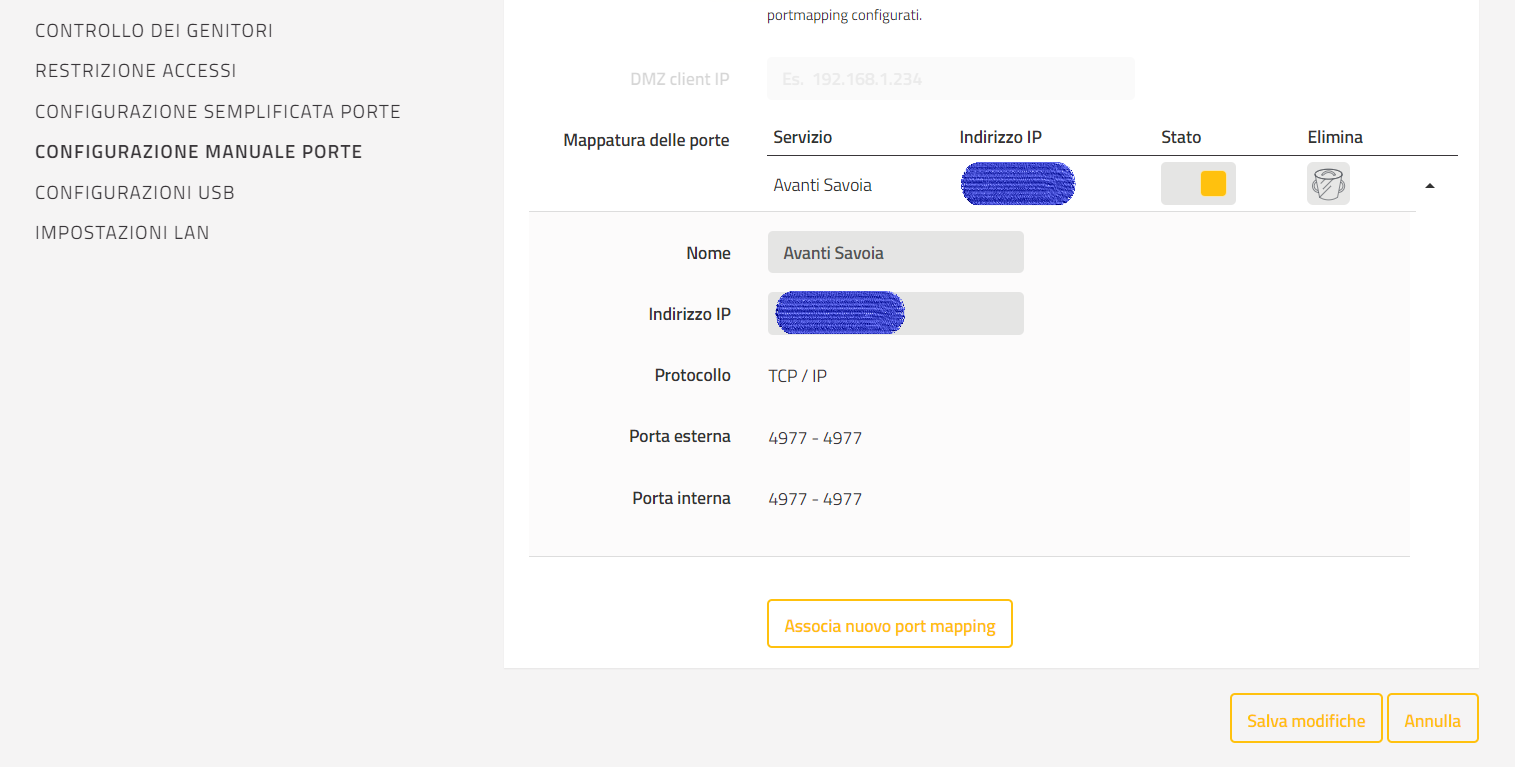
    Ciao a tutti, ho seguito alla lettera questo tutorial https://www.youtube.com/watch?v=BDfokZXXx6M che prende spunto dalla guida di ReactionGaming. https://reactiongaming.us/community/threads/setting-up-a-plutonium-t6-mp-dedicated-server-aug-2020-update.1358/ e apparentemente sembra tutto giusto, solo che dopo aver lanciato Plutonium ed aver fatto partire il server, non riesco a trovarlo nella lista. Vi lascio di seguito alcune immagini che in teoria attestano la correttezza del mio procedimenti e aiutano a capire meglio cosa intendo. Grazie in anticipo per l'aiuto.
    Screenshot (5).png Screenshot (3).png Screenshot (2).png Screenshot (1).png

    Dss0 1 Reply Last reply
    0
    • FraTuck FraTuck

      Ciao a tutti, ho seguito alla lettera questo tutorial https://www.youtube.com/watch?v=BDfokZXXx6M che prende spunto dalla guida di ReactionGaming. https://reactiongaming.us/community/threads/setting-up-a-plutonium-t6-mp-dedicated-server-aug-2020-update.1358/ e apparentemente sembra tutto giusto, solo che dopo aver lanciato Plutonium ed aver fatto partire il server, non riesco a trovarlo nella lista. Vi lascio di seguito alcune immagini che in teoria attestano la correttezza del mio procedimenti e aiutano a capire meglio cosa intendo. Grazie in anticipo per l'aiuto.
      Screenshot (5).png Screenshot (3).png Screenshot (2).png Screenshot (1).png

      Dss0 Offline
      Dss0 Offline
      Dss0
      Plutonium Staff
      wrote on last edited by
      #2

      FraTuck

      alt text

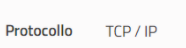
      needs to be UDP.
      Also the forum language is english.

      1 Reply Last reply
      0
      • FraTuck Offline
        FraTuck Offline
        FraTuck
        wrote on last edited by FraTuck
        #3

        Oh im sorry, thank you for the answer. I changed the port protocol, but nothing changed, other options?😢

        1 Reply Last reply
        1
        • FraTuck Offline
          FraTuck Offline
          FraTuck
          wrote on last edited by FraTuck
          #4

          Now if i text "connect ip: port" i can join the game, but i cant see the server on the list and my friend can't join me. i have removed the password but nothing changes. now i have tested the port forwarding and it seems that port 4977 is closen, despite i have create it manually in my rooter settings. Please help me.

          Dss0 1 Reply Last reply
          0
          • FraTuck FraTuck

            Now if i text "connect ip: port" i can join the game, but i cant see the server on the list and my friend can't join me. i have removed the password but nothing changes. now i have tested the port forwarding and it seems that port 4977 is closen, despite i have create it manually in my rooter settings. Please help me.

            Dss0 Offline
            Dss0 Offline
            Dss0
            Plutonium Staff
            wrote on last edited by
            #5

            FraTuck and can your friend see it on the serverlist? Make sure that "indirizzo IP" is the lan ip of your pc (also no need to censor it, it's only available on your lan). You can get your lan ip via cmd -> ipconfig.

            1 Reply Last reply
            0
            • FraTuck Offline
              FraTuck Offline
              FraTuck
              wrote on last edited by
              #6

              no, my friend can't find it in the servers list. Anyway, i copied and pasted in the command bar what u told me to write, but nothing happened. What's appening? 😂 😧

              Dss0 1 Reply Last reply
              0
              • FraTuck FraTuck

                no, my friend can't find it in the servers list. Anyway, i copied and pasted in the command bar what u told me to write, but nothing happened. What's appening? 😂 😧

                Dss0 Offline
                Dss0 Offline
                Dss0
                Plutonium Staff
                wrote on last edited by
                #7

                FraTuck well something is still blocking the connection, have you tried creating a windows firewall rule to allow incoming traffic on port 4977?

                1 Reply Last reply
                0
                • FraTuck Offline
                  FraTuck Offline
                  FraTuck
                  wrote on last edited by
                  #8

                  Yes i have already done it. i also have seen an other thing: the program in "background" that is opened when i launch the game says me "port 4976". I think there is a problem of comunication from my pc and the game: in the network section of it there are some uncorrect informations: the IPv4 (mine is 192.168.1.170), the Upnp off (on my router virtual program it is on), and other....
                  Screenshot (7).png
                  Screenshot (8).png

                  Dss0 1 Reply Last reply
                  0
                  • FraTuck FraTuck

                    Yes i have already done it. i also have seen an other thing: the program in "background" that is opened when i launch the game says me "port 4976". I think there is a problem of comunication from my pc and the game: in the network section of it there are some uncorrect informations: the IPv4 (mine is 192.168.1.170), the Upnp off (on my router virtual program it is on), and other....
                    Screenshot (7).png
                    Screenshot (8).png

                    Dss0 Offline
                    Dss0 Offline
                    Dss0
                    Plutonium Staff
                    wrote on last edited by
                    #9

                    FraTuck yea the server does not use upnp tho so it has nothing to do with that, this is just relevant for hosting private matches. so 192.168.1.170 is also the ip you got in here?
                    alt text
                    If yes i'm out of ideas, it should just work.

                    1 Reply Last reply
                    0
                    • FraTuck Offline
                      FraTuck Offline
                      FraTuck
                      wrote on last edited by FraTuck
                      #10

                      yes it is (i admit that i am extremely confused). If my ipv4 192.168.1.170 isn't considerated by the game, can that create some problems?
                      Screenshot (10).png
                      this pic is taken from the properties of my wifi, inside of windows settings

                      Dss0 1 Reply Last reply
                      0
                      • FraTuck FraTuck

                        yes it is (i admit that i am extremely confused). If my ipv4 192.168.1.170 isn't considerated by the game, can that create some problems?
                        Screenshot (10).png
                        this pic is taken from the properties of my wifi, inside of windows settings

                        Dss0 Offline
                        Dss0 Offline
                        Dss0
                        Plutonium Staff
                        wrote on last edited by
                        #11

                        FraTuck said in everything looks ok but i don't find the server:

                        If my ipv4 192.168.1.170 isn't considerated by the game, can that create some problems?

                        No, as i said that is only relevant for hosting private matches. The server doesn't use upnp but relies on manual port forwarding.

                        Can you check if your router's web interface shows your WAN ip anywhere? Maybe it has a status page or something? If yes compare it to the ip you see here https://whatsmyip.com/. Is it the same?
                        1 Reply Last reply
                        0

                        Hello! It looks like you're interested in this conversation, but you don't have an account yet.

                        Getting fed up of having to scroll through the same posts each visit? When you register for an account, you'll always come back to exactly where you were before, and choose to be notified of new replies (either via email, or push notification). You'll also be able to save bookmarks and upvote posts to show your appreciation to other community members.

                        With your input, this post could be even better 💗

                        Register Login
                        Reply
                        • Reply as topic
                        Log in to reply
                        • Oldest to Newest
                        • Newest to Oldest
                        • Most Votes


                        • Login

                        • Don't have an account? Register

                        • Login or register to search.
                        • First post
                          Last post
                        0
                        • Unread 0
                        • Recent
                        • Tags
                        • Popular
                        • Users
                        • Groups
                        • Donate

