Skip to content
  • 0 Unread 0
  • Recent
  • Tags
  • Popular
  • Users
  • Groups
  • Donate
Collapse

Plutonium

  1. Home
  2. BO2 Modding Releases & Resources
  3. [Release] Haisa's Skin Pack V1

[Release] Haisa's Skin Pack V1

Scheduled Pinned Locked Moved BO2 Modding Releases & Resources
37 Posts 19 Posters 27.5k Views 4 Watching
  • Oldest to Newest
  • Newest to Oldest
  • Most Votes
Reply
  • Reply as topic
Log in to reply
This topic has been deleted. Only users with topic management privileges can see it.
  • PanchoGames PanchoGames

    Haisa i not found the carpet t6r

    Haisa Offline
    Haisa Offline
    Haisa
    wrote on last edited by
    #16

    PanchoGames sorry i am not sure if i understood you, but if you don't have the folders you can create them, but make sure they have the exact names i mentioned!

    PanchoGames 1 Reply Last reply
    0
    • Haisa Haisa

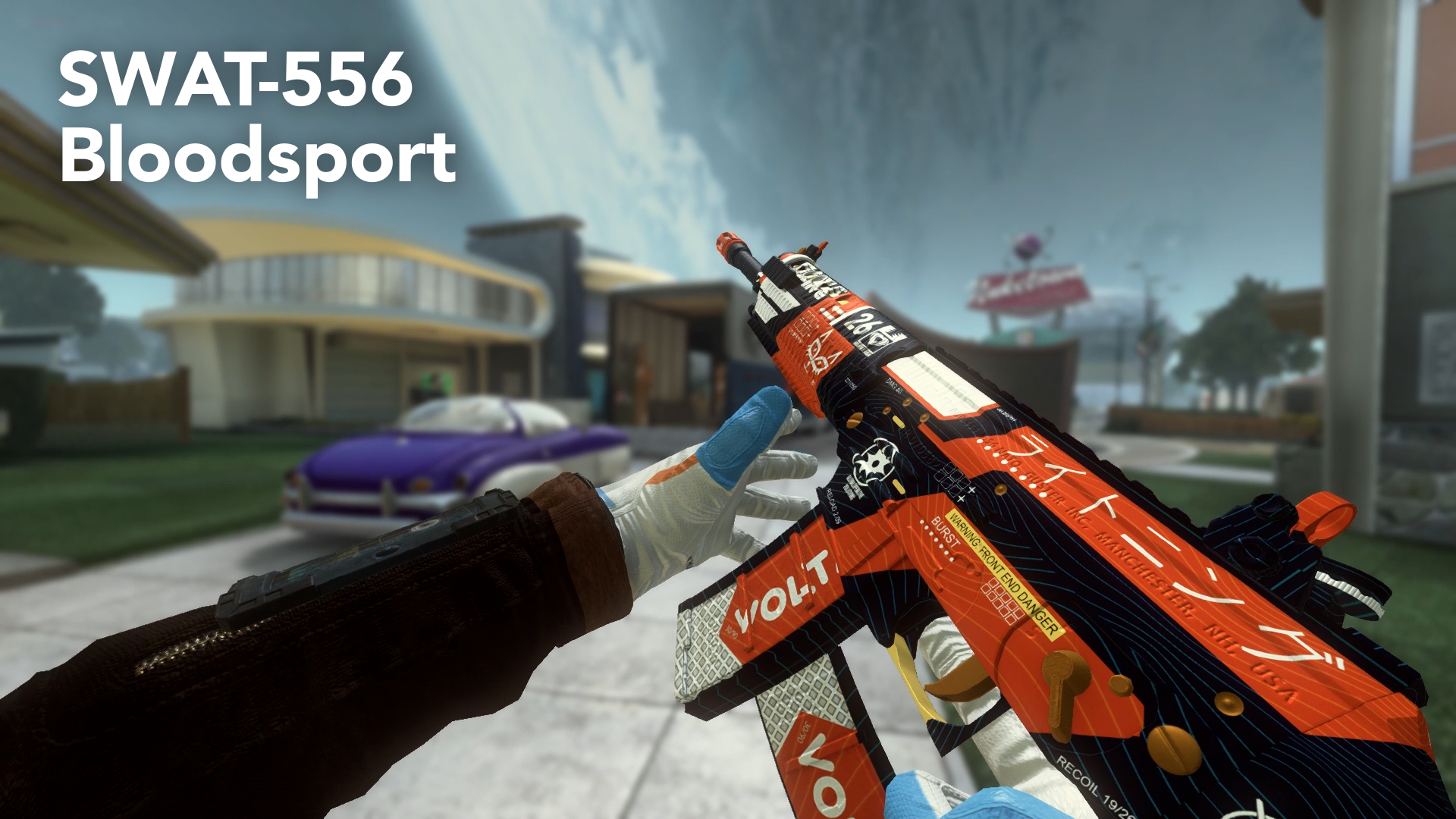
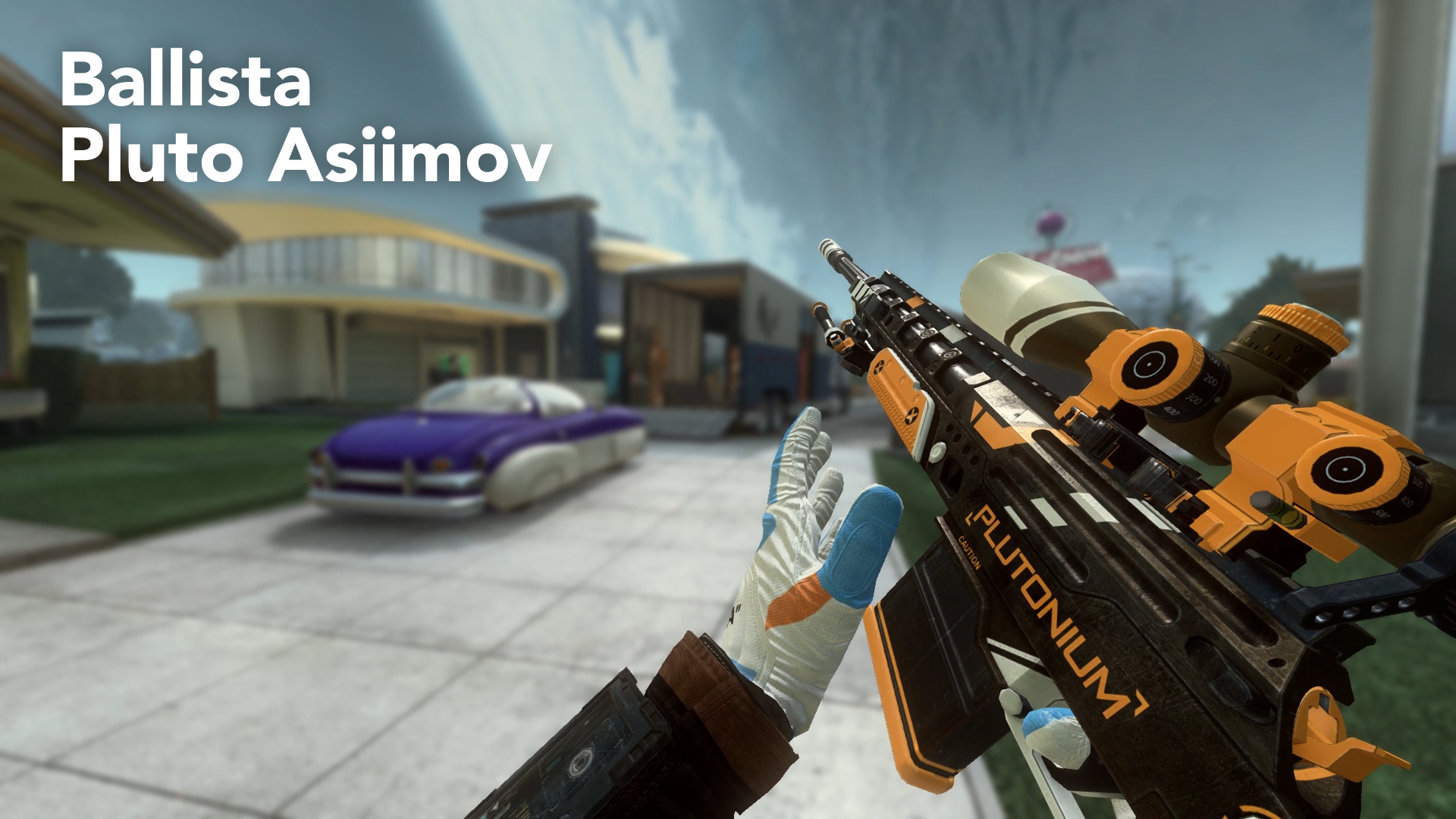
      Hey guys, since you liked my first Camo Pack (thank you again) I decided to make a Skin Pack for Plutonium! This is a little more complicated than creating normal camos but it looks much better in my opinion, because you can create real skins und not just repeating patterns.

      So here they are:

      https://www.youtube.com/watch?v=Put-y4vDfq8

      AN94.png

      FAL.png

      PEACEKEEPER.png

      SCAR.png

      SWAT.png

      Ballista.png

      Installation Guide:

      Just download the following files and place the .iwi files in your Plutonium>t6r>data>images folder. If you don't have these folders you can create them, but make sure that they have the exact names as mentioned before!

      Warning: These skins replace your standard weapon skin! So you actually equip them by not choosing a camo in your Create-A-Class Menu! This also means, that you will have these camos in Zombies.

      If you don't want them anymore, you can put a camo on the gun or delete the files from the folder.

      Download Link:
      https://www.dropbox.com/sh/4wiens1p92cxxkz/AABjx3Po7tbCbsdjPsPKwoeEa?dl=0
      on Dropbox

      https://mega.nz/file/J1klWaRb#yRYnzjsukQOa4hO_wZT9Zt_MzRYIhMNPrJ31bDYHjNI
      on Mega

      PLEASE DOWNLOAD THE WHOLE FOLDER, there is a strange bug where it doesn't work if you download the files individually!

      My goal is to make a skin for every weapon in Black Ops 2, so I am always open for suggestions, but please keep in mind that the skins take a while to create so my next Skin Pack won't come as quickly as this one. Thanks in advance for your feedback and suggestions! Glad to be a part of this community!

      birchy Offline
      birchy Offline
      birchy
      wrote on last edited by
      #17
      This post is deleted!
      Haisa 1 Reply Last reply
      0
      • Haisa Haisa

        PanchoGames sorry i am not sure if i understood you, but if you don't have the folders you can create them, but make sure they have the exact names i mentioned!

        PanchoGames Offline
        PanchoGames Offline
        PanchoGames
        wrote on last edited by
        #18

        Haisa thx

        1 Reply Last reply
        0
        • birchy birchy

          This post is deleted!

          Haisa Offline
          Haisa Offline
          Haisa
          wrote on last edited by
          #19

          birchy These are my custom gloves inspired by the Off-White UNCs. I will release them with my next skin pack!

          1 Reply Last reply
          0
          • TedXd Offline
            TedXd Offline
            TedXd
            wrote on last edited by
            #20
            This post is deleted!
            1 Reply Last reply
            0
            • Migter12 Offline
              Migter12 Offline
              Migter12
              wrote on last edited by
              #21

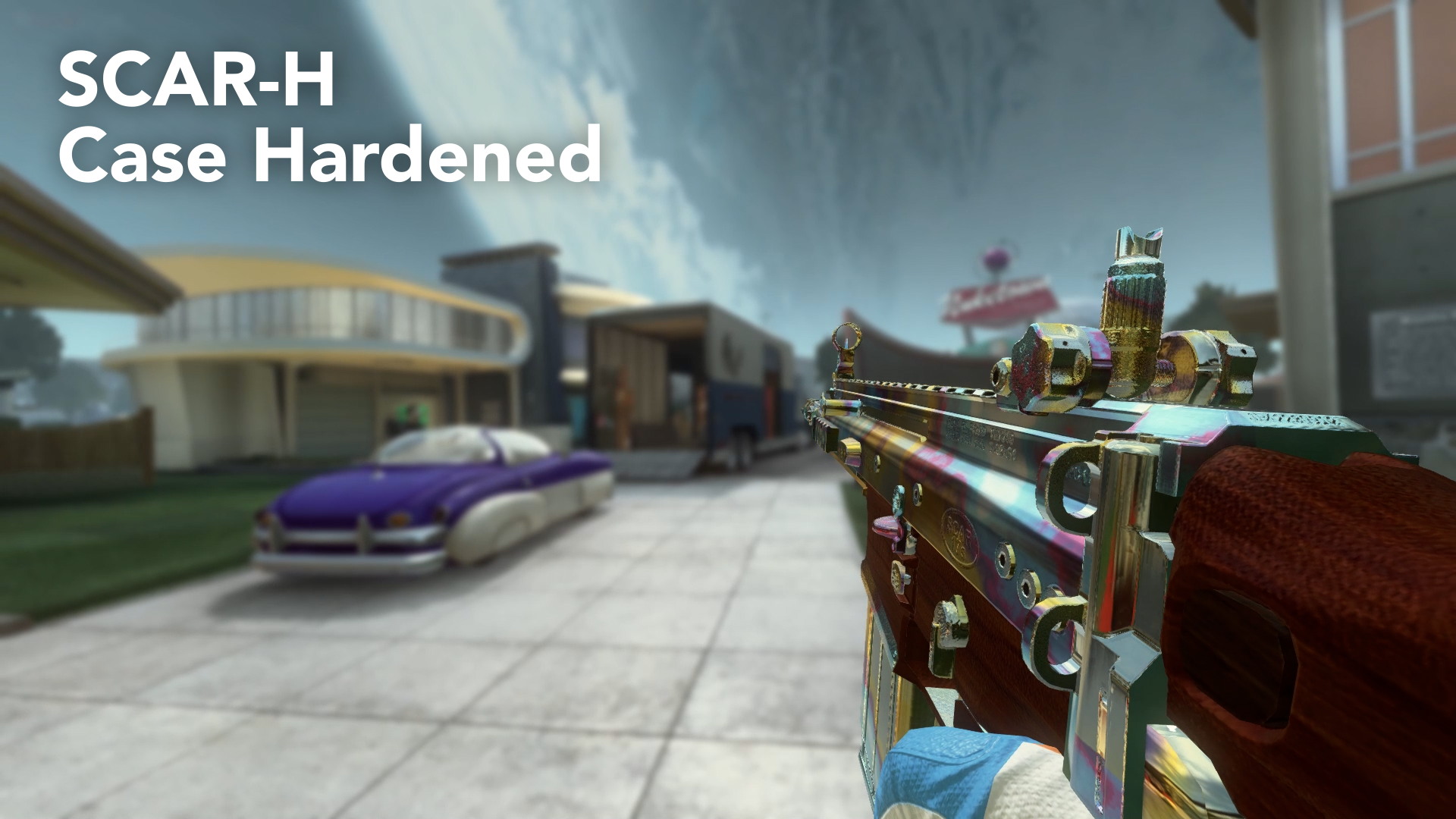
              can you make case hardened as a camo? plz it looks so good
              i know it's a pretty late reply but plz i loved it so much, and thank you for the pack it's really good

              Haisa 1 Reply Last reply
              1
              • Migter12 Migter12

                can you make case hardened as a camo? plz it looks so good
                i know it's a pretty late reply but plz i loved it so much, and thank you for the pack it's really good

                Haisa Offline
                Haisa Offline
                Haisa
                wrote on last edited by
                #22

                @migter_12 if I find the time, I will do it. But right now I am working on more skins and a tutorial to make your own skins.

                Migter12 1 Reply Last reply
                0
                • Haisa Haisa

                  @migter_12 if I find the time, I will do it. But right now I am working on more skins and a tutorial to make your own skins.

                  Migter12 Offline
                  Migter12 Offline
                  Migter12
                  wrote on last edited by
                  #23

                  Haisa thank you for replying, and good luk with your new project!

                  1 Reply Last reply
                  0
                  • Haisa Haisa

                    Hey guys, since you liked my first Camo Pack (thank you again) I decided to make a Skin Pack for Plutonium! This is a little more complicated than creating normal camos but it looks much better in my opinion, because you can create real skins und not just repeating patterns.

                    So here they are:

                    https://www.youtube.com/watch?v=Put-y4vDfq8

                    AN94.png

                    FAL.png

                    PEACEKEEPER.png

                    SCAR.png

                    SWAT.png

                    Ballista.png

                    Installation Guide:

                    Just download the following files and place the .iwi files in your Plutonium>t6r>data>images folder. If you don't have these folders you can create them, but make sure that they have the exact names as mentioned before!

                    Warning: These skins replace your standard weapon skin! So you actually equip them by not choosing a camo in your Create-A-Class Menu! This also means, that you will have these camos in Zombies.

                    If you don't want them anymore, you can put a camo on the gun or delete the files from the folder.

                    Download Link:
                    https://www.dropbox.com/sh/4wiens1p92cxxkz/AABjx3Po7tbCbsdjPsPKwoeEa?dl=0
                    on Dropbox

                    https://mega.nz/file/J1klWaRb#yRYnzjsukQOa4hO_wZT9Zt_MzRYIhMNPrJ31bDYHjNI
                    on Mega

                    PLEASE DOWNLOAD THE WHOLE FOLDER, there is a strange bug where it doesn't work if you download the files individually!

                    My goal is to make a skin for every weapon in Black Ops 2, so I am always open for suggestions, but please keep in mind that the skins take a while to create so my next Skin Pack won't come as quickly as this one. Thanks in advance for your feedback and suggestions! Glad to be a part of this community!

                    therealviolent Offline
                    therealviolent Offline
                    therealviolent
                    Contributor
                    wrote on last edited by therealviolent
                    #24

                    Haisa

                    Just wanted to mention, that the Mega link provides a wrong skin pack. it redirect to v2

                    Haisa 1 Reply Last reply
                    1
                    • Haisa Haisa

                      Hey guys, since you liked my first Camo Pack (thank you again) I decided to make a Skin Pack for Plutonium! This is a little more complicated than creating normal camos but it looks much better in my opinion, because you can create real skins und not just repeating patterns.

                      So here they are:

                      https://www.youtube.com/watch?v=Put-y4vDfq8

                      AN94.png

                      FAL.png

                      PEACEKEEPER.png

                      SCAR.png

                      SWAT.png

                      Ballista.png

                      Installation Guide:

                      Just download the following files and place the .iwi files in your Plutonium>t6r>data>images folder. If you don't have these folders you can create them, but make sure that they have the exact names as mentioned before!

                      Warning: These skins replace your standard weapon skin! So you actually equip them by not choosing a camo in your Create-A-Class Menu! This also means, that you will have these camos in Zombies.

                      If you don't want them anymore, you can put a camo on the gun or delete the files from the folder.

                      Download Link:
                      https://www.dropbox.com/sh/4wiens1p92cxxkz/AABjx3Po7tbCbsdjPsPKwoeEa?dl=0
                      on Dropbox

                      https://mega.nz/file/J1klWaRb#yRYnzjsukQOa4hO_wZT9Zt_MzRYIhMNPrJ31bDYHjNI
                      on Mega

                      PLEASE DOWNLOAD THE WHOLE FOLDER, there is a strange bug where it doesn't work if you download the files individually!

                      My goal is to make a skin for every weapon in Black Ops 2, so I am always open for suggestions, but please keep in mind that the skins take a while to create so my next Skin Pack won't come as quickly as this one. Thanks in advance for your feedback and suggestions! Glad to be a part of this community!

                      Drago_Rx Offline
                      Drago_Rx Offline
                      Drago_Rx
                      wrote on last edited by
                      #25

                      Haisa You should do a tutorial on how to do customs like this, I have tried to do it but it does not come out and if you teach how it would be of great help

                      luigistyle 1 Reply Last reply
                      0
                      • Drago_Rx Drago_Rx

                        Haisa You should do a tutorial on how to do customs like this, I have tried to do it but it does not come out and if you teach how it would be of great help

                        luigistyle Offline
                        luigistyle Offline
                        luigistyle
                        Plutonium Staff
                        wrote on last edited by
                        #26

                        @Drago-DRG He's already made a tutorial, it's linked in Skin Pack V3.

                        Drago_Rx 1 Reply Last reply
                        1
                        • luigistyle luigistyle

                          @Drago-DRG He's already made a tutorial, it's linked in Skin Pack V3.

                          Drago_Rx Offline
                          Drago_Rx Offline
                          Drago_Rx
                          wrote on last edited by
                          #27

                          luigistyle said in [Release] Haisa's Skin Pack V1:

                          He's already

                          thanks

                          1 Reply Last reply
                          1
                          • therealviolent therealviolent

                            Haisa

                            Just wanted to mention, that the Mega link provides a wrong skin pack. it redirect to v2

                            Haisa Offline
                            Haisa Offline
                            Haisa
                            wrote on last edited by
                            #28

                            @h-h-h-h-h-h Thank you! It should now be the correct link.

                            WhyAreYouGay 1 Reply Last reply
                            1
                            • Haisa Haisa

                              @h-h-h-h-h-h Thank you! It should now be the correct link.

                              WhyAreYouGay Offline
                              WhyAreYouGay Offline
                              WhyAreYouGay
                              wrote on last edited by
                              #29

                              Haisa How can I equip howl camo for my gun

                              Haisa 1 Reply Last reply
                              0
                              • WhyAreYouGay WhyAreYouGay

                                Haisa How can I equip howl camo for my gun

                                Haisa Offline
                                Haisa Offline
                                Haisa
                                wrote on last edited by
                                #30

                                WhyAreYouGay The Howl skin only works for the FAL, it isn't a camo so to speak. It replaces your standard FAL texture, so you don't choose a camo.

                                1 Reply Last reply
                                0
                                • helpless Offline
                                  helpless Offline
                                  helpless
                                  wrote on last edited by
                                  #31
                                  This post is deleted!
                                  Haisa 1 Reply Last reply
                                  0
                                  • helpless helpless

                                    This post is deleted!

                                    Haisa Offline
                                    Haisa Offline
                                    Haisa
                                    wrote on last edited by
                                    #32

                                    @wq9 Have you downloaded the whole pack or individual files? Sometimes it doesnt work when you download the files individually. Also make sure, that you dont select a camo in the class editor, these skins replace the base weapon skins.

                                    1 Reply Last reply
                                    0
                                    • Haisa Haisa

                                      Hey guys, since you liked my first Camo Pack (thank you again) I decided to make a Skin Pack for Plutonium! This is a little more complicated than creating normal camos but it looks much better in my opinion, because you can create real skins und not just repeating patterns.

                                      So here they are:

                                      https://www.youtube.com/watch?v=Put-y4vDfq8
                                      AN94.png

                                      FAL.png

                                      PEACEKEEPER.png

                                      SCAR.png

                                      SWAT.png

                                      Ballista.png

                                      Installation Guide:

                                      Just download the following files and place the .iwi files in your Plutonium>t6r>data>images folder. If you don't have these folders you can create them, but make sure that they have the exact names as mentioned before!

                                      Warning: These skins replace your standard weapon skin! So you actually equip them by not choosing a camo in your Create-A-Class Menu! This also means, that you will have these camos in Zombies.

                                      If you don't want them anymore, you can put a camo on the gun or delete the files from the folder.

                                      Download Link:
                                      https://www.dropbox.com/sh/4wiens1p92cxxkz/AABjx3Po7tbCbsdjPsPKwoeEa?dl=0
                                      on Dropbox

                                      https://mega.nz/file/J1klWaRb#yRYnzjsukQOa4hO_wZT9Zt_MzRYIhMNPrJ31bDYHjNI
                                      on Mega

                                      PLEASE DOWNLOAD THE WHOLE FOLDER, there is a strange bug where it doesn't work if you download the files individually!

                                      My goal is to make a skin for every weapon in Black Ops 2, so I am always open for suggestions, but please keep in mind that the skins take a while to create so my next Skin Pack won't come as quickly as this one. Thanks in advance for your feedback and suggestions! Glad to be a part of this community!

                                      Allonzy Offline
                                      Allonzy Offline
                                      Allonzy
                                      wrote on last edited by Allonzy
                                      #33

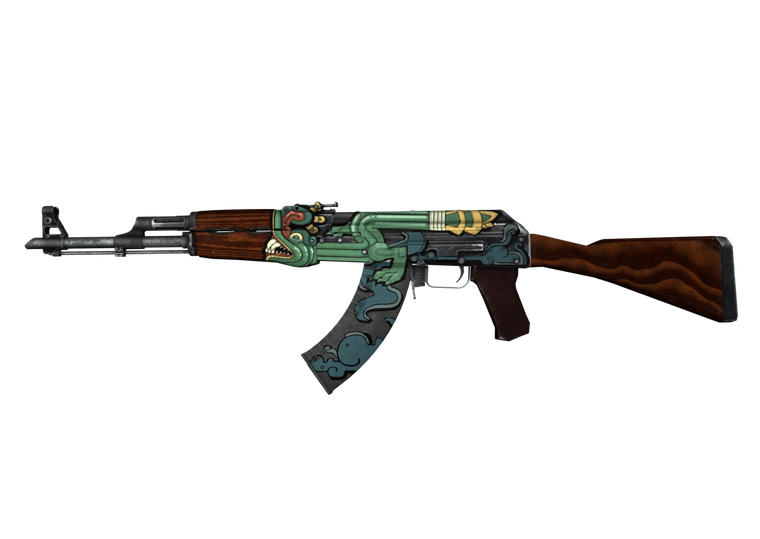
                                      Haisa Hi, i love the CS:GO skins they look awesome in game. I have no idea how to make my own and was wondering if you could make the Fire Serpent skin from CS:GO for the AK-47 on mob of the dead?

                                      wiki_JaIso01_large_preview.png

                                      1 Reply Last reply
                                      1
                                      • YaMissediDidnt Offline
                                        YaMissediDidnt Offline
                                        YaMissediDidnt
                                        Contributor
                                        wrote on last edited by
                                        #34

                                        This guy has the best skins ever! The battery one is legit a BLUEPRINT.

                                        Wish they'd hire this guy lol.

                                        I'm on a new PC and I don't have any of my Pluto files but I have a USB stick with Haisa's old skin packs - will they still work?

                                        Haisa 1 Reply Last reply
                                        0
                                        • YaMissediDidnt YaMissediDidnt

                                          This guy has the best skins ever! The battery one is legit a BLUEPRINT.

                                          Wish they'd hire this guy lol.

                                          I'm on a new PC and I don't have any of my Pluto files but I have a USB stick with Haisa's old skin packs - will they still work?

                                          Haisa Offline
                                          Haisa Offline
                                          Haisa
                                          wrote on last edited by
                                          #35

                                          YaMissediDidnt Thank you! Yes they will still work! Just put the files in the images folder

                                          1 Reply Last reply
                                          0

                                          Hello! It looks like you're interested in this conversation, but you don't have an account yet.

                                          Getting fed up of having to scroll through the same posts each visit? When you register for an account, you'll always come back to exactly where you were before, and choose to be notified of new replies (either via email, or push notification). You'll also be able to save bookmarks and upvote posts to show your appreciation to other community members.

                                          With your input, this post could be even better 💗

                                          Register Login
                                          Reply
                                          • Reply as topic
                                          Log in to reply
                                          • Oldest to Newest
                                          • Newest to Oldest
                                          • Most Votes


                                          • 1
                                          • 2
                                          • Login

                                          • Don't have an account? Register

                                          • Login or register to search.
                                          • First post
                                            Last post
                                          0
                                          • Unread 0
                                          • Recent
                                          • Tags
                                          • Popular
                                          • Users
                                          • Groups
                                          • Donate