[Bug] Cards and titles are not displayed as they should be within the game.
-
The cards are not displayed correctly within the game. When I change the title card of my profile and place a custom text with the command "cardtitle", the image of the card is not the same as the one I chose in the menu.
Card in-menu: You don't see the title you enter with the "cardtitle" command
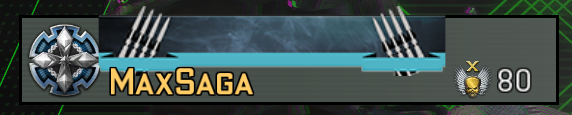
Card in-game: The text is visible, but the image on the card is different (default)

I tried with shorter text and got the same result, even not if it's a fault of mine or the command, but I also tried to enter "cardtitle default" (thought that would remove the title) and it didn't work, I got this:
In-game:

I don't know, if the same thing happens to someone else.
Thanks.
-
Thanks for the report. I confirmed this issue, it is a bug.
-
The cards are not displayed correctly within the game. When I change the title card of my profile and place a custom text with the command "cardtitle", the image of the card is not the same as the one I chose in the menu.
Card in-menu: You don't see the title you enter with the "cardtitle" command
Card in-game: The text is visible, but the image on the card is different (default)
I tried with shorter text and got the same result, even not if it's a fault of mine or the command, but I also tried to enter "cardtitle default" (thought that would remove the title) and it didn't work, I got this:
In-game:
I don't know, if the same thing happens to someone else.
Thanks.
-
FYI : If you want to remove the custom title, type
cardtitle ""in your console -
Thank you! I have removed the text and now the image from the card if it is displayed within the game.
In-game:

That means the command cardtitle has a bug
MaxSaga said in [Bug] Cards and titles are not displayed as they should be within the game.:
That means the command cardtitle has a bug
Yes and it will be fixed with the next update!
-
Already fixed for next update.





Hello! It looks like you're interested in this conversation, but you don't have an account yet.
Getting fed up of having to scroll through the same posts each visit? When you register for an account, you'll always come back to exactly where you were before, and choose to be notified of new replies (either via email, or push notification). You'll also be able to save bookmarks and upvote posts to show your appreciation to other community members.
With your input, this post could be even better 💗
Register Login