Skip to content
  • 0 Unread 0
  • Recent
  • Tags
  • Popular
  • Users
  • Groups
Collapse

Plutonium

  1. Home
  2. Launcher Support
  3. plutonium is not launching

plutonium is not launching

Scheduled Pinned Locked Moved Launcher Support
7 Posts 4 Posters 530 Views 1 Watching
  • Oldest to Newest
  • Newest to Oldest
  • Most Votes
Reply
  • Reply as topic
Log in to reply
This topic has been deleted. Only users with topic management privileges can see it.
  • [141]Cpt.Ghostundefined Offline
    [141]Cpt.Ghostundefined Offline
    [141]Cpt.Ghost
    wrote on last edited by
    #1

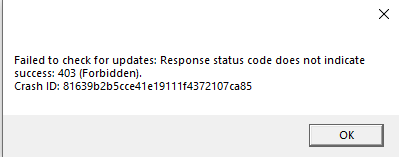
    The launcher isn't working now.....when i try to open it it shows this...what to do??
    b6e2ce13-c2cd-48b9-a00c-0bc4f9529a6a-image.png

    1 Reply Last reply
    0
    • IICaptainundefined Offline
      IICaptainundefined Offline
      IICaptain
      wrote on last edited by
      #2

      Man, how do I post like this ?

      1 Reply Last reply
      0
      • [141]Cpt.Ghostundefined Offline
        [141]Cpt.Ghostundefined Offline
        [141]Cpt.Ghost
        wrote on last edited by
        #3

        IICaptain Go to home....choose a topic....you will see a new post button on top. Use that to post something

        Dss0undefined 1 Reply Last reply
        1
        • [141]Cpt.Ghostundefined [141]Cpt.Ghost

          IICaptain Go to home....choose a topic....you will see a new post button on top. Use that to post something

          Dss0undefined Offline
          Dss0undefined Offline
          Dss0
          Plutonium Staff
          wrote on last edited by
          #4

          [dark ghost]

          • try redownloading the launcher from here: https://cdn.plutonium.pw/updater/plutonium.exe
          • try deleting %localappdata%/Plutonium/info.json if it exists
          • try changing your dns servers (https://www.windowscentral.com/how-change-your-pcs-dns-settings-windows-10)
          • try using a vpn
          • disable any 3rd party firewall software you might have installed
          [141]Cpt.Ghostundefined 1 Reply Last reply
          0
          • Dss0undefined Dss0

            [dark ghost]

            • try redownloading the launcher from here: https://cdn.plutonium.pw/updater/plutonium.exe
            • try deleting %localappdata%/Plutonium/info.json if it exists
            • try changing your dns servers (https://www.windowscentral.com/how-change-your-pcs-dns-settings-windows-10)
            • try using a vpn
            • disable any 3rd party firewall software you might have installed
            [141]Cpt.Ghostundefined Offline
            [141]Cpt.Ghostundefined Offline
            [141]Cpt.Ghost
            wrote on last edited by
            #5

            Dss0 Thanks for the help but I tried all the steps it doesn't work.Only using a vpn can make it run....is there any other way cause using vpn is banned in many bo2 servers inwhere I play most of the time

            Dss0undefined 1 Reply Last reply
            0
            • [141]Cpt.Ghostundefined [141]Cpt.Ghost

              Dss0 Thanks for the help but I tried all the steps it doesn't work.Only using a vpn can make it run....is there any other way cause using vpn is banned in many bo2 servers inwhere I play most of the time

              Dss0undefined Offline
              Dss0undefined Offline
              Dss0
              Plutonium Staff
              wrote on last edited by
              #6

              [dark ghost] no, might be your isp blocking pluto.

              1 Reply Last reply
              0
              • Xerxesundefined Offline
                Xerxesundefined Offline
                Xerxes
                Plutonium Staff
                wrote on last edited by
                #7

                You might get away with just tunneling all connections to Plutonium through a proxy, most VPN providers to also offer socks5 proxies.

                1 Reply Last reply
                0

                Hello! It looks like you're interested in this conversation, but you don't have an account yet.

                Getting fed up of having to scroll through the same posts each visit? When you register for an account, you'll always come back to exactly where you were before, and choose to be notified of new replies (either via email, or push notification). You'll also be able to save bookmarks and upvote posts to show your appreciation to other community members.

                With your input, this post could be even better 💗

                Register Login
                Reply
                • Reply as topic
                Log in to reply
                • Oldest to Newest
                • Newest to Oldest
                • Most Votes


                • Login

                • Don't have an account? Register

                • Login or register to search.
                • First post
                  Last post
                0
                • Unread 0
                • Recent
                • Tags
                • Popular
                • Users
                • Groups