Skip to content
  • 0 Unread 0
  • Recent
  • Tags
  • Popular
  • Users
  • Groups
Collapse

Plutonium

  1. Home
  2. BO2 Modding Support & Discussion
  3. white lines in custom skins

white lines in custom skins

Scheduled Pinned Locked Moved BO2 Modding Support & Discussion
8 Posts 5 Posters 1.1k Views 1 Watching
  • Oldest to Newest
  • Newest to Oldest
  • Most Votes
Reply
  • Reply as topic
Log in to reply
This topic has been deleted. Only users with topic management privileges can see it.
  • A Former User? Offline
    A Former User? Offline
    A Former User
    wrote on last edited by
    #1

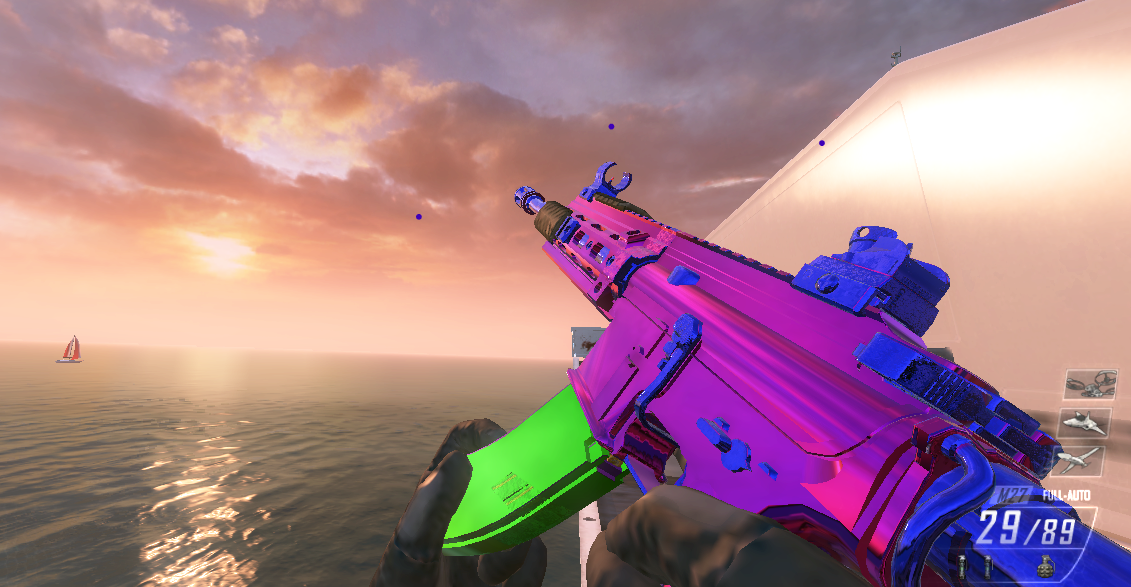
    i followed Haisa 's custom skin tutorial but everytime my camo is finished i get these white lines on my camo

    87841035-ba69-403a-8557-6516f5ee6c42-image.png

    what could cause this? i used substance painter like haisa did and there were no white lines in the program itself

    Evolightundefined Haisaundefined 2 Replies Last reply
    0
    • A Former User? A Former User

      i followed Haisa 's custom skin tutorial but everytime my camo is finished i get these white lines on my camo

      87841035-ba69-403a-8557-6516f5ee6c42-image.png

      what could cause this? i used substance painter like haisa did and there were no white lines in the program itself

      Evolightundefined Offline
      Evolightundefined Offline
      Evolight
      wrote on last edited by
      #2

      @mulekick i kinda got the same issue

      it doesn't show the white lines in the program but its still there in-game, not as noticeable tho but its still annoying

      dcbee51e-6e4e-4d82-8856-6442fcc013f2-image.png

      1 Reply Last reply
      0
      • A Former User? A Former User

        i followed Haisa 's custom skin tutorial but everytime my camo is finished i get these white lines on my camo

        87841035-ba69-403a-8557-6516f5ee6c42-image.png

        what could cause this? i used substance painter like haisa did and there were no white lines in the program itself

        Haisaundefined Offline
        Haisaundefined Offline
        Haisa
        wrote on last edited by
        #3

        @mulekick @M0untainLight6 Hi, this is the part in the video which I explain around the 19:10 minute mark. The parts don't match 100% with the weapon. So you have to select everything white in photoshop with the magic wand tool (Magic wand tool with a tolerance of 1 and contiguous disabled), delete the white parts and create a new layer underneath it. You then choose a color which is the "average" of the other colors, so for mulekicks skin a purple color and for mountainlights skin a black or yellowish color. This should relatively fix your issues! If you have more questions you can always ask me on discord Haisa#7802

        Evolightundefined A Former User? Itachi Amatirasundefined 3 Replies Last reply
        2
        • Haisaundefined Haisa

          @mulekick @M0untainLight6 Hi, this is the part in the video which I explain around the 19:10 minute mark. The parts don't match 100% with the weapon. So you have to select everything white in photoshop with the magic wand tool (Magic wand tool with a tolerance of 1 and contiguous disabled), delete the white parts and create a new layer underneath it. You then choose a color which is the "average" of the other colors, so for mulekicks skin a purple color and for mountainlights skin a black or yellowish color. This should relatively fix your issues! If you have more questions you can always ask me on discord Haisa#7802

          Evolightundefined Offline
          Evolightundefined Offline
          Evolight
          wrote on last edited by
          #4

          Haisa c399fffe-46b2-44df-acc1-8bf891cc4931-image.png

          you're the best, thank you so much for helping us out ♥ ♥ ♥

          1 Reply Last reply
          2
          • Haisaundefined Haisa

            @mulekick @M0untainLight6 Hi, this is the part in the video which I explain around the 19:10 minute mark. The parts don't match 100% with the weapon. So you have to select everything white in photoshop with the magic wand tool (Magic wand tool with a tolerance of 1 and contiguous disabled), delete the white parts and create a new layer underneath it. You then choose a color which is the "average" of the other colors, so for mulekicks skin a purple color and for mountainlights skin a black or yellowish color. This should relatively fix your issues! If you have more questions you can always ask me on discord Haisa#7802

            A Former User? Offline
            A Former User? Offline
            A Former User
            wrote on last edited by
            #5

            Haisa ♥♥♥♥♥

            1 Reply Last reply
            2
            • Haisaundefined Haisa

              @mulekick @M0untainLight6 Hi, this is the part in the video which I explain around the 19:10 minute mark. The parts don't match 100% with the weapon. So you have to select everything white in photoshop with the magic wand tool (Magic wand tool with a tolerance of 1 and contiguous disabled), delete the white parts and create a new layer underneath it. You then choose a color which is the "average" of the other colors, so for mulekicks skin a purple color and for mountainlights skin a black or yellowish color. This should relatively fix your issues! If you have more questions you can always ask me on discord Haisa#7802

              Itachi Amatirasundefined Offline
              Itachi Amatirasundefined Offline
              Itachi Amatiras
              wrote on last edited by
              #6

              Haisa hey! can you tell me how to install please ?

              Evolightundefined 1 Reply Last reply
              0
              • Itachi Amatirasundefined Itachi Amatiras

                Haisa hey! can you tell me how to install please ?

                Evolightundefined Offline
                Evolightundefined Offline
                Evolight
                wrote on last edited by
                #7

                GhostMW install what exactly?

                TahjGaddundefined 1 Reply Last reply
                0
                • Evolightundefined Evolight

                  GhostMW install what exactly?

                  TahjGaddundefined Offline
                  TahjGaddundefined Offline
                  TahjGadd
                  wrote on last edited by
                  #8

                  Evolight he wants the camo
                  i do too

                  1 Reply Last reply
                  0

                  Hello! It looks like you're interested in this conversation, but you don't have an account yet.

                  Getting fed up of having to scroll through the same posts each visit? When you register for an account, you'll always come back to exactly where you were before, and choose to be notified of new replies (either via email, or push notification). You'll also be able to save bookmarks and upvote posts to show your appreciation to other community members.

                  With your input, this post could be even better 💗

                  Register Login
                  Reply
                  • Reply as topic
                  Log in to reply
                  • Oldest to Newest
                  • Newest to Oldest
                  • Most Votes


                  • Login

                  • Don't have an account? Register

                  • Login or register to search.
                  • First post
                    Last post
                  0
                  • Unread 0
                  • Recent
                  • Tags
                  • Popular
                  • Users
                  • Groups