Skip to content
  • 0 Unread 0
  • Recent
  • Tags
  • Popular
  • Users
  • Groups
  • Donate
Collapse

Plutonium

  1. Home
  2. MW3 Client Support
  3. After pressing play Bootstrapper sits at 0% cpu usage and doesnt open the Game

After pressing play Bootstrapper sits at 0% cpu usage and doesnt open the Game

Scheduled Pinned Locked Moved MW3 Client Support
7 Posts 3 Posters 701 Views 1 Watching
  • Oldest to Newest
  • Newest to Oldest
  • Most Votes
Reply
  • Reply as topic
Log in to reply
This topic has been deleted. Only users with topic management privileges can see it.
  • Tqhr Offline
    Tqhr Offline
    Tqhr
    wrote on last edited by
    #1

    Capture2.PNG
    Capture.PNG

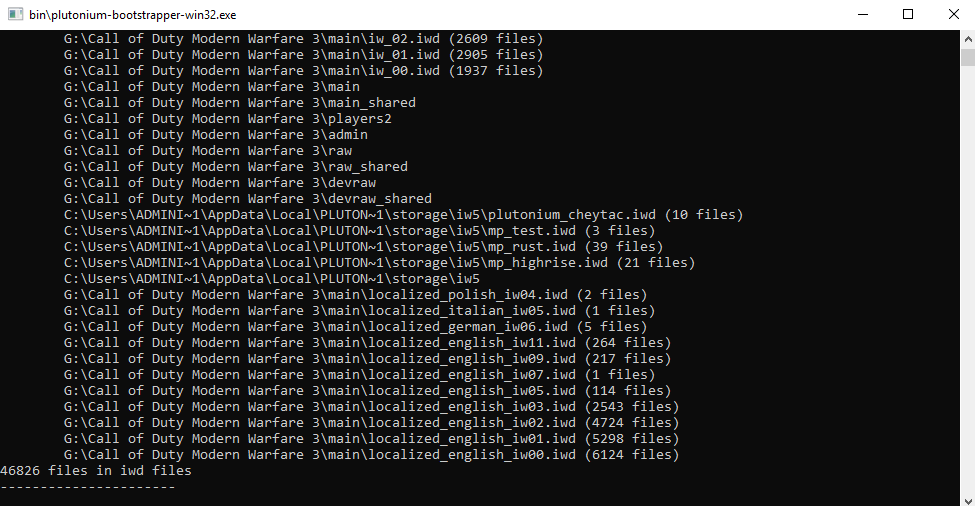
    It doesnt crash nor give me an error. It just sits there and doesnt open the game, which is weird because it worked perfectly fine up until now. I have completely wiped my Mw3 install and re-downloaded it, deleted the %appdata% pluto folder and re-downloaded the pluto launcher. I dont have any anti-virus and Windows defender is completely disabled.
    I also re-installed the vc packages + directX.

    1 Reply Last reply
    0
    • BdawgTheSlaya Offline
      BdawgTheSlaya Offline
      BdawgTheSlaya
      wrote on last edited by
      #2

      Oh boy. You too? I thought I was the only one experiencing that tbh 😅

      1 Reply Last reply
      0
      • HannesC Offline
        HannesC Offline
        HannesC
        Plutonium Staff
        wrote on last edited by HannesC
        #3

        And is the game window blackscreen'd or does it not even launch? If it the first, try typing r_fullscreen 0; vid_restart into the bootstrapper cmd and try getting into the game again. If it's the latter, make sure you don't have any overlays/dx hooking softwares such as msi afterburner/rivatuner or avermedia, etc.

        Tqhr 1 Reply Last reply
        1
        • Tqhr Offline
          Tqhr Offline
          Tqhr
          wrote on last edited by
          #4

          HannesC it didnt even launch before, just the cmd as shown in the pic. I tried the commands and that seemed to start my game normally again. It still is a bit weird because sometimes it just reverts back to not starting but atleast i can go ingame now so thx for that! And no i dont have any overlay running when im starting the game (no dc, nvidia, rtss and so on)

          1 Reply Last reply
          0
          • HannesC HannesC

            And is the game window blackscreen'd or does it not even launch? If it the first, try typing r_fullscreen 0; vid_restart into the bootstrapper cmd and try getting into the game again. If it's the latter, make sure you don't have any overlays/dx hooking softwares such as msi afterburner/rivatuner or avermedia, etc.

            Tqhr Offline
            Tqhr Offline
            Tqhr
            wrote on last edited by Tqhr
            #5

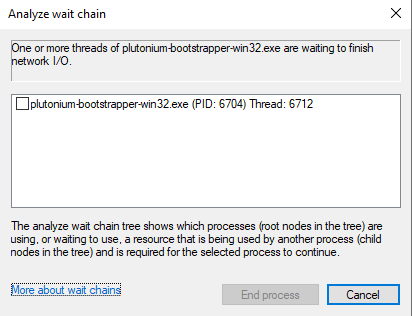
            HannesC yeah now its back to not starting again even after entering these commands. This is also on a fresh boot / no other programs running.
            Edit: could that be of relevance?
            Capture.PNG

            1 Reply Last reply
            0
            • HannesC Offline
              HannesC Offline
              HannesC
              Plutonium Staff
              wrote on last edited by
              #6

              Nah. Are your GPU drivers up-to-date? Other than that, no clue what could be the problem.

              Tqhr 1 Reply Last reply
              0
              • HannesC HannesC

                Nah. Are your GPU drivers up-to-date? Other than that, no clue what could be the problem.

                Tqhr Offline
                Tqhr Offline
                Tqhr
                wrote on last edited by
                #7

                HannesC Yes the latest nvidia drivers are installed after performing a wipe with DDU. Would there be any other way to troubleshoot this problem? Or forcing logs that i could share

                1 Reply Last reply
                0

                Hello! It looks like you're interested in this conversation, but you don't have an account yet.

                Getting fed up of having to scroll through the same posts each visit? When you register for an account, you'll always come back to exactly where you were before, and choose to be notified of new replies (either via email, or push notification). You'll also be able to save bookmarks and upvote posts to show your appreciation to other community members.

                With your input, this post could be even better 💗

                Register Login
                Reply
                • Reply as topic
                Log in to reply
                • Oldest to Newest
                • Newest to Oldest
                • Most Votes


                • Login

                • Don't have an account? Register

                • Login or register to search.
                • First post
                  Last post
                0
                • Unread 0
                • Recent
                • Tags
                • Popular
                • Users
                • Groups
                • Donate