Skip to content
  • 0 Unread 0
  • Recent
  • Tags
  • Popular
  • Users
  • Groups
  • Donate
Collapse

Plutonium

  1. Home
  2. WAW Client Support
  3. Directory Help

Directory Help

Scheduled Pinned Locked Moved WAW Client Support
10 Posts 4 Posters 2.2k Views 1 Watching
  • Oldest to Newest
  • Newest to Oldest
  • Most Votes
Reply
  • Reply as topic
Log in to reply
This topic has been deleted. Only users with topic management privileges can see it.
  • ThisIsntRoblox Offline
    ThisIsntRoblox Offline
    ThisIsntRoblox
    wrote on last edited by
    #1

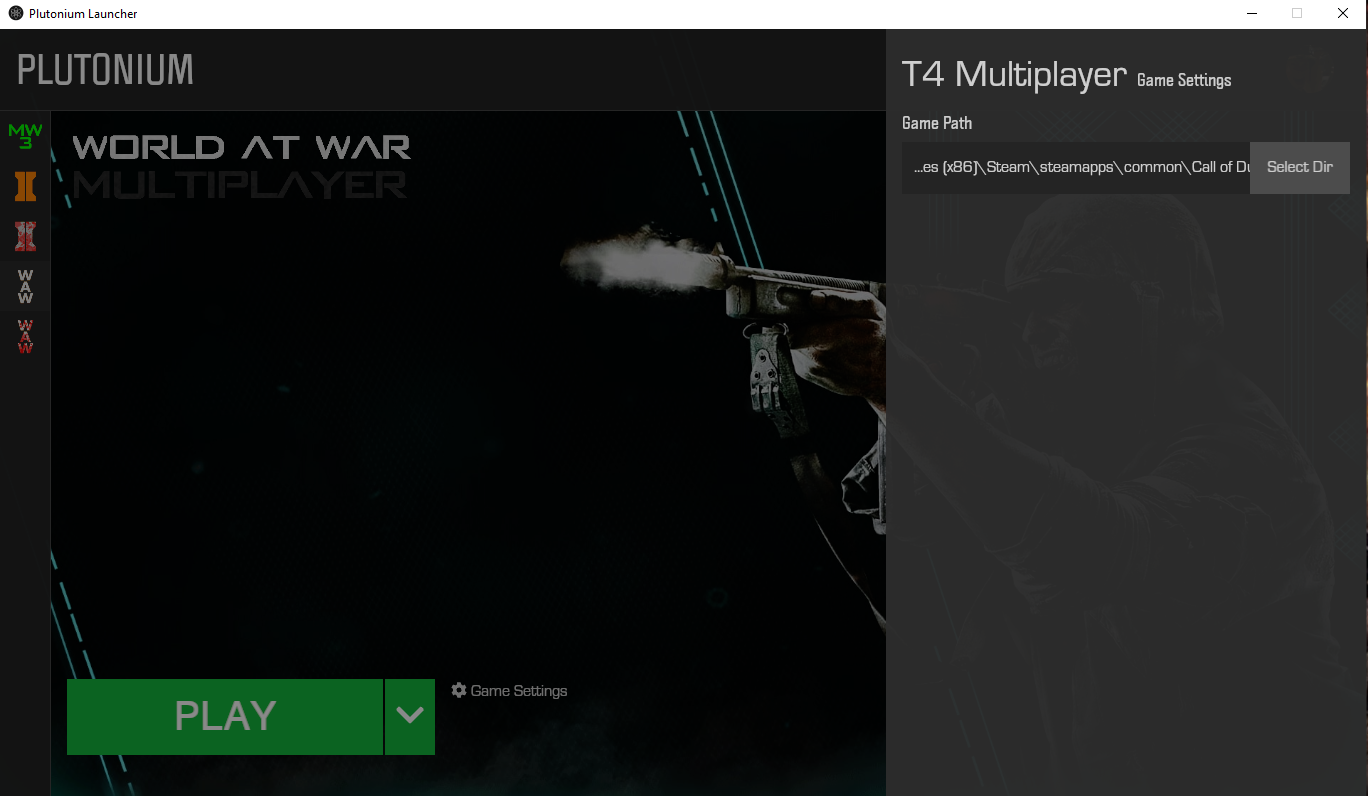
    After multiple attempts, I am stumped. I have Plutonium T4 set to C:\Program Files (x86)\Steam\steamapps\common\Call of Duty World at War.
    When I try to launch the game, I get the error message that the directory is incorrect. I would like to play Plutonium but the error responses I've been receiving have not been helpful.

    Pistakilla Resxt 2 Replies Last reply
    0
    • ThisIsntRoblox ThisIsntRoblox

      After multiple attempts, I am stumped. I have Plutonium T4 set to C:\Program Files (x86)\Steam\steamapps\common\Call of Duty World at War.
      When I try to launch the game, I get the error message that the directory is incorrect. I would like to play Plutonium but the error responses I've been receiving have not been helpful.

      Pistakilla Offline
      Pistakilla Offline
      Pistakilla
      wrote on last edited by
      #2

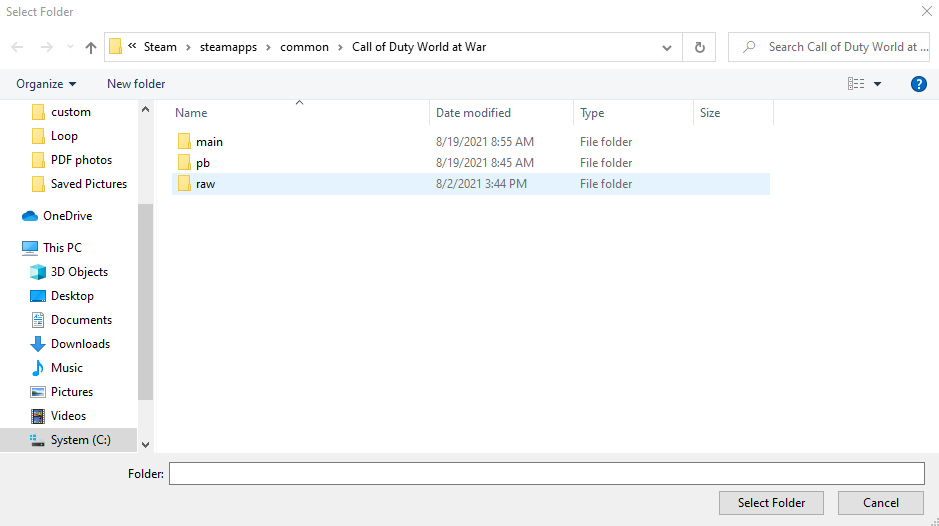
      ThisIsntRoblox screenshot your game folder and launcher game settings.

      ThisIsntRoblox 1 Reply Last reply
      0
      • ThisIsntRoblox ThisIsntRoblox

        After multiple attempts, I am stumped. I have Plutonium T4 set to C:\Program Files (x86)\Steam\steamapps\common\Call of Duty World at War.
        When I try to launch the game, I get the error message that the directory is incorrect. I would like to play Plutonium but the error responses I've been receiving have not been helpful.

        Resxt Offline
        Resxt Offline
        Resxt
        Plutonium Staff
        wrote on last edited by
        #3

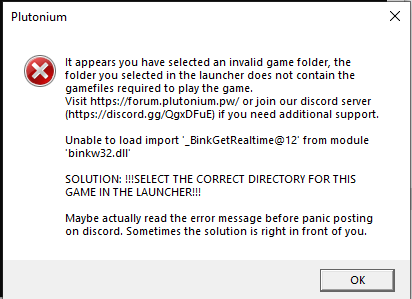
        ThisIsntRoblox Also screenshot the error, it's always better than text

        1 Reply Last reply
        0
        • Pistakilla Pistakilla

          ThisIsntRoblox screenshot your game folder and launcher game settings.

          ThisIsntRoblox Offline
          ThisIsntRoblox Offline
          ThisIsntRoblox
          wrote on last edited by
          #4

          Screenshot 2021-10-18 134406.png
          Screenshot 2021-10-18 134607.png

          Pistakilla Resxt 2 Replies Last reply
          0
          • ThisIsntRoblox ThisIsntRoblox

            Screenshot 2021-10-18 134406.png
            Screenshot 2021-10-18 134607.png

            Pistakilla Offline
            Pistakilla Offline
            Pistakilla
            wrote on last edited by
            #5

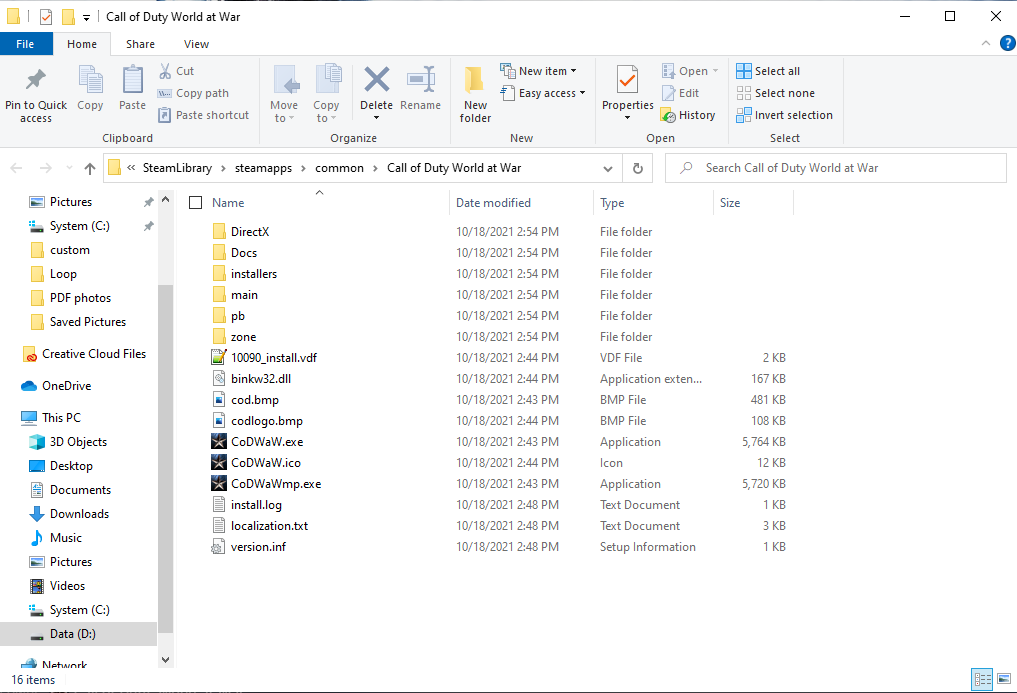
            ThisIsntRoblox I need a screenshot of game folder from windows file explorer...viewing it from the launcher only displays folder. However what I can see is that you are missing some files as well. Try repairing them from steam using "verify game integrity" - Right click on world at war in steam library, then hit properties > local files > verify game integrity.

            1 Reply Last reply
            0
            • ThisIsntRoblox ThisIsntRoblox

              Screenshot 2021-10-18 134406.png
              Screenshot 2021-10-18 134607.png

              Resxt Offline
              Resxt Offline
              Resxt
              Plutonium Staff
              wrote on last edited by
              #6

              ThisIsntRoblox You also didn't include the screenshot of the error. You might get stuck forever if we're not talking about the same error..

              1 Reply Last reply
              0
              • ThisIsntRoblox Offline
                ThisIsntRoblox Offline
                ThisIsntRoblox
                wrote on last edited by
                #7

                Screenshot 2021-10-18 134432.png Screenshot 2021-10-18 145557.png

                Resxt 1 Reply Last reply
                0
                • ThisIsntRoblox ThisIsntRoblox

                  Screenshot 2021-10-18 134432.png Screenshot 2021-10-18 145557.png

                  Resxt Offline
                  Resxt Offline
                  Resxt
                  Plutonium Staff
                  wrote on last edited by
                  #8

                  ThisIsntRoblox Okay then you have missing/broken files so as said above repair your game in Steam. Note that if you created a Steam folder yourself and the game doesn't come from Steam this is where your issue comes from. Make sure to get files from Steam or provided torrent. Other sources have a high chance of not working and we cannot really help with that

                  1 Reply Last reply
                  0
                  • ThisIsntRoblox Offline
                    ThisIsntRoblox Offline
                    ThisIsntRoblox
                    wrote on last edited by
                    #9

                    This was after a complete uninstall and reinstall.

                    1 Reply Last reply
                    0
                    • HannesC Offline
                      HannesC Offline
                      HannesC
                      Plutonium Staff
                      wrote on last edited by
                      #10

                      But those are 2 different folders no? One's SteamLibrary/steamapps and the other's Steam/steamapps which you've selected in game settings of the launcher, containing broken files.

                      Select SteamLibrary/steamapps/common/Call of Duty World at War as the new directory in the launcher, and the game should work.

                      1 Reply Last reply
                      0

                      Hello! It looks like you're interested in this conversation, but you don't have an account yet.

                      Getting fed up of having to scroll through the same posts each visit? When you register for an account, you'll always come back to exactly where you were before, and choose to be notified of new replies (either via email, or push notification). You'll also be able to save bookmarks and upvote posts to show your appreciation to other community members.

                      With your input, this post could be even better 💗

                      Register Login
                      Reply
                      • Reply as topic
                      Log in to reply
                      • Oldest to Newest
                      • Newest to Oldest
                      • Most Votes


                      • Login

                      • Don't have an account? Register

                      • Login or register to search.
                      • First post
                        Last post
                      0
                      • Unread 0
                      • Recent
                      • Tags
                      • Popular
                      • Users
                      • Groups
                      • Donate