Game crashes after a while and when i restart it there's no audio
-

Hello.
After some minutes of playing, my game crashes. It can be during a match, at the end, in the menu.
If i restart the game, i have no audio. If i restart the PC, audio is back but eventually i'll crash again.All my antivirus software was disabled but nothing changed
When i go to the crashdump folder, there's a file of around 1GB for every crash, sometimes more, + a text document that says this:
Exception Code: 0xC0000005
Exception Address: 0x68CB526CThanks for any help
-
Hello.
After some minutes of playing, my game crashes. It can be during a match, at the end, in the menu.
If i restart the game, i have no audio. If i restart the PC, audio is back but eventually i'll crash again.All my antivirus software was disabled but nothing changed
When i go to the crashdump folder, there's a file of around 1GB for every crash, sometimes more, + a text document that says this:
Exception Code: 0xC0000005
Exception Address: 0x68CB526CThanks for any help

Vaillant said in Game crashes after a while and when i restart it there's no audio:
When i go to the crashdump folder, there's a file of around 1GB for every crash
we need this file, upload it to google drive and post the link here.
-
Hello. I had deleted the files because they weighted a bit and now my game hasn't crashed for a while...
However, if i manually close the game and open it again, i will have no audio. So the audio problem is probably unrelated to the crashes.
If i go to settings when the audio works, I can see my output device in grey, so i can't change it but at least it's there. If i go there after i closed and opened the game again, there's no output device. Not even in grey.
What can I do to help you help me? -
Hello. I had deleted the files because they weighted a bit and now my game hasn't crashed for a while...
However, if i manually close the game and open it again, i will have no audio. So the audio problem is probably unrelated to the crashes.
If i go to settings when the audio works, I can see my output device in grey, so i can't change it but at least it's there. If i go there after i closed and opened the game again, there's no output device. Not even in grey.
What can I do to help you help me?
Vaillant maybe another application using your output device, not sure. You could try disabling "allow applications to take exclusive control of this device":
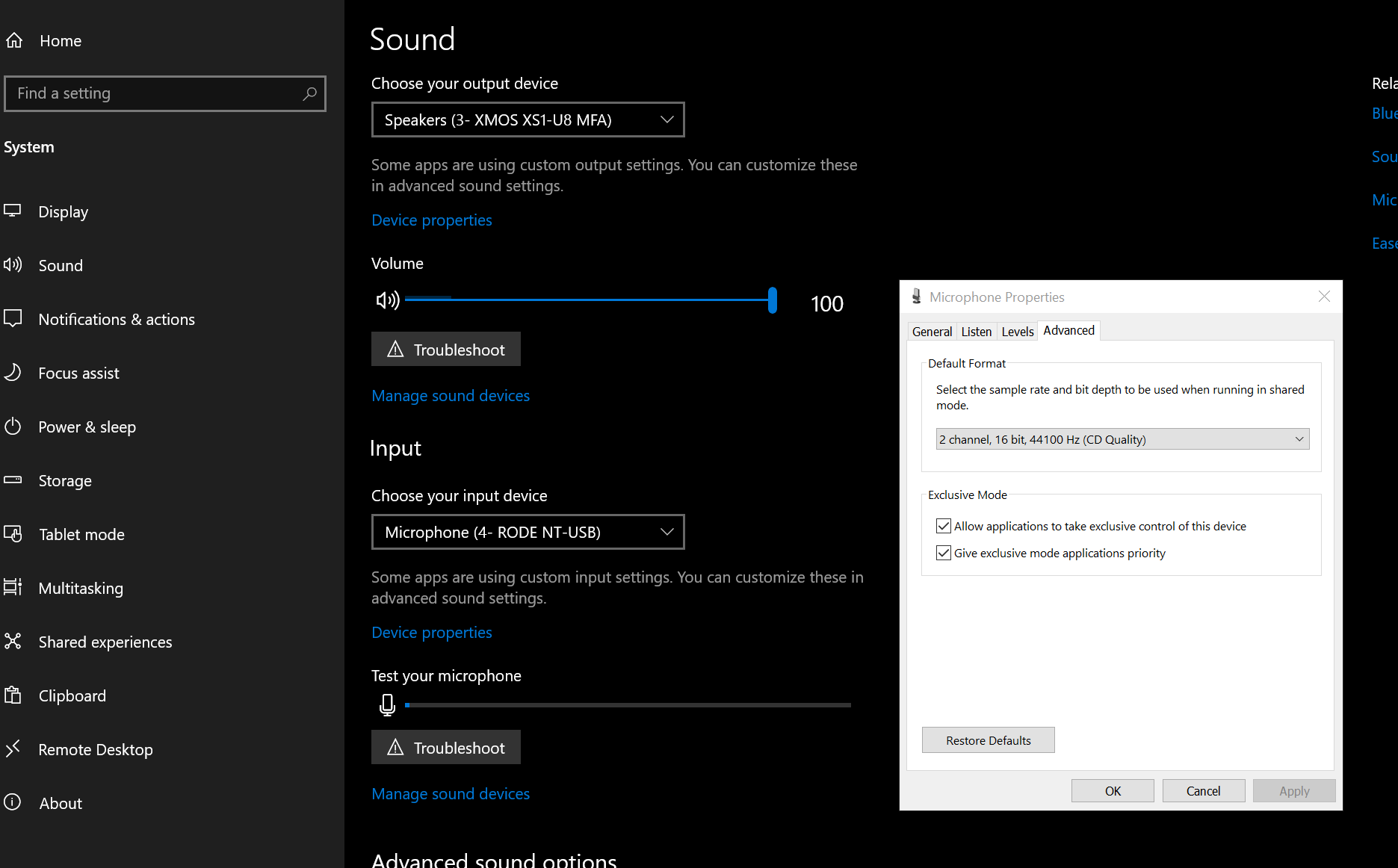
System -> Sound -> Device properties below your output device -> Additional device properties -> advanced
-

Vaillant Note that bad antiviruses like WebRoot will completely ignore your file exclusions and will still work even if you turn them off. I recommend reading the antivirus guide and mentioning your antivirus name here
Hello! It looks like you're interested in this conversation, but you don't have an account yet.
Getting fed up of having to scroll through the same posts each visit? When you register for an account, you'll always come back to exactly where you were before, and choose to be notified of new replies (either via email, or push notification). You'll also be able to save bookmarks and upvote posts to show your appreciation to other community members.
With your input, this post could be even better 💗
Register Login