Skip to content
  • Recent
  • Tags
  • Popular
  • Users
  • Groups
  • Donate
Collapse

Plutonium

  1. Home
  2. BO2 Client Support
  3. UPNP discovery timed out.
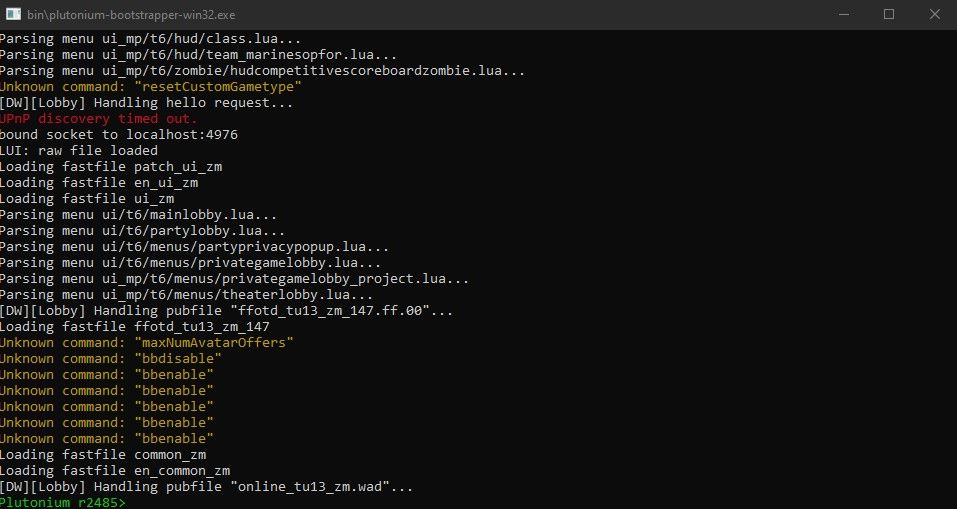
UPNP discovery timed out.

Scheduled Pinned Locked Moved BO2 Client Support
15 Posts 4 Posters 1.0k Views 1 Watching
  • Oldest to Newest
  • Newest to Oldest
  • Most Votes
Reply
  • Reply as topic
Log in to reply
This topic has been deleted. Only users with topic management privileges can see it.
  • HannesCundefined HannesC

    Screenshot your port forwarding settings. Have you whitelisted the ports on defender as well?

    qndaundefined Offline
    qndaundefined Offline
    qnda
    wrote on last edited by
    #5

    HannesC
    Yeah, i've done that as well. I think is a Plutonium problem because before this update, I didn't have any problems whatsoever.

    btw, this is my port forwading on my modem (i've partially covered the IP)

    screen.jpg
    Then, this is my windows firewall rules:
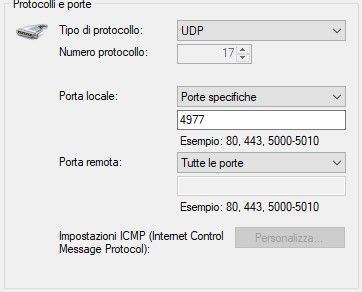
    Immagine 2021-11-20 144114.jpg Cattura.PNG

    Resxtundefined 1 Reply Last reply
    0
    • qndaundefined Offline
      qndaundefined Offline
      qnda
      wrote on last edited by
      #6
      This post is deleted!
      1 Reply Last reply
      0
      • qndaundefined qnda

        HannesC
        Yeah, i've done that as well. I think is a Plutonium problem because before this update, I didn't have any problems whatsoever.

        btw, this is my port forwading on my modem (i've partially covered the IP)
        screen.jpg
        Then, this is my windows firewall rules:
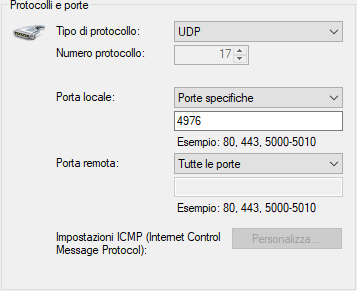
        Immagine 2021-11-20 144114.jpg Cattura.PNG

        Resxtundefined Offline
        Resxtundefined Offline
        Resxt
        Plutonium Staff
        wrote on last edited by Resxt
        #7

        @DR-qnda you have to make sure the IP is your PC local IP. Also make sure there are no firewalls blocking the connection. Note that some antivirus like ESET have built-in firewalls that will block game hosting by default.

        To be clear port forwarding will not enable UPnP, you don't need UPnP enabled to make things work.

        Also the routers IP are local IPs so only people on your router can see and interact with them so no need hide them.

        qndaundefined 1 Reply Last reply
        0
        • Resxtundefined Resxt

          @DR-qnda you have to make sure the IP is your PC local IP. Also make sure there are no firewalls blocking the connection. Note that some antivirus like ESET have built-in firewalls that will block game hosting by default.

          To be clear port forwarding will not enable UPnP, you don't need UPnP enabled to make things work.

          Also the routers IP are local IPs so only people on your router can see and interact with them so no need hide them.

          qndaundefined Offline
          qndaundefined Offline
          qnda
          wrote on last edited by qnda
          #8

          @lResxt
          I have verified that the IP is correct and I do not use any antivirus outside of Windows Defender.
          I took the screenshot of the ports as HannesC asked me for it.
          However I think it is a problem of the new Plutonium update as before this update everything was working perfectly.
          But I'm not able to host Custom Games yet and don't know how to fix.

          Resxtundefined 1 Reply Last reply
          0
          • qndaundefined qnda

            @lResxt
            I have verified that the IP is correct and I do not use any antivirus outside of Windows Defender.
            I took the screenshot of the ports as HannesC asked me for it.
            However I think it is a problem of the new Plutonium update as before this update everything was working perfectly.
            But I'm not able to host Custom Games yet and don't know how to fix.

            Resxtundefined Offline
            Resxtundefined Offline
            Resxt
            Plutonium Staff
            wrote on last edited by
            #9

            @DR-qnda I think that UPnP has been changed with the recent update so yes it could be an issue but I really don't think port forward is impacted by this. Your port forwarding rule looks correct, I just don't know if Remote Host should be 0.0.0.0 but idk

            Everything seems right from what I see so idk.
            Either wait for an admin to answer or we could try to get this to work on Discord if you'd like

            qndaundefined 1 Reply Last reply
            0
            • Resxtundefined Resxt

              @DR-qnda I think that UPnP has been changed with the recent update so yes it could be an issue but I really don't think port forward is impacted by this. Your port forwarding rule looks correct, I just don't know if Remote Host should be 0.0.0.0 but idk

              Everything seems right from what I see so idk.
              Either wait for an admin to answer or we could try to get this to work on Discord if you'd like

              qndaundefined Offline
              qndaundefined Offline
              qnda
              wrote on last edited by
              #10

              @lResxt
              I can wait for an admin to reply.
              Have you received reports from other users with this problem?

              1 Reply Last reply
              0
              • Resxtundefined Offline
                Resxtundefined Offline
                Resxt
                Plutonium Staff
                wrote on last edited by
                #11

                No, nothing new about this for now

                qndaundefined 1 Reply Last reply
                0
                • Resxtundefined Resxt

                  No, nothing new about this for now

                  qndaundefined Offline
                  qndaundefined Offline
                  qnda
                  wrote on last edited by
                  #12

                  @lResxt
                  As usual, things only happen to me, I'm too unlucky.
                  I will try to solve this problem and if I find the solution I will post it here, in case someone else needs it.
                  Thank you so much for taking the time to answer my problem, I really appreciate it.

                  Resxtundefined 1 Reply Last reply
                  0
                  • qndaundefined qnda

                    @lResxt
                    As usual, things only happen to me, I'm too unlucky.
                    I will try to solve this problem and if I find the solution I will post it here, in case someone else needs it.
                    Thank you so much for taking the time to answer my problem, I really appreciate it.

                    Resxtundefined Offline
                    Resxtundefined Offline
                    Resxt
                    Plutonium Staff
                    wrote on last edited by
                    #13

                    @DR-qnda In the meantime if you want a temporary solution you can either join public servers or use RadminVPN and play in LAN mode with your friends but keep in mind that's a temporary solution that's not ideal although it works

                    1 Reply Last reply
                    0
                    • MuccaRancidaundefined Offline
                      MuccaRancidaundefined Offline
                      MuccaRancida
                      wrote on last edited by
                      #14

                      we replit e questo

                      1 Reply Last reply
                      0
                      • qndaundefined Offline
                        qndaundefined Offline
                        qnda
                        wrote on last edited by
                        #15

                        EDIT: It resolved itself after about ten days from the update. I have not yet discovered the cause, but it reassures me that now I no longer have any problems.

                        1 Reply Last reply
                        2
                        Reply
                        • Reply as topic
                        Log in to reply
                        • Oldest to Newest
                        • Newest to Oldest
                        • Most Votes


                        • Login

                        • Don't have an account? Register

                        • Login or register to search.
                        • First post
                          Last post
                        0
                        • Recent
                        • Tags
                        • Popular
                        • Users
                        • Groups
                        • Donate