DirectX Error - ask help from Kyubey on KickassTorrents
-

I have reset my PC over 5 times and only installing Directx from the official Microsoft website and/or using the Redist-Installer.bat file and updating my 3090 drivers. I have tested running the game on another PC and it works perfect, but I keep getting the same popup error for my fresh install Windows PC.
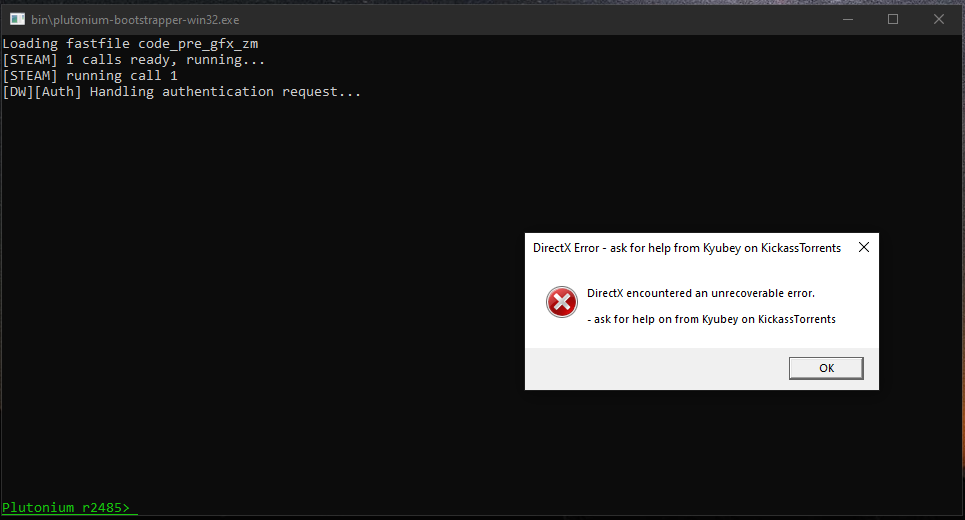
-
-
Forgot to mention, I've installed T4:WAW on my fresh install Windows PC and it works perfectly if that information helps

TheBatu Where did you download the game from?
try launching cmd as admin and writing these commands. After it's done, restart your PC.dism /online /cleanup-image /restorehealth -
I downloaded the torrent from the official Plutonium website
https://drive.google.com/file/d/1loejoTfKYZhYJOaorI8XaWgtPB7zocdi/viewI've also ran " dism /online /cleanup-image /restorehealth " and restarted my PC but the same error comes up
@Mr-MaPSaBino Yes, I have ran the Redist-installer.bat file to install DirectX files and also tried to install the DX90c_Addon_Installer.exe after the fresh install of Windows
P.S. I am on a 10 minute reply post timer since I just created this account
-
I downloaded the torrent from the official Plutonium website
https://drive.google.com/file/d/1loejoTfKYZhYJOaorI8XaWgtPB7zocdi/viewI've also ran " dism /online /cleanup-image /restorehealth " and restarted my PC but the same error comes up
@Mr-MaPSaBino Yes, I have ran the Redist-installer.bat file to install DirectX files and also tried to install the DX90c_Addon_Installer.exe after the fresh install of Windows
P.S. I am on a 10 minute reply post timer since I just created this account
TheBatu DId you have DX11.?
Did you try install this https://cdn.discordapp.com/attachments/219514629703860235/779123984088301578/DX90c_Addon_Installer.exe
TheBatu Caused because you downloaded a shitty repack for some other game and messing with the system DLLs. That may be it. The only way to fix this problem is by Reinstalling Windows
-
-
@Mr-MaPSaBino I have not installed any repacks, but if have done so, I did a fresh install of Windows 10 multiple times to bring back my registry to default settings, but I still have the same error occur
TheBatu said in DirectX Error - ask help from Kyubey on KickassTorrents:
but if have done so
means that at some point you downloaded some other repack of some other game, which corrupted system dlls.
-
-
@Mr-MaPSaBino
messing with the system DLLs. That may be it. The only way to fix this problem is by Reinstalling Windows
I have reinstalled Windows as stated to fix corrupted system DLLs, is there another method that I haven't already stated I have done
TheBatu I have no other method, I have run out of ideas, wait for a response from a staff or admin who knows about this problem because, as far as I know, those are the only ways to remove this problem. Sorry for not helping you
-
I have reset my PC over 5 times and only installing Directx from the official Microsoft website and/or using the Redist-Installer.bat file and updating my 3090 drivers. I have tested running the game on another PC and it works perfect, but I keep getting the same popup error for my fresh install Windows PC.

TheBatu try to install Direct X from the official installer directly https://www.microsoft.com/en-us/download/details.aspx?id=35
Maybe something on your PC blocked the Direct X install done by the redist installer, this one will work for sure.
Also you can always try repairing your game https://plutonium.pw/docs/repair/
-
Hello! It looks like you're interested in this conversation, but you don't have an account yet.
Getting fed up of having to scroll through the same posts each visit? When you register for an account, you'll always come back to exactly where you were before, and choose to be notified of new replies (either via email, or push notification). You'll also be able to save bookmarks and upvote posts to show your appreciation to other community members.
With your input, this post could be even better 💗
Register Login