Skip to content
  • 0 Unread 0
  • Recent
  • Tags
  • Popular
  • Users
  • Groups
Collapse

Plutonium

  1. Home
  2. BO2 Client Support
  3. DirectX Error - ask help from Kyubey on KickassTorrents

DirectX Error - ask help from Kyubey on KickassTorrents

Scheduled Pinned Locked Moved BO2 Client Support
11 Posts 4 Posters 1.6k Views 1 Watching
  • Oldest to Newest
  • Newest to Oldest
  • Most Votes
Reply
  • Reply as topic
Log in to reply
This topic has been deleted. Only users with topic management privileges can see it.
  • TheBatuundefined Offline
    TheBatuundefined Offline
    TheBatu
    wrote on last edited by
    #1

    I have reset my PC over 5 times and only installing Directx from the official Microsoft website and/or using the Redist-Installer.bat file and updating my 3090 drivers. I have tested running the game on another PC and it works perfect, but I keep getting the same popup error for my fresh install Windows PC.
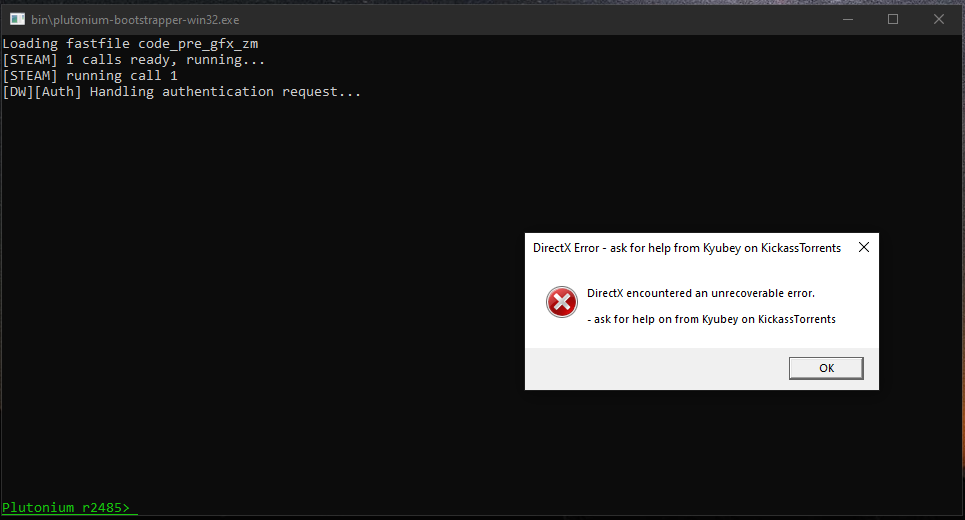
    a7fecdc4-56c3-4ac2-b46d-510309a86354-image.png

    Resxtundefined 1 Reply Last reply
    0
    • TheBatuundefined Offline
      TheBatuundefined Offline
      TheBatu
      wrote on last edited by
      #2

      Forgot to mention, I've installed T4:WAW on my fresh install Windows PC and it works perfectly if that information helps

      Sabino.ahkundefined 1 Reply Last reply
      0
      • TheBatuundefined TheBatu

        Forgot to mention, I've installed T4:WAW on my fresh install Windows PC and it works perfectly if that information helps

        Sabino.ahkundefined Offline
        Sabino.ahkundefined Offline
        Sabino.ahk
        wrote on last edited by Sabino.ahk
        #3

        TheBatu Where did you download the game from?
        try launching cmd as admin and writing these commands. After it's done, restart your PC.

        dism /online /cleanup-image /restorehealth
        
        1 Reply Last reply
        0
        • TheBatuundefined Offline
          TheBatuundefined Offline
          TheBatu
          wrote on last edited by TheBatu
          #4

          I downloaded the torrent from the official Plutonium website
          https://drive.google.com/file/d/1loejoTfKYZhYJOaorI8XaWgtPB7zocdi/view

          I've also ran " dism /online /cleanup-image /restorehealth " and restarted my PC but the same error comes up

          @Mr-MaPSaBino Yes, I have ran the Redist-installer.bat file to install DirectX files and also tried to install the DX90c_Addon_Installer.exe after the fresh install of Windows

          P.S. I am on a 10 minute reply post timer since I just created this account

          Sabino.ahkundefined 1 Reply Last reply
          0
          • TheBatuundefined TheBatu

            I downloaded the torrent from the official Plutonium website
            https://drive.google.com/file/d/1loejoTfKYZhYJOaorI8XaWgtPB7zocdi/view

            I've also ran " dism /online /cleanup-image /restorehealth " and restarted my PC but the same error comes up

            @Mr-MaPSaBino Yes, I have ran the Redist-installer.bat file to install DirectX files and also tried to install the DX90c_Addon_Installer.exe after the fresh install of Windows

            P.S. I am on a 10 minute reply post timer since I just created this account

            Sabino.ahkundefined Offline
            Sabino.ahkundefined Offline
            Sabino.ahk
            wrote on last edited by Sabino.ahk
            #5

            TheBatu DId you have DX11.?

            Did you try install this https://cdn.discordapp.com/attachments/219514629703860235/779123984088301578/DX90c_Addon_Installer.exe

            TheBatu Caused because you downloaded a shitty repack for some other game and messing with the system DLLs. That may be it. The only way to fix this problem is by Reinstalling Windows

            1 Reply Last reply
            0
            • TheBatuundefined Offline
              TheBatuundefined Offline
              TheBatu
              wrote on last edited by TheBatu
              #6

              @Mr-MaPSaBino I have not installed any repacks, but if have done so, I did a fresh install of Windows 10 multiple times to bring back my registry to default settings, but I still have the same error occur

              Sabino.ahkundefined 1 Reply Last reply
              0
              • TheBatuundefined TheBatu

                @Mr-MaPSaBino I have not installed any repacks, but if have done so, I did a fresh install of Windows 10 multiple times to bring back my registry to default settings, but I still have the same error occur

                Sabino.ahkundefined Offline
                Sabino.ahkundefined Offline
                Sabino.ahk
                wrote on last edited by
                #7

                TheBatu said in DirectX Error - ask help from Kyubey on KickassTorrents:

                but if have done so

                means that at some point you downloaded some other repack of some other game, which corrupted system dlls.

                1 Reply Last reply
                0
                • TheBatuundefined Offline
                  TheBatuundefined Offline
                  TheBatu
                  wrote on last edited by
                  #8

                  @Mr-MaPSaBino

                  messing with the system DLLs. That may be it. The only way to fix this problem is by Reinstalling Windows

                  I have reinstalled Windows as stated to fix corrupted system DLLs, is there another method that I haven't already stated I have done

                  Sabino.ahkundefined 1 Reply Last reply
                  0
                  • TheBatuundefined TheBatu

                    @Mr-MaPSaBino

                    messing with the system DLLs. That may be it. The only way to fix this problem is by Reinstalling Windows

                    I have reinstalled Windows as stated to fix corrupted system DLLs, is there another method that I haven't already stated I have done

                    Sabino.ahkundefined Offline
                    Sabino.ahkundefined Offline
                    Sabino.ahk
                    wrote on last edited by Sabino.ahk
                    #9

                    TheBatu I have no other method, I have run out of ideas, wait for a response from a staff or admin who knows about this problem because, as far as I know, those are the only ways to remove this problem. Sorry for not helping you

                    1 Reply Last reply
                    1
                    • TheBatuundefined TheBatu

                      I have reset my PC over 5 times and only installing Directx from the official Microsoft website and/or using the Redist-Installer.bat file and updating my 3090 drivers. I have tested running the game on another PC and it works perfect, but I keep getting the same popup error for my fresh install Windows PC.

                      a7fecdc4-56c3-4ac2-b46d-510309a86354-image.png

                      Resxtundefined Offline
                      Resxtundefined Offline
                      Resxt
                      Plutonium Staff
                      wrote on last edited by
                      #10

                      TheBatu try to install Direct X from the official installer directly https://www.microsoft.com/en-us/download/details.aspx?id=35

                      Maybe something on your PC blocked the Direct X install done by the redist installer, this one will work for sure.

                      Also you can always try repairing your game https://plutonium.pw/docs/repair/

                      1 Reply Last reply
                      0
                      • Aegonlundefined Offline
                        Aegonlundefined Offline
                        Aegonl
                        wrote on last edited by
                        #11

                        it works with this command if someone has this issue in 2025. open cmd administrator a put sfc /scannow and then open the game

                        1 Reply Last reply
                        0

                        Hello! It looks like you're interested in this conversation, but you don't have an account yet.

                        Getting fed up of having to scroll through the same posts each visit? When you register for an account, you'll always come back to exactly where you were before, and choose to be notified of new replies (either via email, or push notification). You'll also be able to save bookmarks and upvote posts to show your appreciation to other community members.

                        With your input, this post could be even better 💗

                        Register Login
                        Reply
                        • Reply as topic
                        Log in to reply
                        • Oldest to Newest
                        • Newest to Oldest
                        • Most Votes


                        • Login

                        • Don't have an account? Register

                        • Login or register to search.
                        • First post
                          Last post
                        0
                        • Unread 0
                        • Recent
                        • Tags
                        • Popular
                        • Users
                        • Groups
