Plutonium Crash
-
Hi, new guy here.
After installing the exe and files from the torrent, I've placed them as the guide suggest on C:\Games\pluto_t6_full_game.
But when starting T6 I'm getting this error and there doesn't seem to be a listing for this on the FAQ.
Has anyone run into this problem, if yes how did you fix this?
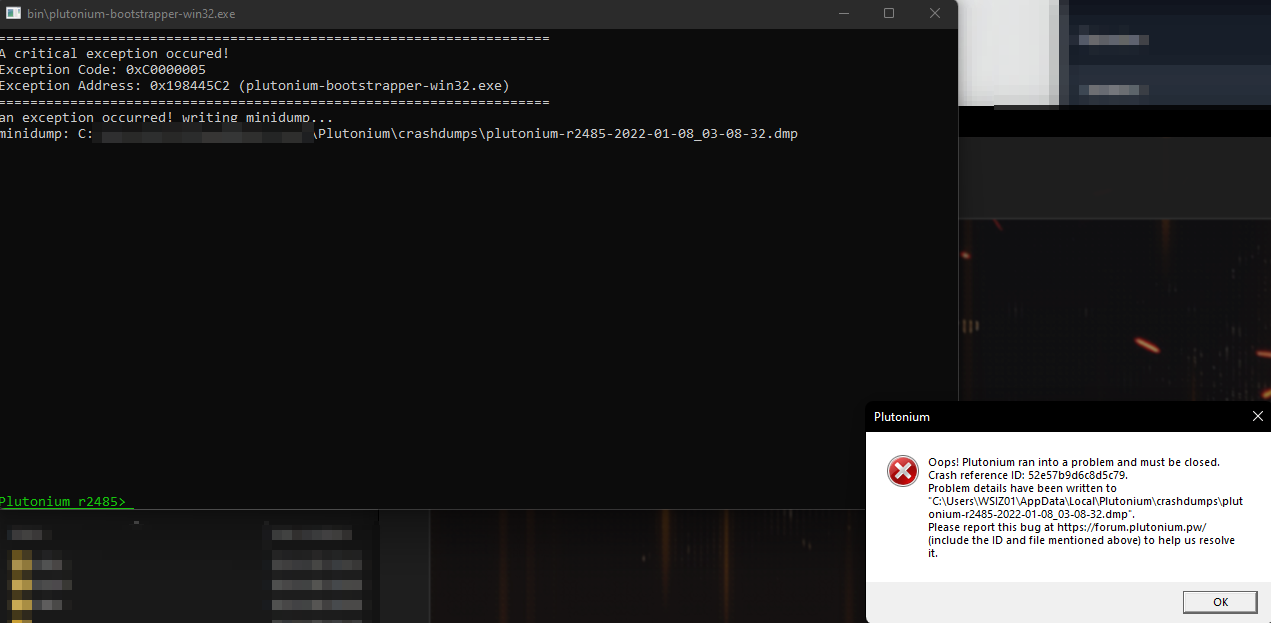
-
Upload the dump file to google drive.
Hi Scottie,
I've uploaded the crash dumps here: https://drive.google.com/drive/folders/1n5IOcezoTPQ_3xlnB0T6ND1P7LprilsG?usp=sharing -
-
Where should I put this google drive file?
Hi LolobibiChoco,
If you want to upload your crash dump files to then send me your email address, and I will give you write access to a subfolder of the above-shared folder/ link. -
Update:
After an update of the Plutonium launcher, I don't get this error anymore.
But the game doesn't launch either, where it normally would give the crash notification it now just closes without leaving an error or log/ dump file. -
Update:
After some updates to the launcher the original problem occurs again, kinda.
There is no pop-up warning and the command line output is now formatted differently:[process exited with code 3221225477 (0xc0000005)]

Hello! It looks like you're interested in this conversation, but you don't have an account yet.
Getting fed up of having to scroll through the same posts each visit? When you register for an account, you'll always come back to exactly where you were before, and choose to be notified of new replies (either via email, or push notification). You'll also be able to save bookmarks and upvote posts to show your appreciation to other community members.
With your input, this post could be even better 💗
Register Login