Skip to content
  • 0 Unread 0
  • Recent
  • Tags
  • Popular
  • Users
  • Groups
  • Donate
Collapse

Plutonium

  1. Home
  2. BO2 Client Support
  3. Joining game session then nothing

Joining game session then nothing

Scheduled Pinned Locked Moved BO2 Client Support
5 Posts 2 Posters 338 Views 1 Watching
  • Oldest to Newest
  • Newest to Oldest
  • Most Votes
Reply
  • Reply as topic
Log in to reply
This topic has been deleted. Only users with topic management privileges can see it.
  • Gligaa Offline
    Gligaa Offline
    Gligaa
    wrote on last edited by
    #1

    Can someone help ? My friend and I can't play zombies it just says joining game session and nothing happens, we both have uPnP enabled and we both port forwarded. We made sure our wifi is set on private and that plutonium is allowed through the firewall.

    Dss0 1 Reply Last reply
    0
    • Gligaa Gligaa

      Can someone help ? My friend and I can't play zombies it just says joining game session and nothing happens, we both have uPnP enabled and we both port forwarded. We made sure our wifi is set on private and that plutonium is allowed through the firewall.

      Dss0 Offline
      Dss0 Offline
      Dss0
      Plutonium Staff
      wrote on last edited by
      #2

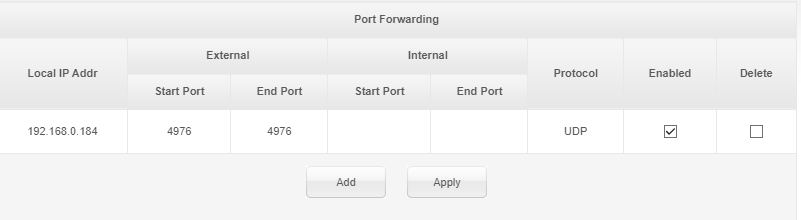
      Gligaa can whoever is the host of the match post a screenshot of their port forwarding settings?

      Gligaa 1 Reply Last reply
      0
      • Dss0 Dss0

        Gligaa can whoever is the host of the match post a screenshot of their port forwarding settings?

        Gligaa Offline
        Gligaa Offline
        Gligaa
        wrote on last edited by
        #3

        Dss0 949827ac-f173-4e16-b696-d8eb0cd31323-image.png This is my port forwarding settings since my friend is not online at the moment. However we both tried hosting the game and neither of us worked

        Dss0 1 Reply Last reply
        0
        • Gligaa Gligaa

          Dss0 949827ac-f173-4e16-b696-d8eb0cd31323-image.png This is my port forwarding settings since my friend is not online at the moment. However we both tried hosting the game and neither of us worked

          Dss0 Offline
          Dss0 Offline
          Dss0
          Plutonium Staff
          wrote on last edited by
          #4

          Gligaa try adding 4976 to internal start and end aswell, also make sure your pc's lan ip hasn't changed and is still 192.168.0.184.


          Gligaa 1 Reply Last reply
          0
          • Dss0 Dss0

            Gligaa try adding 4976 to internal start and end aswell, also make sure your pc's lan ip hasn't changed and is still 192.168.0.184.

            Gligaa Offline
            Gligaa Offline
            Gligaa
            wrote on last edited by
            #5

            Dss0 I already did but for some reason it doesn't show up there. And my ip hasn't changed

            1 Reply Last reply
            0

            Hello! It looks like you're interested in this conversation, but you don't have an account yet.

            Getting fed up of having to scroll through the same posts each visit? When you register for an account, you'll always come back to exactly where you were before, and choose to be notified of new replies (either via email, or push notification). You'll also be able to save bookmarks and upvote posts to show your appreciation to other community members.

            With your input, this post could be even better 💗

            Register Login
            Reply
            • Reply as topic
            Log in to reply
            • Oldest to Newest
            • Newest to Oldest
            • Most Votes


            • Login

            • Don't have an account? Register

            • Login or register to search.
            • First post
              Last post
            0
            • Unread 0
            • Recent
            • Tags
            • Popular
            • Users
            • Groups
            • Donate