how to fix t6r/crashdumps/mp/01_05_2020_08_01_36.dmp error?
-
I'm having this problem:
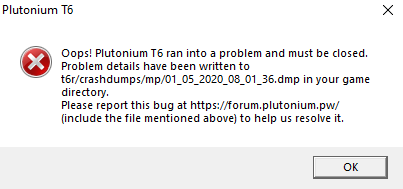
Oops! Plutonium T6 ran into a problem and must be closed.
Problem details have been written to t6r/crashdumps/mp/01_05_2020_08_01_36.dmp in your game directory.It's similar to that of another person who posted earlier. I'm doing this topic because I am not sure if it is the same problem.
*Att: You try again after a few minutes, and notice that not only appears in a specific file, almost every time you start the game a similar file appears, but it is not the same, it changes only a few numbers.
*Att²: Hahaha, i just understood that the numbers that change in the files mean the times that I tried to enter the game. -
I'm having this problem:
Oops! Plutonium T6 ran into a problem and must be closed.
Problem details have been written to t6r/crashdumps/mp/01_05_2020_08_01_36.dmp in your game directory.It's similar to that of another person who posted earlier. I'm doing this topic because I am not sure if it is the same problem.
*Att: You try again after a few minutes, and notice that not only appears in a specific file, almost every time you start the game a similar file appears, but it is not the same, it changes only a few numbers.
*Att²: Hahaha, i just understood that the numbers that change in the files mean the times that I tried to enter the game.nomxd Do you have anything running in the background? Anything at all. Any overlays like MSI afterburner, ccleaner, or antivirus software?


Hello! It looks like you're interested in this conversation, but you don't have an account yet.
Getting fed up of having to scroll through the same posts each visit? When you register for an account, you'll always come back to exactly where you were before, and choose to be notified of new replies (either via email, or push notification). You'll also be able to save bookmarks and upvote posts to show your appreciation to other community members.
With your input, this post could be even better 💗
Register Login