Skip to content
  • 0 Unread 0
  • Recent
  • Popular
  • Users
  • Donate
Collapse

Plutonium

  1. Home
  2. BO2 Client Support
  3. Noone can join my Custom Games

Noone can join my Custom Games

Scheduled Pinned Locked Moved BO2 Client Support
16 Posts 2 Posters 880 Views 1 Watching
  • Oldest to Newest
  • Newest to Oldest
  • Most Votes
Reply
  • Reply as topic
Log in to reply
This topic has been deleted. Only users with topic management privileges can see it.
  • DerLucas DerLucas

    Hello as mentoined above noone of my friends can join my private session even tho i did open all required Ports on my Router AND my firewall and UPnP enabled. It still does not work i did everything i could find, if someone could help me with that i would be gratefull.

    Resxt Offline
    Resxt Offline
    Resxt
    Plutonium Staff
    wrote on last edited by
    #2

    DerLucas explain in detail how you host the game and show your port forwarding rules.
    Also what is your antivirus? Some of them like ESET have firewalls that will block hosting by default

    1 Reply Last reply
    0
    • DerLucas Offline
      DerLucas Offline
      DerLucas
      wrote on last edited by
      #3

      I dont have any Antivirus only Windows Defender on MP for example i simply start the custom game my friends see it on F10 but on joining me they just load and then it stops with nothing happening

      Resxt 1 Reply Last reply
      0
      • DerLucas Offline
        DerLucas Offline
        DerLucas
        wrote on last edited by
        #4

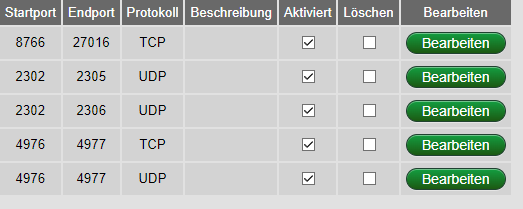
        mmc_H2cSDYgE6r.png
        Made this for 4977 TCP and UDP aswell

        1 Reply Last reply
        0
        • DerLucas DerLucas

          I dont have any Antivirus only Windows Defender on MP for example i simply start the custom game my friends see it on F10 but on joining me they just load and then it stops with nothing happening

          Resxt Offline
          Resxt Offline
          Resxt
          Plutonium Staff
          wrote on last edited by
          #5

          DerLucas did you start the game or no? Staying in the lobby doesn't work.
          Also you opened TCP while the guide says UDP.
          You also said you opened on your router then show it. This is the most important

          1 Reply Last reply
          0
          • DerLucas Offline
            DerLucas Offline
            DerLucas
            wrote on last edited by
            #6

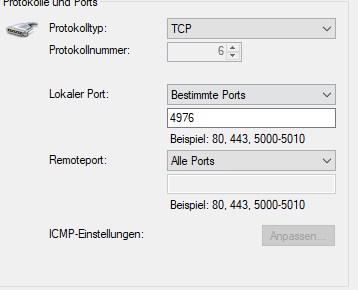
            opera_7ZFetIBvgs.png
            I was ingame running around waiting for them to join
            and yeah i did UDP and TCP both

            Resxt 1 Reply Last reply
            0
            • DerLucas DerLucas

              opera_7ZFetIBvgs.png
              I was ingame running around waiting for them to join
              and yeah i did UDP and TCP both

              Resxt Offline
              Resxt Offline
              Resxt
              Plutonium Staff
              wrote on last edited by
              #7

              DerLucas do 4976 - 4976 UDP and 4977 - 4977 UDP instead
              Make sure you don't have any network software like Hamachi or a VPN running and make sure your firewall isn't blocking anything

              If you start a game and play with your pistol he should be able to join by double clicking on your name
              Also make sure you both have the latest version https://plutonium.pw/docs/update/#checking-if-your-launcher-is-up-to-date

              1 Reply Last reply
              0
              • DerLucas Offline
                DerLucas Offline
                DerLucas
                wrote on last edited by
                #8

                Weird it says my core version is r2798 while the newest one on the changelog is r2794
                and i dont use any vpn or hamachi services

                1 Reply Last reply
                0
                • DerLucas Offline
                  DerLucas Offline
                  DerLucas
                  wrote on last edited by
                  #9

                  But its the newest one right? my mates have the same version aswell so that shouldnt be an issue

                  Resxt 1 Reply Last reply
                  0
                  • DerLucas DerLucas

                    But its the newest one right? my mates have the same version aswell so that shouldnt be an issue

                    Resxt Offline
                    Resxt Offline
                    Resxt
                    Plutonium Staff
                    wrote on last edited by
                    #10

                    DerLucas Yes it's just that r2794 to r2798 is a small update or bug fix probably so it wasn't added to the changelog but if it's above latest version in the changelog or equal you're good

                    Did you change your firewall rules as well to make it UDP and did you allow Plutonium exes through the firewall?

                    Also are you sure your port forward rules on your router are linked to your PC?
                    Normally you can choose which device to forward the port on.
                    If you chose your TV or another PC it won't work

                    1 Reply Last reply
                    0
                    • DerLucas Offline
                      DerLucas Offline
                      DerLucas
                      wrote on last edited by
                      #11

                      I use the Mac adress of my pc on my router and yes i did everything for both tcp and udp i rly tried all that came to my mind thats why i ask for help

                      Resxt 1 Reply Last reply
                      0
                      • DerLucas DerLucas

                        I use the Mac adress of my pc on my router and yes i did everything for both tcp and udp i rly tried all that came to my mind thats why i ask for help

                        Resxt Offline
                        Resxt Offline
                        Resxt
                        Plutonium Staff
                        wrote on last edited by Resxt
                        #12

                        DerLucas I'm not sure using the mac address works
                        Can you try using your PC local IP instead?
                        Open a cmd and type ipconfig
                        Get the IP next to IPv4 on the network adapter you use
                        If you're on ethernet like me take the IP below the ethernet adapter
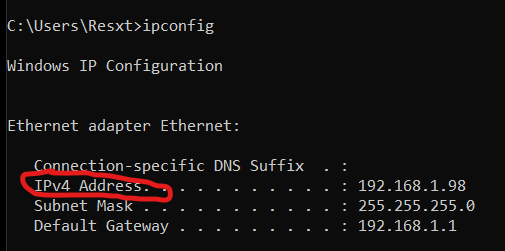
                        877e5dde-7dc0-4a22-9acf-cb9899366289-image.png

                        1 Reply Last reply
                        0
                        • DerLucas Offline
                          DerLucas Offline
                          DerLucas
                          wrote on last edited by
                          #13

                          My router only takes mac adress everything else and it tells me that i need to use a mac adress

                          1 Reply Last reply
                          0
                          • Resxt Offline
                            Resxt Offline
                            Resxt
                            Plutonium Staff
                            wrote on last edited by
                            #14

                            Then I have no other idea sorry

                            1 Reply Last reply
                            0
                            • DerLucas Offline
                              DerLucas Offline
                              DerLucas
                              wrote on last edited by
                              #15

                              Damn it thanks for your time tho i appreciate it 😄

                              1 Reply Last reply
                              0
                              • DerLucas Offline
                                DerLucas Offline
                                DerLucas
                                wrote on last edited by
                                #16

                                So i now have a new Router and it looks like the problem was that my router only had IPv6 Forwarding cause with the new one it works perfectly fine

                                1 Reply Last reply
                                0

                                Hello! It looks like you're interested in this conversation, but you don't have an account yet.

                                Getting fed up of having to scroll through the same posts each visit? When you register for an account, you'll always come back to exactly where you were before, and choose to be notified of new replies (either via email, or push notification). You'll also be able to save bookmarks and upvote posts to show your appreciation to other community members.

                                With your input, this post could be even better 💗

                                Register Login
                                Reply
                                • Reply as topic
                                Log in to reply
                                • Oldest to Newest
                                • Newest to Oldest
                                • Most Votes


                                • Login

                                • Don't have an account? Register

                                • Login or register to search.
                                • First post
                                  Last post
                                0
                                • Unread 0
                                • Recent
                                • Popular
                                • Users
                                • Donate