[ZM] [Bo1] Rollon's Gun Mod
-
So far the only working gun mod I found for plutonium. Functional mystery box and fixed dual cz75 crash. (I haven't tested out the pap yet but it'll probably work)
Includes several bo2 weapons and even wonder weapons as well such as Ray gun mark II and origins staffs
Currently only working for kino and fiveDownload link 1: https://www.mediafire.com/file/9985tnyy8a89p5j/zm_rollongunmod.rar/file
Download link 2: https://mega.nz/file/H8RXCJaY#WNWC_kNT8xlqGwmj1wob1-Zih974ENDgr7iiUkCndVA
-
So far the only working gun mod I found for plutonium. Functional mystery box and fixed dual cz75 crash. (I haven't tested out the pap yet but it'll probably work)
Includes several bo2 weapons and even wonder weapons as well such as Ray gun mark II and origins staffs
Currently only working for kino and fiveDownload link 1: https://www.mediafire.com/file/9985tnyy8a89p5j/zm_rollongunmod.rar/file
Download link 2: https://mega.nz/file/H8RXCJaY#WNWC_kNT8xlqGwmj1wob1-Zih974ENDgr7iiUkCndVA
-
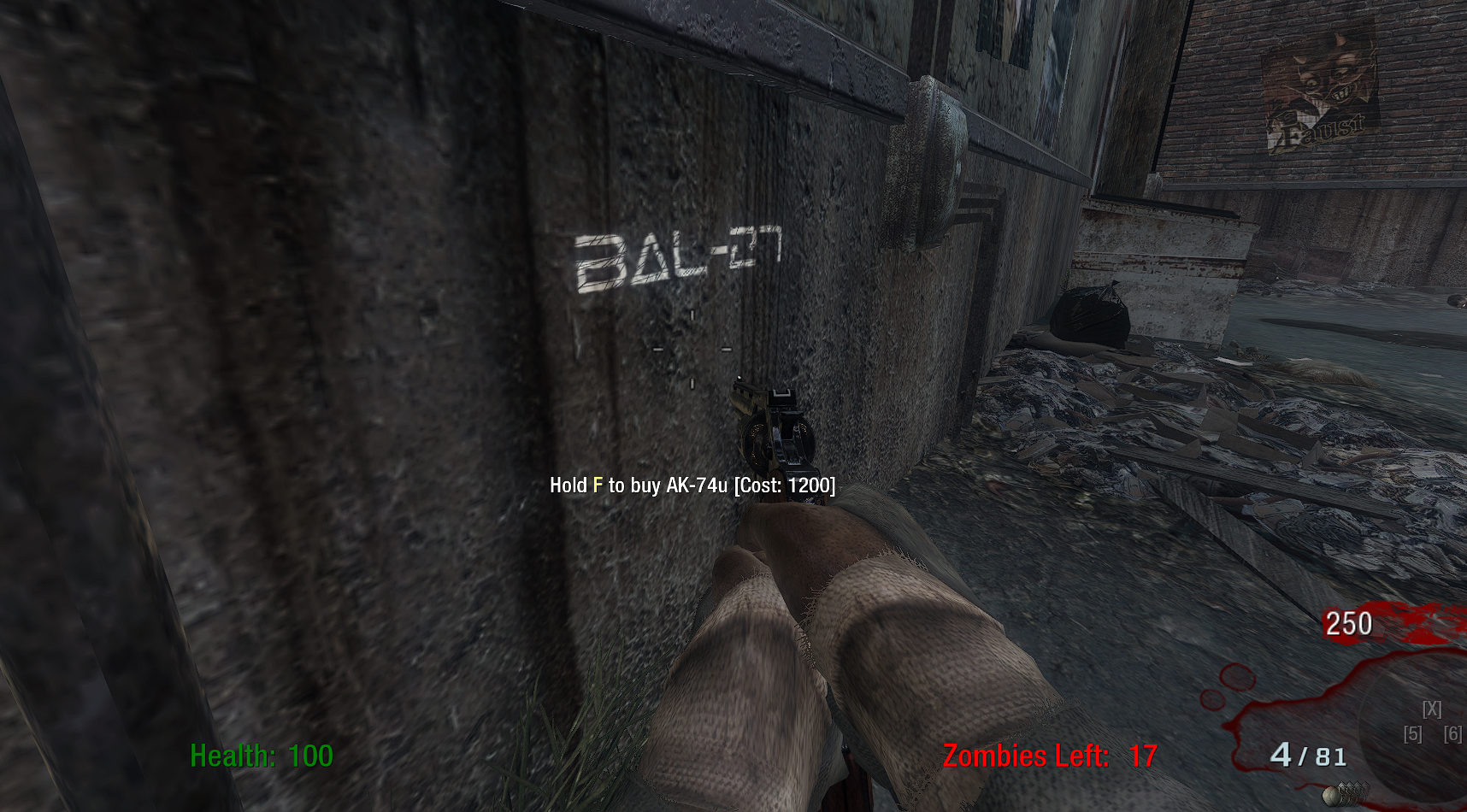
Nucleye Is there any image files or anything else I need. Game loads in to Kino perfectly fine and I see the chalk text but im not getting any other weapons besides vanilla ones
-
So far the only working gun mod I found for plutonium. Functional mystery box and fixed dual cz75 crash. (I haven't tested out the pap yet but it'll probably work)
Includes several bo2 weapons and even wonder weapons as well such as Ray gun mark II and origins staffs
Currently only working for kino and fiveDownload link 1: https://www.mediafire.com/file/9985tnyy8a89p5j/zm_rollongunmod.rar/file
Download link 2: https://mega.nz/file/H8RXCJaY#WNWC_kNT8xlqGwmj1wob1-Zih974ENDgr7iiUkCndVA
Nucleye the Mod works For Moon. I’ve tried it.
-
So far the only working gun mod I found for plutonium. Functional mystery box and fixed dual cz75 crash. (I haven't tested out the pap yet but it'll probably work)
Includes several bo2 weapons and even wonder weapons as well such as Ray gun mark II and origins staffs
Currently only working for kino and fiveDownload link 1: https://www.mediafire.com/file/9985tnyy8a89p5j/zm_rollongunmod.rar/file
Download link 2: https://mega.nz/file/H8RXCJaY#WNWC_kNT8xlqGwmj1wob1-Zih974ENDgr7iiUkCndVA
-
Nucleye it doesnt do anything, did intall it wrong?
-
@HeavilySusYT Did you put all the mod files into the First ever folder? That’s how you make it work.
PS2ABBACHIO What do you mean First ever folder?
-
@HeavilySusYT Did you put all the mod files into the First ever folder? That’s how you make it work.
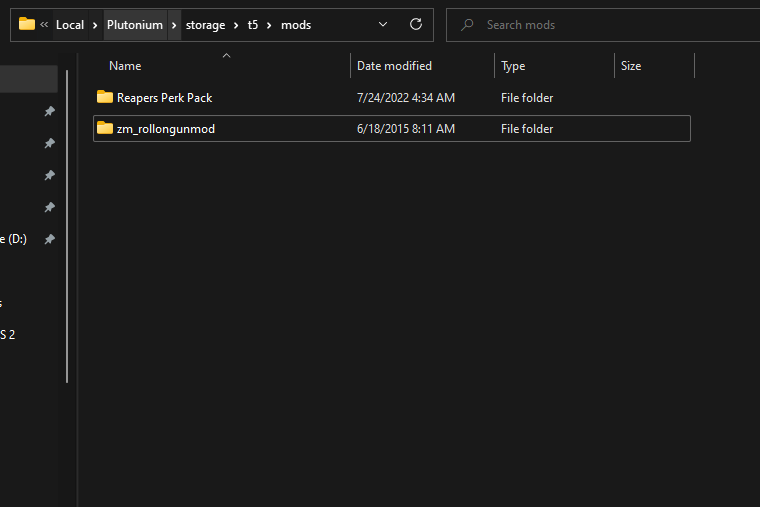
PS2ABBACHIO i installed it by putting in the mods folder, every other mod ive used worked that way
-
@HeavilySusYT Did you put all the mod files into the First ever folder? That’s how you make it work.
PS2ABBACHIO am i wrong with the installation process??? it works for every other mod ive done
-
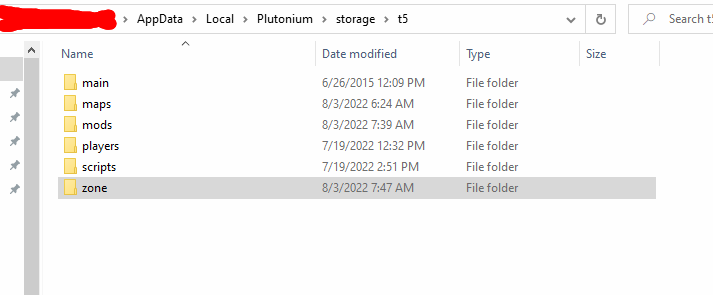
Greetings @HeavilySusYT I just figured it out over here, the files in the common folder move them to t5 > zone and move the main folder to t5

-
Greetings @HeavilySusYT I just figured it out over here, the files in the common folder move them to t5 > zone and move the main folder to t5
so it kinda works, all of the wall weapons and spawn pistol are modded weapons. BUT there textures are all white and the wall weapons make the same noises as the gun they replace. AND the box is completely unmodded
-
so it kinda works, all of the wall weapons and spawn pistol are modded weapons. BUT there textures are all white and the wall weapons make the same noises as the gun they replace. AND the box is completely unmodded
@HeavilySusYT update: there are modded weapons in the box though they dont show up in the rotation and there all white
-
Sorry for the length of this but I figued this may help others, and I wanted to include image examples to help
Disclaimer, I don't use the mods folder for any of this
Before starting, I recommend throwing the folders, images and zone, into a .zip folder or .rar before editing them as a backup. They can stay in the root T5 folder as they won't interact with the game at all. In case you want to remove the mod, it's easier to delete the folders and pull out the backups.
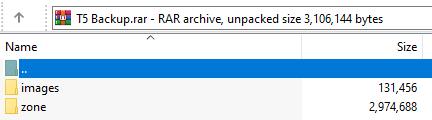
If you're having problems with things like textures not showing up properly, you could try how I have it set up, which is messier but works. Inside the main folder of the mod you open the iw_42.iwd in winrar, which I personally use for this, I have no idea if something like 7zip works. You can take the images folder and put it in the root storage/T5 folder.
Here's a visual example of a chunk of the files in the said folder

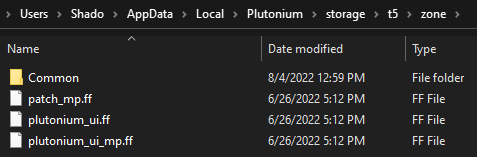
If the custom weapons aren't working at all, you also need to make sure that inside the zone folder that you don't have a folder called Common. Whatever is in that folder, put it into the root zone folder, and I have found everyhing to work.
Another visual example of what it should roughly look like
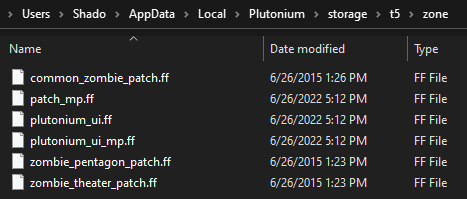
This is when it's incorrectly set up

-
Sorry for the length of this but I figued this may help others, and I wanted to include image examples to help
Disclaimer, I don't use the mods folder for any of this
Before starting, I recommend throwing the folders, images and zone, into a .zip folder or .rar before editing them as a backup. They can stay in the root T5 folder as they won't interact with the game at all. In case you want to remove the mod, it's easier to delete the folders and pull out the backups.
If you're having problems with things like textures not showing up properly, you could try how I have it set up, which is messier but works. Inside the main folder of the mod you open the iw_42.iwd in winrar, which I personally use for this, I have no idea if something like 7zip works. You can take the images folder and put it in the root storage/T5 folder.
Here's a visual example of a chunk of the files in the said folder
If the custom weapons aren't working at all, you also need to make sure that inside the zone folder that you don't have a folder called Common. Whatever is in that folder, put it into the root zone folder, and I have found everyhing to work.
Another visual example of what it should roughly look like
This is when it's incorrectly set up
@ShadowFerret24 i dont have an image folder in the rolongun mod rar
-
@ShadowFerret24 i dont have an image folder in the rolongun mod rar
@HeavilySusYT inside the rar, go through these folders: zm_rollongunmod > main and you will find iw_42.iwd when you open that, there should be an images folder inside of it
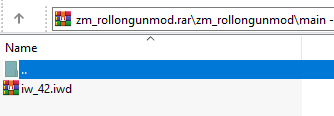

this images folder inside the iw_42.iwd need to be put in the T5 folder as previously mentioned
-
So far the only working gun mod I found for plutonium. Functional mystery box and fixed dual cz75 crash. (I haven't tested out the pap yet but it'll probably work)
Includes several bo2 weapons and even wonder weapons as well such as Ray gun mark II and origins staffs
Currently only working for kino and fiveDownload link 1: https://www.mediafire.com/file/9985tnyy8a89p5j/zm_rollongunmod.rar/file
Download link 2: https://mega.nz/file/H8RXCJaY#WNWC_kNT8xlqGwmj1wob1-Zih974ENDgr7iiUkCndVA
Nucleye Do you think you can do the same with the Natch mod?
-
 bhfff referenced this topic on


Hello! It looks like you're interested in this conversation, but you don't have an account yet.
Getting fed up of having to scroll through the same posts each visit? When you register for an account, you'll always come back to exactly where you were before, and choose to be notified of new replies (either via email, or push notification). You'll also be able to save bookmarks and upvote posts to show your appreciation to other community members.
With your input, this post could be even better 💗
Register Login