Skip to content
  • 0 Unread 0
  • Recent
  • Tags
  • Popular
  • Users
  • Groups
  • Donate
Collapse

Plutonium

  1. Home
  2. WAW Server Hosting Support
  3. WAW server not starting

WAW server not starting

Scheduled Pinned Locked Moved WAW Server Hosting Support
41 Posts 7 Posters 7.0k Views 2 Watching
  • Oldest to Newest
  • Newest to Oldest
  • Most Votes
Reply
  • Reply as topic
Log in to reply
This topic has been deleted. Only users with topic management privileges can see it.
  • hindercanrun hindercanrun

    C2GN you didnt set it up correctly

    felixoboyytb Offline
    felixoboyytb Offline
    felixoboyytb
    wrote on last edited by
    #5

    hindercanrun https://youtu.be/6JQxOvImLnw

    hindercanrun 1 Reply Last reply
    0
    • felixoboyytb felixoboyytb

      hindercanrun https://youtu.be/6JQxOvImLnw

      hindercanrun Offline
      hindercanrun Offline
      hindercanrun
      Contributor
      wrote on last edited by
      #6

      felixoboyytb dont think u r meant put it in the storge\t4 folder

      felixoboyytb 1 Reply Last reply
      0
      • hindercanrun hindercanrun

        felixoboyytb dont think u r meant put it in the storge\t4 folder

        felixoboyytb Offline
        felixoboyytb Offline
        felixoboyytb
        wrote on last edited by
        #7

        hindercanrun ok, so where do we have to put them then?

        ljave018 Dss0 2 Replies Last reply
        0
        • felixoboyytb felixoboyytb

          hindercanrun ok, so where do we have to put them then?

          ljave018 Offline
          ljave018 Offline
          ljave018
          wrote on last edited by
          #8

          felixoboyytb in a separate folder.
          You can make one on desktop, or in a specific directory:
          C:\gameserver
          Everything is explained in the guide.

          1 Reply Last reply
          0
          • felixoboyytb felixoboyytb

            hindercanrun ok, so where do we have to put them then?

            Dss0 Offline
            Dss0 Offline
            Dss0
            Plutonium Staff
            wrote on last edited by
            #9

            felixoboyytb the files and folder inside "T4ServerConfigs-main" go into your waw game folder.

            felixoboyytb 2 Replies Last reply
            0
            • Dss0 Dss0

              felixoboyytb the files and folder inside "T4ServerConfigs-main" go into your waw game folder.

              felixoboyytb Offline
              felixoboyytb Offline
              felixoboyytb
              wrote on last edited by
              #10
              This post is deleted!
              1 Reply Last reply
              0
              • Dss0 Dss0

                felixoboyytb the files and folder inside "T4ServerConfigs-main" go into your waw game folder.

                felixoboyytb Offline
                felixoboyytb Offline
                felixoboyytb
                wrote on last edited by
                #11

                Dss0 and now, what is the problem?

                https://youtu.be/SvNNBE1c2oc

                Dss0 1 Reply Last reply
                0
                • felixoboyytb felixoboyytb

                  Dss0 and now, what is the problem?

                  https://youtu.be/SvNNBE1c2oc

                  Dss0 Offline
                  Dss0 Offline
                  Dss0
                  Plutonium Staff
                  wrote on last edited by
                  #12

                  felixoboyytb you didn't add a server key to the batch file. https://plutonium.pw/docs/server/t4/setting-up-a-server/#12-creating-a-server-key

                  felixoboyytb 1 Reply Last reply
                  0
                  • Dss0 Dss0

                    felixoboyytb you didn't add a server key to the batch file. https://plutonium.pw/docs/server/t4/setting-up-a-server/#12-creating-a-server-key

                    felixoboyytb Offline
                    felixoboyytb Offline
                    felixoboyytb
                    wrote on last edited by
                    #13
                    This post is deleted!
                    1 Reply Last reply
                    0
                    • felixoboyytb Offline
                      felixoboyytb Offline
                      felixoboyytb
                      wrote on last edited by
                      #14

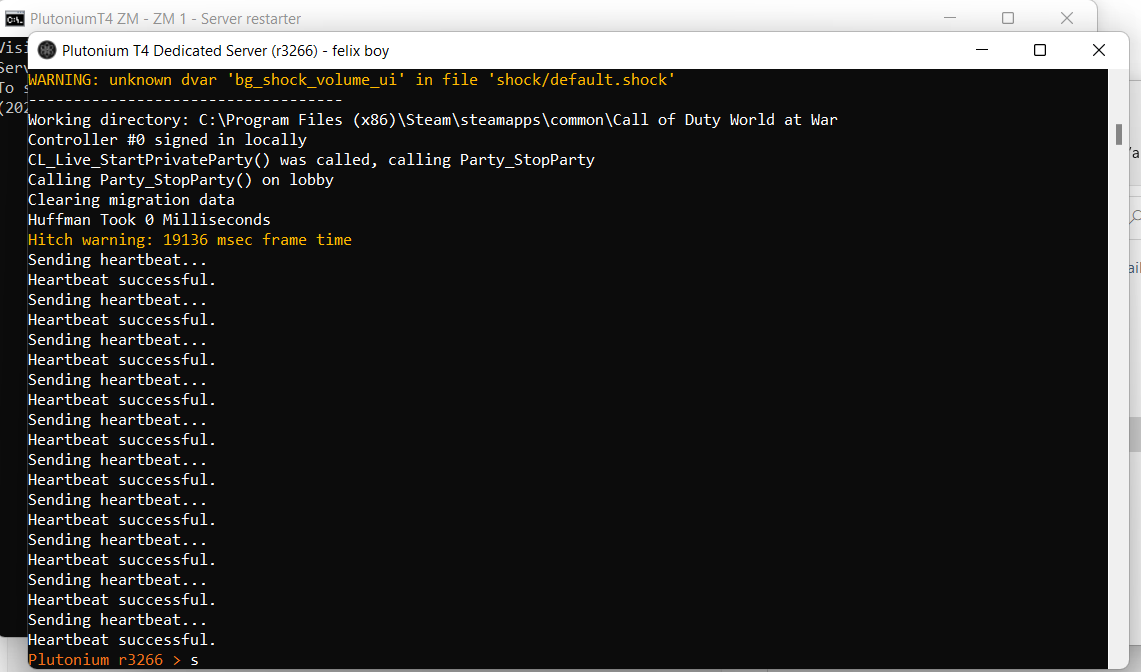
                      Dss0 ! after?
                      2874ff79-7e18-4d67-9662-7db8d7937192-image.png

                      Dss0 1 Reply Last reply
                      0
                      • felixoboyytb felixoboyytb

                        Dss0 ! after?
                        2874ff79-7e18-4d67-9662-7db8d7937192-image.png

                        Dss0 Offline
                        Dss0 Offline
                        Dss0
                        Plutonium Staff
                        wrote on last edited by
                        #15

                        felixoboyytb well server is up. should work now.

                        felixoboyytb 1 Reply Last reply
                        0
                        • Dss0 Dss0

                          felixoboyytb well server is up. should work now.

                          felixoboyytb Offline
                          felixoboyytb Offline
                          felixoboyytb
                          wrote on last edited by
                          #16

                          Dss0 How? how you do the rest because I didn't understand anything about what to do for that part

                          Dss0 1 Reply Last reply
                          0
                          • felixoboyytb felixoboyytb

                            Dss0 How? how you do the rest because I didn't understand anything about what to do for that part

                            Dss0 Offline
                            Dss0 Offline
                            Dss0
                            Plutonium Staff
                            wrote on last edited by
                            #17

                            felixoboyytb which part? the server is running. did you forward the port already? If not: https://www.lifewire.com/how-to-port-forward-4163829.

                            The port will be the one you set in the batch file. If you're running server and game on the same pc you need to start the game first and server second, it won't work if you start the game first as it interferes with the server. This will also result in the server using the next free port (so 28961 instead of 28960).

                            felixoboyytb 1 Reply Last reply
                            0
                            • Dss0 Dss0

                              felixoboyytb which part? the server is running. did you forward the port already? If not: https://www.lifewire.com/how-to-port-forward-4163829.

                              The port will be the one you set in the batch file. If you're running server and game on the same pc you need to start the game first and server second, it won't work if you start the game first as it interferes with the server. This will also result in the server using the next free port (so 28961 instead of 28960).

                              felixoboyytb Offline
                              felixoboyytb Offline
                              felixoboyytb
                              wrote on last edited by
                              #18

                              Dss0 check this video for more info:
                              https://youtu.be/yRYoepG2Ooo

                              Dss0 1 Reply Last reply
                              0
                              • felixoboyytb felixoboyytb

                                Dss0 check this video for more info:
                                https://youtu.be/yRYoepG2Ooo

                                Dss0 Offline
                                Dss0 Offline
                                Dss0
                                Plutonium Staff
                                wrote on last edited by
                                #19

                                felixoboyytb how's that more info? you still didn't tell me if you already forwarded the port. You also didn't tell me what you actually want to do with that server. Do you want to join it? do you want your friends to join it? why did you set up a server?

                                If you want to join it and play alone just type

                                connect 127.0.0.1:28961
                                

                                into the in-game console. As i said you'll have to start the game first and server second if both are running on the same pc.
                                If you want other people to be able to join as well you need to forward the server's port.

                                felixoboyytb 1 Reply Last reply
                                0
                                • Dss0 Dss0

                                  felixoboyytb how's that more info? you still didn't tell me if you already forwarded the port. You also didn't tell me what you actually want to do with that server. Do you want to join it? do you want your friends to join it? why did you set up a server?

                                  If you want to join it and play alone just type

                                  connect 127.0.0.1:28961
                                  

                                  into the in-game console. As i said you'll have to start the game first and server second if both are running on the same pc.
                                  If you want other people to be able to join as well you need to forward the server's port.

                                  felixoboyytb Offline
                                  felixoboyytb Offline
                                  felixoboyytb
                                  wrote on last edited by
                                  #20

                                  Dss0 basically what I want is to create a public server on waw zombie with the map I choose and that people join from all over the world

                                  Dss0 1 Reply Last reply
                                  0
                                  • felixoboyytb felixoboyytb

                                    Dss0 basically what I want is to create a public server on waw zombie with the map I choose and that people join from all over the world

                                    Dss0 Offline
                                    Dss0 Offline
                                    Dss0
                                    Plutonium Staff
                                    wrote on last edited by
                                    #21

                                    felixoboyytb so you need to forward the port via your router's web interface. after that the server will be visible on the serverlist.
                                    It's possible that it's not visible for you but is visible for other people, this usually happens because your router doesn't support wan loopback. It's not an issue tho, you can still connect to your server manually via the console and your pc's lan ip:port.

                                    felixoboyytb 1 Reply Last reply
                                    0
                                    • Dss0 Dss0

                                      felixoboyytb so you need to forward the port via your router's web interface. after that the server will be visible on the serverlist.
                                      It's possible that it's not visible for you but is visible for other people, this usually happens because your router doesn't support wan loopback. It's not an issue tho, you can still connect to your server manually via the console and your pc's lan ip:port.

                                      felixoboyytb Offline
                                      felixoboyytb Offline
                                      felixoboyytb
                                      wrote on last edited by
                                      #22

                                      Dss0 like that? and how you're supposed to know the password?
                                      eac028e6-fc0d-4008-a802-36d636a0c813-image.png

                                      Dss0 2 Replies Last reply
                                      0
                                      • felixoboyytb felixoboyytb

                                        Dss0 like that? and how you're supposed to know the password?
                                        eac028e6-fc0d-4008-a802-36d636a0c813-image.png

                                        Dss0 Offline
                                        Dss0 Offline
                                        Dss0
                                        Plutonium Staff
                                        wrote on last edited by
                                        #23

                                        felixoboyytb default password for mikrotik routers is just empty (no password). If that doesn't work check the back of the router or try googling "routermodel default login credentials". Replace "routermodel" with the model of mikrotik router you have.

                                        felixoboyytb 1 Reply Last reply
                                        0
                                        • felixoboyytb felixoboyytb

                                          Dss0 like that? and how you're supposed to know the password?
                                          eac028e6-fc0d-4008-a802-36d636a0c813-image.png

                                          Dss0 Offline
                                          Dss0 Offline
                                          Dss0
                                          Plutonium Staff
                                          wrote on last edited by
                                          #24

                                          felixoboyytb i removed your post because it showed your router's mac address and serial number, you prolly don't wanna put that on the internet for everyone to see.

                                          No there was no password on the sticker, the default password for your router is indeed empty. If that doesn't work someone has changed the password, i can't help you with that.

                                          felixoboyytb 1 Reply Last reply
                                          0

                                          Hello! It looks like you're interested in this conversation, but you don't have an account yet.

                                          Getting fed up of having to scroll through the same posts each visit? When you register for an account, you'll always come back to exactly where you were before, and choose to be notified of new replies (either via email, or push notification). You'll also be able to save bookmarks and upvote posts to show your appreciation to other community members.

                                          With your input, this post could be even better 💗

                                          Register Login
                                          Reply
                                          • Reply as topic
                                          Log in to reply
                                          • Oldest to Newest
                                          • Newest to Oldest
                                          • Most Votes


                                          • 1
                                          • 2
                                          • 3
                                          • Login

                                          • Don't have an account? Register

                                          • Login or register to search.
                                          • First post
                                            Last post
                                          0
                                          • Unread 0
                                          • Recent
                                          • Tags
                                          • Popular
                                          • Users
                                          • Groups
                                          • Donate