Skip to content
  • 0 Unread 0
  • Recent
  • Tags
  • Popular
  • Users
  • Groups
  • Donate
Collapse

Plutonium

  1. Home
  2. BO2 Modding Releases & Resources
  3. ZM-Background packs for the main menu

ZM-Background packs for the main menu

Scheduled Pinned Locked Moved BO2 Modding Releases & Resources
backgroundbo2moddingzombie
24 Posts 12 Posters 21.2k Views 3 Watching
  • Oldest to Newest
  • Newest to Oldest
  • Most Votes
Reply
  • Reply as topic
Log in to reply
This topic has been deleted. Only users with topic management privileges can see it.
  • CrissJ0 CrissJ0
    • 1 Method
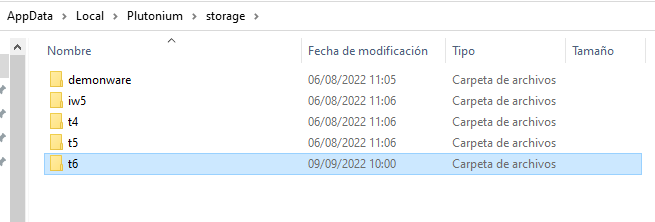
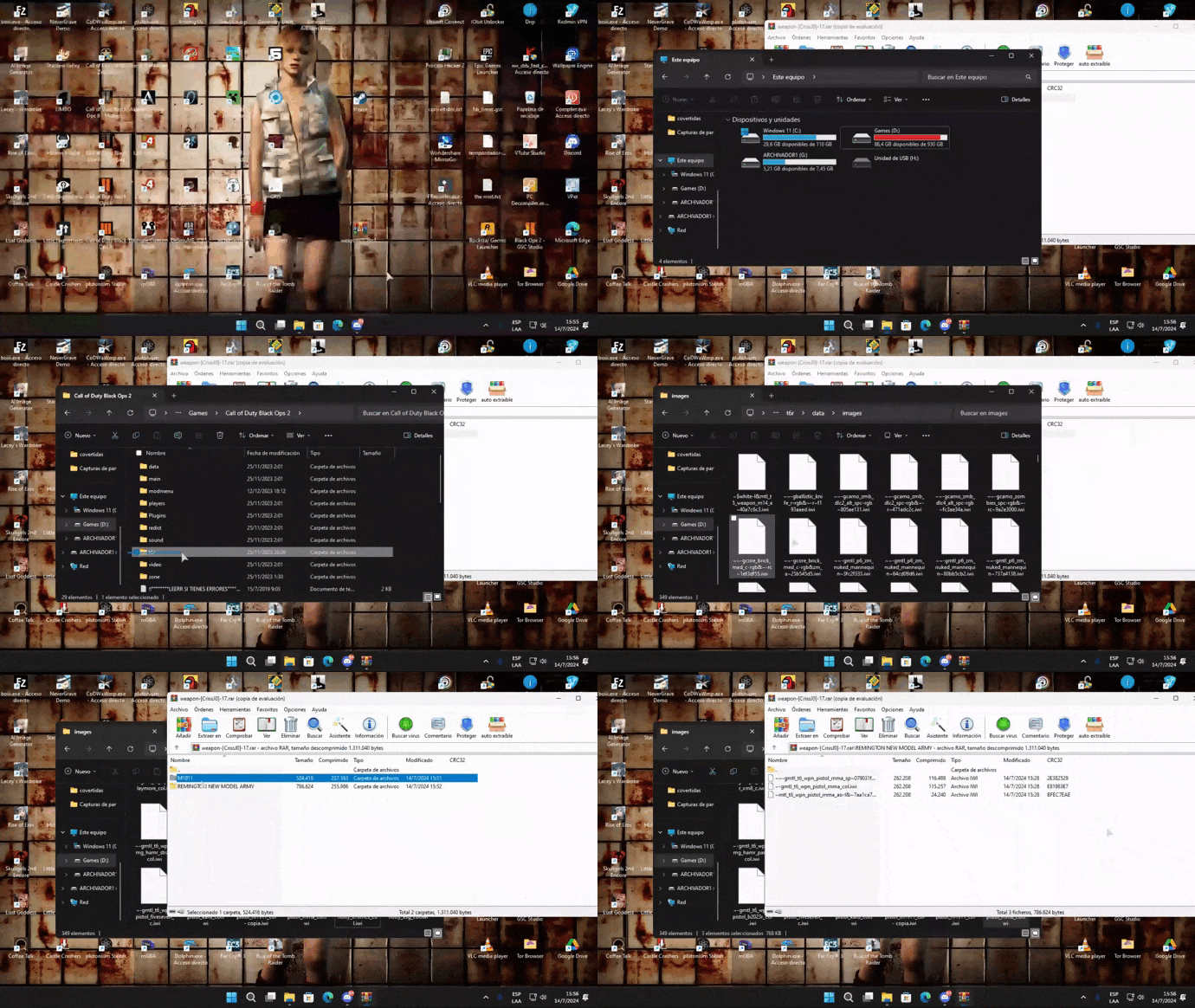
      To use them you have to copy the .iwi files in the %LocalAppData%/Plutonium/storage/t6/images folder if you don't have it create the folder.

    metodo1.gif

    • 2 Method
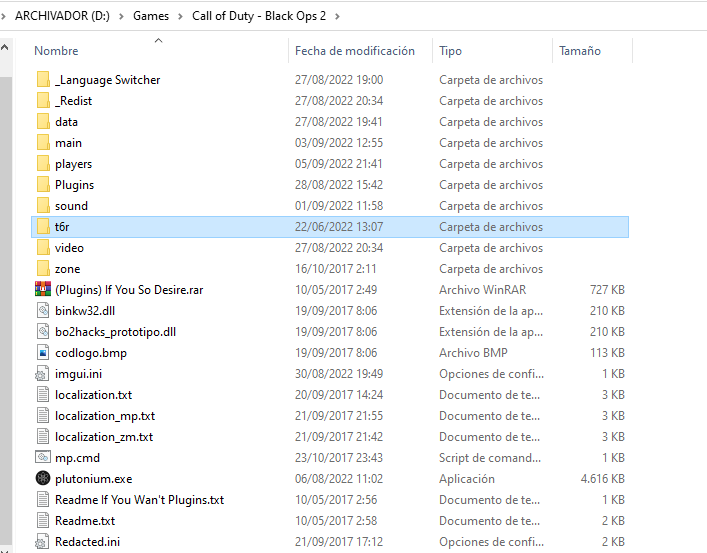
      Enter the root folder of the game and create the folders t6r\data\images,place the .iwi files in images.
    metodo21.gif

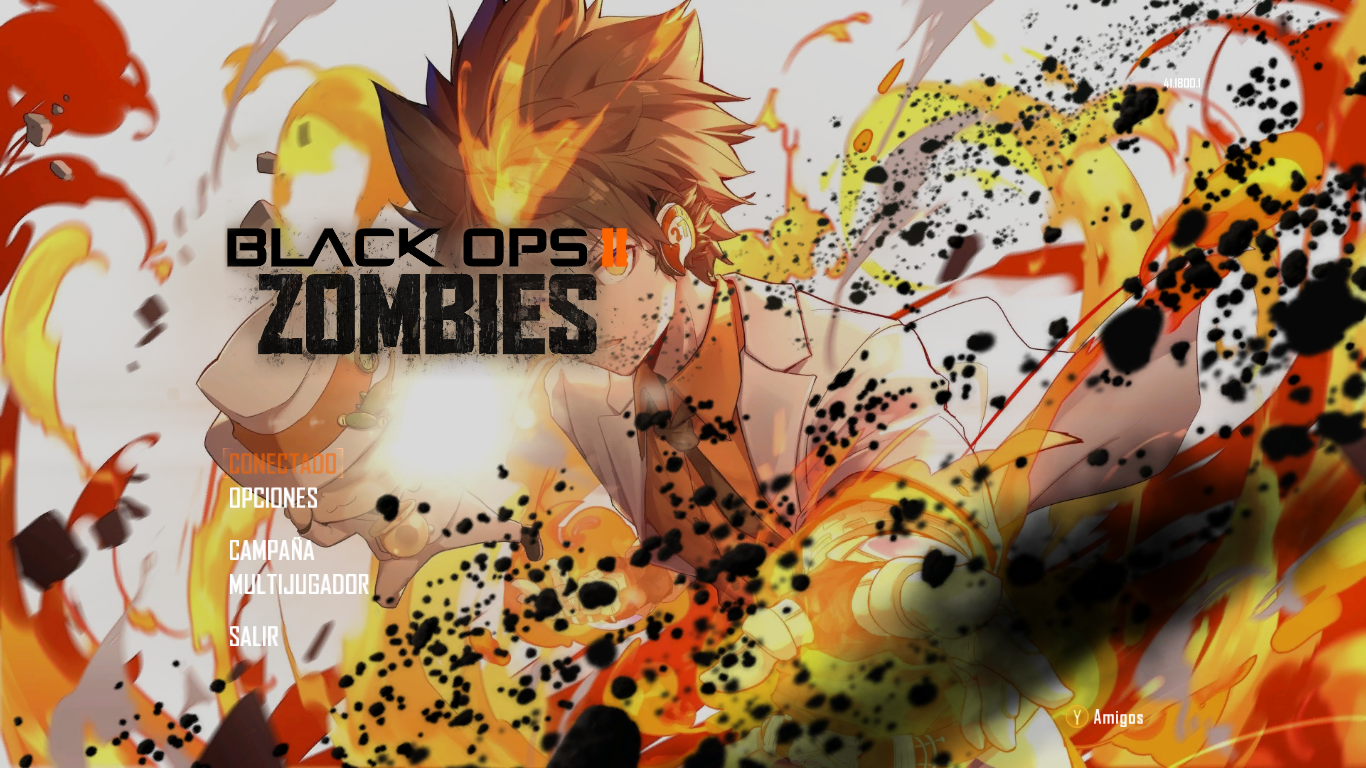
    1.Abigail Misty Briarton

    Abigail Misty Briarton.png

    2.GoG Sword art Online

    GoG.png

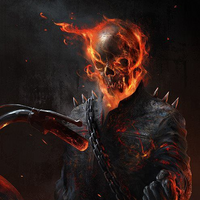
    3.killing zombies

    killing zombies.png

    4.Primis

    Primis.png

    5.Tsunayoshi&Rebor

    Tsunayoshi&Rebor.png

    6.Ultimis

    Ultimis.png

    7.Victis

    Victis.png

    🟒MediaFire

    πŸ”΄Mega

    Pd: Favored xd pasa Pack xD

    SirHerboXI Offline
    SirHerboXI Offline
    SirHerboXI
    wrote on last edited by
    #2

    CrissJ0 W

    1 Reply Last reply
    0
    • CrissJ0 CrissJ0
      • 1 Method
        To use them you have to copy the .iwi files in the %LocalAppData%/Plutonium/storage/t6/images folder if you don't have it create the folder.

      metodo1.gif

      • 2 Method
        Enter the root folder of the game and create the folders t6r\data\images,place the .iwi files in images.

      metodo21.gif

      1.Abigail Misty Briarton

      Abigail Misty Briarton.png

      2.GoG Sword art Online

      GoG.png

      3.killing zombies

      killing zombies.png

      4.Primis

      Primis.png

      5.Tsunayoshi&Rebor

      Tsunayoshi&Rebor.png

      6.Ultimis

      Ultimis.png

      7.Victis

      Victis.png

      🟒MediaFire

      πŸ”΄Mega

      Pd: Favored xd pasa Pack xD

      hindercanrun Offline
      hindercanrun Offline
      hindercanrun
      Contributor
      wrote on last edited by
      #3

      CrissJ0 this is great!

      1 Reply Last reply
      0
      • CrissJ0 CrissJ0
        • 1 Method
          To use them you have to copy the .iwi files in the %LocalAppData%/Plutonium/storage/t6/images folder if you don't have it create the folder.

        metodo1.gif

        • 2 Method
          Enter the root folder of the game and create the folders t6r\data\images,place the .iwi files in images.

        metodo21.gif

        1.Abigail Misty Briarton

        Abigail Misty Briarton.png

        2.GoG Sword art Online

        GoG.png

        3.killing zombies

        killing zombies.png

        4.Primis

        Primis.png

        5.Tsunayoshi&Rebor

        Tsunayoshi&Rebor.png

        6.Ultimis

        Ultimis.png

        7.Victis

        Victis.png

        🟒MediaFire

        πŸ”΄Mega

        Pd: Favored xd pasa Pack xD

        hindercanrun Offline
        hindercanrun Offline
        hindercanrun
        Contributor
        wrote on last edited by
        #4

        CrissJ0 also t6r is outdated, the latest method is %localappdata%plutonium\stroage\t6\images

        CrissJ0 1 Reply Last reply
        3
        • CrissJ0 CrissJ0
          • 1 Method
            To use them you have to copy the .iwi files in the %LocalAppData%/Plutonium/storage/t6/images folder if you don't have it create the folder.

          metodo1.gif

          • 2 Method
            Enter the root folder of the game and create the folders t6r\data\images,place the .iwi files in images.

          metodo21.gif

          1.Abigail Misty Briarton

          Abigail Misty Briarton.png

          2.GoG Sword art Online

          GoG.png

          3.killing zombies

          killing zombies.png

          4.Primis

          Primis.png

          5.Tsunayoshi&Rebor

          Tsunayoshi&Rebor.png

          6.Ultimis

          Ultimis.png

          7.Victis

          Victis.png

          🟒MediaFire

          πŸ”΄Mega

          Pd: Favored xd pasa Pack xD

          Noor El-Ammen Offline
          Noor El-Ammen Offline
          Noor El-Ammen
          wrote on last edited by
          #5

          CrissJ0 The backgrounds are good, I really liked Killing Floor, it's my favorite game, good realesed.

          1 Reply Last reply
          0
          • hindercanrun hindercanrun

            CrissJ0 also t6r is outdated, the latest method is %localappdata%plutonium\stroage\t6\images

            CrissJ0 Offline
            CrissJ0 Offline
            CrissJ0
            wrote on last edited by
            #6

            hindercanrun to a if it still works 😘

            hindercanrun 1 Reply Last reply
            0
            • CrissJ0 CrissJ0

              hindercanrun to a if it still works 😘

              hindercanrun Offline
              hindercanrun Offline
              hindercanrun
              Contributor
              wrote on last edited by
              #7

              CrissJ0 well if it works it works

              1 Reply Last reply
              0
              • GhostRider0125 Offline
                GhostRider0125 Offline
                GhostRider0125
                Banned
                wrote on last edited by
                #8

                in the 6 one takeo looks like dempeys brotherπŸ˜‚ πŸ˜‚

                1 Reply Last reply
                0
                • ahsante9000 Offline
                  ahsante9000 Offline
                  ahsante9000
                  wrote on last edited by
                  #9

                  CrissJ0 said in ZM-Background packs for the main menu:

                  t6r/data/images

                  can someone tell me how to do this in detail all it gave me was a rar file

                  CrissJ0 1 Reply Last reply
                  0
                  • ahsante9000 ahsante9000

                    CrissJ0 said in ZM-Background packs for the main menu:

                    t6r/data/images

                    can someone tell me how to do this in detail all it gave me was a rar file

                    CrissJ0 Offline
                    CrissJ0 Offline
                    CrissJ0
                    wrote on last edited by CrissJ0
                    #10

                    ahsante9000 oks

                    β—½First method.

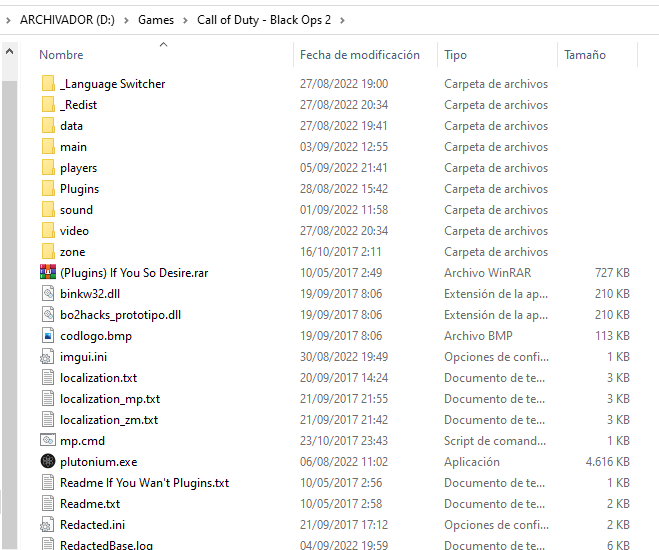
                    • Enter the root folder of the game.
                      Call of Duty - Black Ops 2 09_09_2022 9_57_13.png

                    • Once inside, create the folder t6r
                      Call of Duty - Black Ops 2 09_09_2022 9_57_29.png

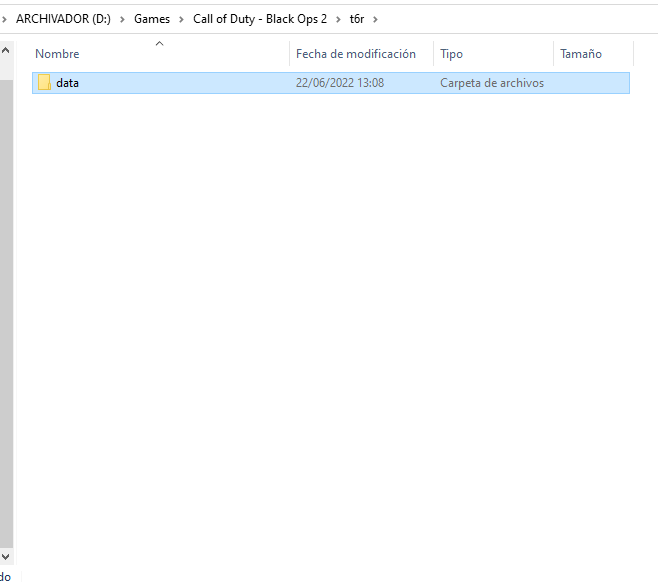
                    • Inside the t6r folder you create another folder called data.
                      Call of Duty - Black Ops 2 09_09_2022 9_57_38.png

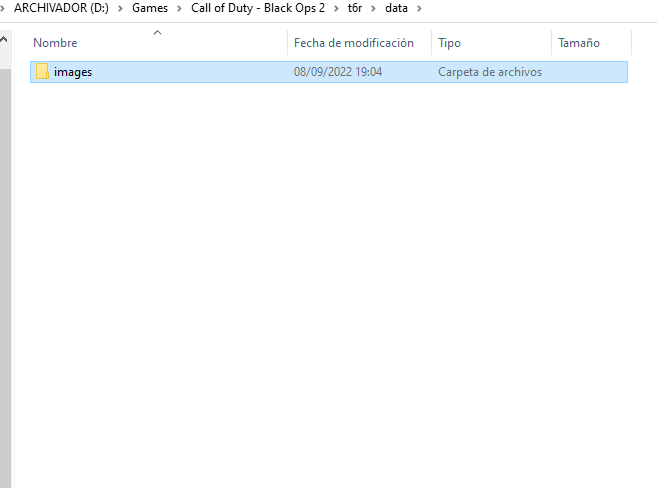
                    • In the same way inside data you create another folder with the name of images
                      Call of Duty - Black Ops 2 09_09_2022 9_57_43.png

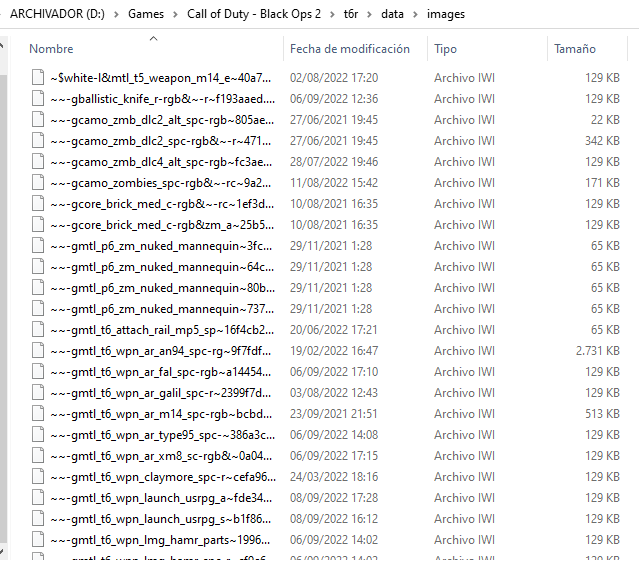
                    • And finally inside images paste all the .iwi files you download.
                      Call of Duty - Black Ops 2 09_09_2022 9_57_50.png

                    β—½Second method
                    This is the most current method available, although the previous method still works.

                    • Press the keysT0SbdeihS16AofBx-Teclas.png

                    • Inside the search engine you type the following.
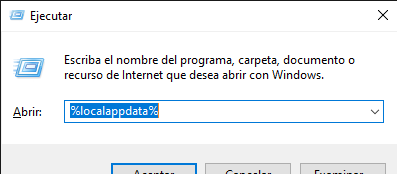
                      Ejecutar 09_09_2022 10_01_31.png

                    • Once inside, locate the plutonium folder.
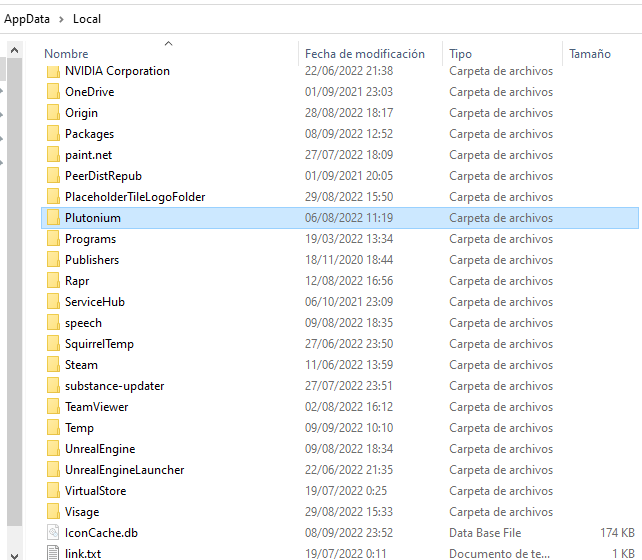
                      t6 09_09_2022 10_24_41.png

                    • Inside you enter the folder with the name storage.
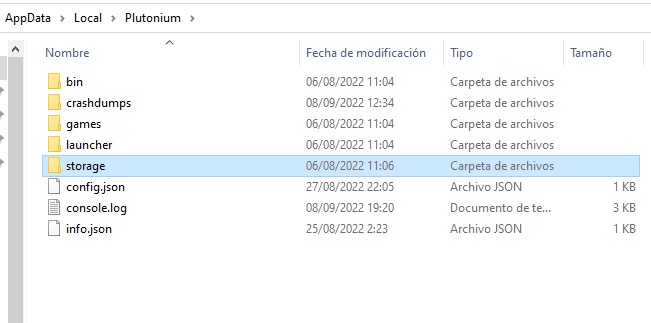
                      t6 09_09_2022 10_01_50.png

                    • Then to the t6 folder.
                      t6 09_09_2022 10_01_55.png

                    • Inside it you create the folder images and paste all the .iwi files you download.
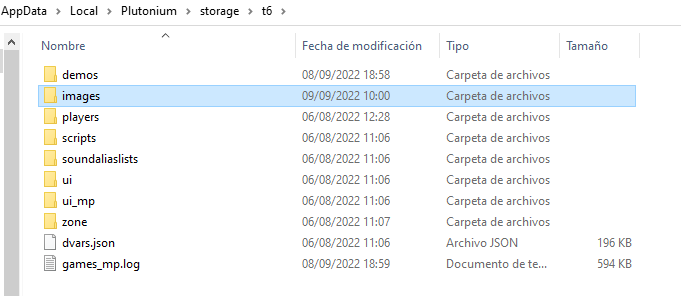
                      t6 09_09_2022 10_02_03.png

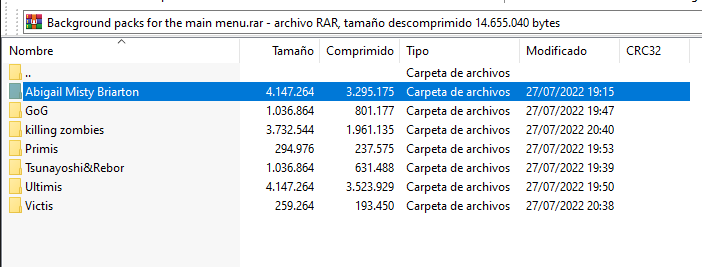
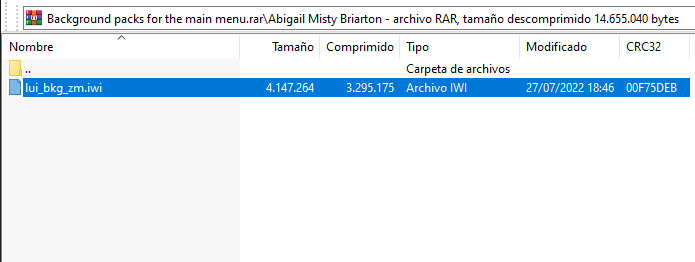
                    • Unzip the rar file and inside the folders you will find files with the extension .iwi those files are the ones you paste in the images folder.
                      Background packs for the main menu.rar (copia de evaluaciΓ³n) 09_09_2022 10_39_43.png
                      Background packs for the main menu.rar (copia de evaluaciΓ³n) 09_09_2022 10_39_47.png


                    Well, I hope I have helped you πŸ™ƒ

                    hindercanrun 1 Reply Last reply
                    2
                    • CrissJ0 CrissJ0

                      ahsante9000 oks

                      β—½First method.

                      • Enter the root folder of the game.
                        Call of Duty - Black Ops 2 09_09_2022 9_57_13.png

                      • Once inside, create the folder t6r
                        Call of Duty - Black Ops 2 09_09_2022 9_57_29.png

                      • Inside the t6r folder you create another folder called data.
                        Call of Duty - Black Ops 2 09_09_2022 9_57_38.png

                      • In the same way inside data you create another folder with the name of images
                        Call of Duty - Black Ops 2 09_09_2022 9_57_43.png

                      • And finally inside images paste all the .iwi files you download.
                        Call of Duty - Black Ops 2 09_09_2022 9_57_50.png

                      β—½Second method
                      This is the most current method available, although the previous method still works.

                      • Press the keysT0SbdeihS16AofBx-Teclas.png

                      • Inside the search engine you type the following.
                        Ejecutar 09_09_2022 10_01_31.png

                      • Once inside, locate the plutonium folder.
                        t6 09_09_2022 10_24_41.png

                      • Inside you enter the folder with the name storage.
                        t6 09_09_2022 10_01_50.png

                      • Then to the t6 folder.
                        t6 09_09_2022 10_01_55.png

                      • Inside it you create the folder images and paste all the .iwi files you download.
                        t6 09_09_2022 10_02_03.png

                      • Unzip the rar file and inside the folders you will find files with the extension .iwi those files are the ones you paste in the images folder.
                        Background packs for the main menu.rar (copia de evaluaciΓ³n) 09_09_2022 10_39_43.png
                        Background packs for the main menu.rar (copia de evaluaciΓ³n) 09_09_2022 10_39_47.png


                      Well, I hope I have helped you πŸ™ƒ

                      hindercanrun Offline
                      hindercanrun Offline
                      hindercanrun
                      Contributor
                      wrote on last edited by
                      #11

                      CrissJ0 nice bo2 hacks

                      CrissJ0 1 Reply Last reply
                      1
                      • hindercanrun hindercanrun

                        CrissJ0 nice bo2 hacks

                        CrissJ0 Offline
                        CrissJ0 Offline
                        CrissJ0
                        wrote on last edited by
                        #12

                        hindercanrun este men is a prototype to a has errors πŸ˜‚

                        1 Reply Last reply
                        0
                        • CrissJ0 CrissJ0
                          • 1 Method
                            To use them you have to copy the .iwi files in the %LocalAppData%/Plutonium/storage/t6/images folder if you don't have it create the folder.

                          metodo1.gif

                          • 2 Method
                            Enter the root folder of the game and create the folders t6r\data\images,place the .iwi files in images.

                          metodo21.gif

                          1.Abigail Misty Briarton

                          Abigail Misty Briarton.png

                          2.GoG Sword art Online

                          GoG.png

                          3.killing zombies

                          killing zombies.png

                          4.Primis

                          Primis.png

                          5.Tsunayoshi&Rebor

                          Tsunayoshi&Rebor.png

                          6.Ultimis

                          Ultimis.png

                          7.Victis

                          Victis.png

                          🟒MediaFire

                          πŸ”΄Mega

                          Pd: Favored xd pasa Pack xD

                          xNando Online
                          xNando Online
                          xNando
                          wrote on last edited by
                          #13

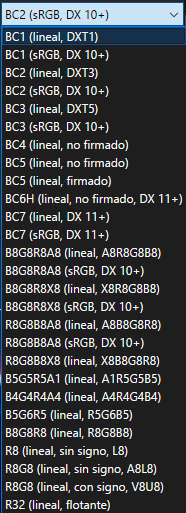
                          CrissJ0 hola bro, a la hora de guardar la imagen como dds, que configuracion utlizas para guardar el dds?? BC1, BC2, BC3....???
                          bb6f33ce-518f-497d-b3a0-85f4a4e726af-image.png

                          CrissJ0 1 Reply Last reply
                          0
                          • xNando xNando

                            CrissJ0 hola bro, a la hora de guardar la imagen como dds, que configuracion utlizas para guardar el dds?? BC1, BC2, BC3....???
                            bb6f33ce-518f-497d-b3a0-85f4a4e726af-image.png

                            CrissJ0 Offline
                            CrissJ0 Offline
                            CrissJ0
                            wrote on last edited by
                            #14

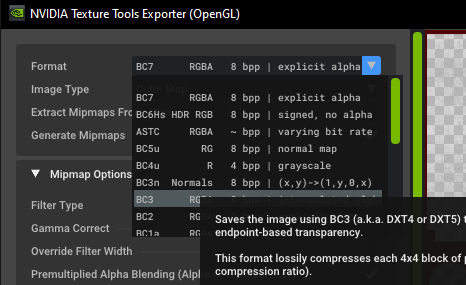
                            xNando Uso el BC3
                            1647663491228-desktop-screenshot-2022.03.18-23.50.35.59.png

                            En tu caso seria el BC3 (sRGB, DX 10+)

                            xNando 1 Reply Last reply
                            1
                            • CrissJ0 CrissJ0

                              xNando Uso el BC3
                              1647663491228-desktop-screenshot-2022.03.18-23.50.35.59.png

                              En tu caso seria el BC3 (sRGB, DX 10+)

                              xNando Online
                              xNando Online
                              xNando
                              wrote on last edited by
                              #15

                              CrissJ0 okey, gracias!!

                              1 Reply Last reply
                              0
                              • CrissJ0 CrissJ0
                                • 1 Method
                                  To use them you have to copy the .iwi files in the %LocalAppData%/Plutonium/storage/t6/images folder if you don't have it create the folder.

                                metodo1.gif

                                • 2 Method
                                  Enter the root folder of the game and create the folders t6r\data\images,place the .iwi files in images.

                                metodo21.gif

                                1.Abigail Misty Briarton

                                Abigail Misty Briarton.png

                                2.GoG Sword art Online

                                GoG.png

                                3.killing zombies

                                killing zombies.png

                                4.Primis

                                Primis.png

                                5.Tsunayoshi&Rebor

                                Tsunayoshi&Rebor.png

                                6.Ultimis

                                Ultimis.png

                                7.Victis

                                Victis.png

                                🟒MediaFire

                                πŸ”΄Mega

                                Pd: Favored xd pasa Pack xD

                                MaouDragon Offline
                                MaouDragon Offline
                                MaouDragon
                                wrote on last edited by
                                #16

                                CrissJ0 muy buenos fondos, me gusto "Primis", sigue haciendo mas de este tipo

                                1 Reply Last reply
                                1
                                • CrissJ0 CrissJ0
                                  • 1 Method
                                    To use them you have to copy the .iwi files in the %LocalAppData%/Plutonium/storage/t6/images folder if you don't have it create the folder.

                                  metodo1.gif

                                  • 2 Method
                                    Enter the root folder of the game and create the folders t6r\data\images,place the .iwi files in images.

                                  metodo21.gif

                                  1.Abigail Misty Briarton

                                  Abigail Misty Briarton.png

                                  2.GoG Sword art Online

                                  GoG.png

                                  3.killing zombies

                                  killing zombies.png

                                  4.Primis

                                  Primis.png

                                  5.Tsunayoshi&Rebor

                                  Tsunayoshi&Rebor.png

                                  6.Ultimis

                                  Ultimis.png

                                  7.Victis

                                  Victis.png

                                  🟒MediaFire

                                  πŸ”΄Mega

                                  Pd: Favored xd pasa Pack xD

                                  Chunkychunga Offline
                                  Chunkychunga Offline
                                  Chunkychunga
                                  wrote on last edited by
                                  #17

                                  CrissJ0 is there any chance you can convert and share the files to a different viewable format like pdf or jpg I've been looking for a hd version of the following images for desktop backgrounds and had no luck finding anything but these ones.

                                  CrissJ0 1 Reply Last reply
                                  0
                                  • Chunkychunga Chunkychunga

                                    CrissJ0 is there any chance you can convert and share the files to a different viewable format like pdf or jpg I've been looking for a hd version of the following images for desktop backgrounds and had no luck finding anything but these ones.

                                    CrissJ0 Offline
                                    CrissJ0 Offline
                                    CrissJ0
                                    wrote on last edited by
                                    #18

                                    Chunkychunga Let me get this straight.
                                    Do you want me to send you the backgrounds in ".png" format to put them as wallpaper for your pc?

                                    9997-tsukasa-points.png

                                    Chunkychunga 1 Reply Last reply
                                    0
                                    • CrissJ0 CrissJ0

                                      Chunkychunga Let me get this straight.
                                      Do you want me to send you the backgrounds in ".png" format to put them as wallpaper for your pc?
                                      9997-tsukasa-points.png

                                      Chunkychunga Offline
                                      Chunkychunga Offline
                                      Chunkychunga
                                      wrote on last edited by
                                      #19

                                      CrissJ0 yeah lol, if you could I'd appreciate it

                                      CrissJ0 1 Reply Last reply
                                      0
                                      • Chunkychunga Chunkychunga

                                        CrissJ0 yeah lol, if you could I'd appreciate it

                                        CrissJ0 Offline
                                        CrissJ0 Offline
                                        CrissJ0
                                        wrote on last edited by
                                        #20

                                        Chunkychunga Sure, no problem, but I don't have the Victis wallpaper anymore. https://mega.nz/file/aiQCyJgb#qxz9GF3ruekXPH3FJFCwi3oCgWhS5xvY4buHoO6PO1w


                                        Chunkychunga 1 Reply Last reply
                                        0
                                        • CrissJ0 CrissJ0

                                          Chunkychunga Sure, no problem, but I don't have the Victis wallpaper anymore. https://mega.nz/file/aiQCyJgb#qxz9GF3ruekXPH3FJFCwi3oCgWhS5xvY4buHoO6PO1w
                                          Chunkychunga Offline
                                          Chunkychunga Offline
                                          Chunkychunga
                                          wrote on last edited by Chunkychunga
                                          #21

                                          CrissJ0 no worries, appreciate it

                                          1 Reply Last reply
                                          0
                                          • CrissJ0 CrissJ0 referenced this topic on

                                          Hello! It looks like you're interested in this conversation, but you don't have an account yet.

                                          Getting fed up of having to scroll through the same posts each visit? When you register for an account, you'll always come back to exactly where you were before, and choose to be notified of new replies (either via email, or push notification). You'll also be able to save bookmarks and upvote posts to show your appreciation to other community members.

                                          With your input, this post could be even better πŸ’—

                                          Register Login
                                          Reply
                                          • Reply as topic
                                          Log in to reply
                                          • Oldest to Newest
                                          • Newest to Oldest
                                          • Most Votes


                                          • 1
                                          • 2
                                          • Login

                                          • Don't have an account? Register

                                          • Login or register to search.
                                          • First post
                                            Last post
                                          0
                                          • Unread 0
                                          • Recent
                                          • Tags
                                          • Popular
                                          • Users
                                          • Groups
                                          • Donate