crashdump error on attempted launch
-
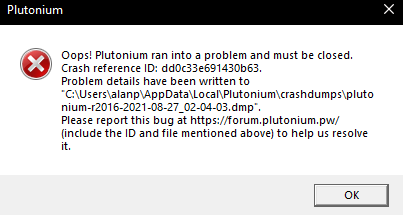
Aidhids Mum that dump file is corrupted/incomplete. Could you post a screenshot of the error message that comes up when the game crashes? If you have msi afterburner/rivatuner or any other software with an overlay try disabling that.
-
-
Thank you Dss0 i got error with ID: 3617de20088c93c6 and your solution solved it.
-
Aidhids Mum could you tab to the plutonium-bootstrapper-win32 cmd console after your game crashes and post a screenshot of that?
-
-
Aidhids Mum the crash is outside of plutoniums code, it could be:
- your antivirus software -> https://forum.plutonium.pw/topic/8546/why-is-my-antivirus-saying-plutonium-is-a-virus-solution
- your game files being broken -> https://forum.plutonium.pw/topic/6353/how-to-repair-your-t6-installation
- software running in the background, try closing all programs except for the pluto launcher and launch the game again
- windows system files being messed up:
- open the start menu and search for "cmd"
- run cmd as admin
- execute the following command
dism /online /cleanup-image /restorehealth- after dism has finished repairing your system restart your pc
If it still doesn't work i'm out of ideas.
-
it still doesnt work ive tried them all and whenever i launch it always has a different error code




Hello! It looks like you're interested in this conversation, but you don't have an account yet.
Getting fed up of having to scroll through the same posts each visit? When you register for an account, you'll always come back to exactly where you were before, and choose to be notified of new replies (either via email, or push notification). You'll also be able to save bookmarks and upvote posts to show your appreciation to other community members.
With your input, this post could be even better 💗
Register Login