MSVCP140.ddl is missing - System Error

-
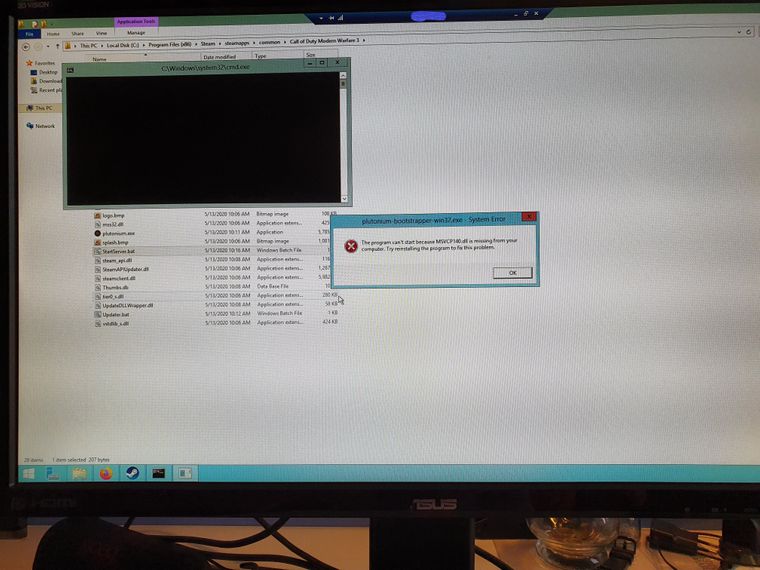
I am following the tutorial for Windows (Using 2012 datacenter). I forwarded that port specified in the tutorial creating a new network rule in Gcloud so that shouldn't be an issue.
The MW3 folder was downloaded straight from steam (Not the "tool" but the multiplayer game itself: regular install).
So the key is set in the .bat, the plutonium bootstrapper is indeed inside the bin folder. Has anyone got this error before?Edit 1:
This is my start.bat, inside the %appdata% there is nothing related to a bin folder. According to other posts I should put the bin folder in Local? Can somebody clarify this? Is this missing dll issue or misplaced bootstrapper?
Echo off
.\bin\plutonium-bootstrapper-win32.exe iw5mp "C:\Program Files (x86)\Steam\steamapps\common\Call of Duty Modern Warfare 3" +set key "---" +start_map_rotate -dedicated -
https://www.microsoft.com/en-gb/download/details.aspx?id=48145
Caused by a missing c++ Redistributable in most cases, install, restart and try again.
-
https://www.microsoft.com/en-gb/download/details.aspx?id=48145
Caused by a missing c++ Redistributable in most cases, install, restart and try again.
@Mr-Android
Can confirm this was the issue.
Download this exe from Microsoft https://aka.ms/vs/16/release/vc_redist.x86.exe -
@Mr-Android
Can confirm this was the issue.
Download this exe from Microsoft https://aka.ms/vs/16/release/vc_redist.x86.exeFutureRave THANK YOU SOO MUCH



Hello! It looks like you're interested in this conversation, but you don't have an account yet.
Getting fed up of having to scroll through the same posts each visit? When you register for an account, you'll always come back to exactly where you were before, and choose to be notified of new replies (either via email, or push notification). You'll also be able to save bookmarks and upvote posts to show your appreciation to other community members.
With your input, this post could be even better 💗
Register Login