Not complete screen when launching World At War README
-
When I try launching plutoniom T4, it just shows a part of the screen and I can´t get it to a complete screen. Please Help me.
-
When I try launching plutoniom T4, it just shows a part of the screen and I can´t get it to a complete screen. Please Help me.
@Luis-Moreno showing a screenshot is always better than words. Since I'm unsure what your issue is I'll give you 2 solutions
1
Make sure your game is closed before doing that.
Go to%localappdata%\Plutonium\storage\t4\players
Open the config file with the notepad to edit it.
plutonium.cfgis for singleplayer/zombies andplutonium_mp.cfgis for multiplayer
Change these 4 dvars to be like below (you can use ctrl+f to search for them)seta r_fullscreen "0" seta r_noborder "1" seta vid_xpos "0" seta vid_ypos "0" -
@Luis-Moreno showing a screenshot is always better than words. Since I'm unsure what your issue is I'll give you 2 solutions
1
Make sure your game is closed before doing that.
Go to%localappdata%\Plutonium\storage\t4\players
Open the config file with the notepad to edit it.
plutonium.cfgis for singleplayer/zombies andplutonium_mp.cfgis for multiplayer
Change these 4 dvars to be like below (you can use ctrl+f to search for them)seta r_fullscreen "0" seta r_noborder "1" seta vid_xpos "0" seta vid_ypos "0"First I wanna thank you for replying. I tried both solutions but any of them fixed the problem. Now that I know that a screenshot could help, I'm gonna show you how it appears on my screen.
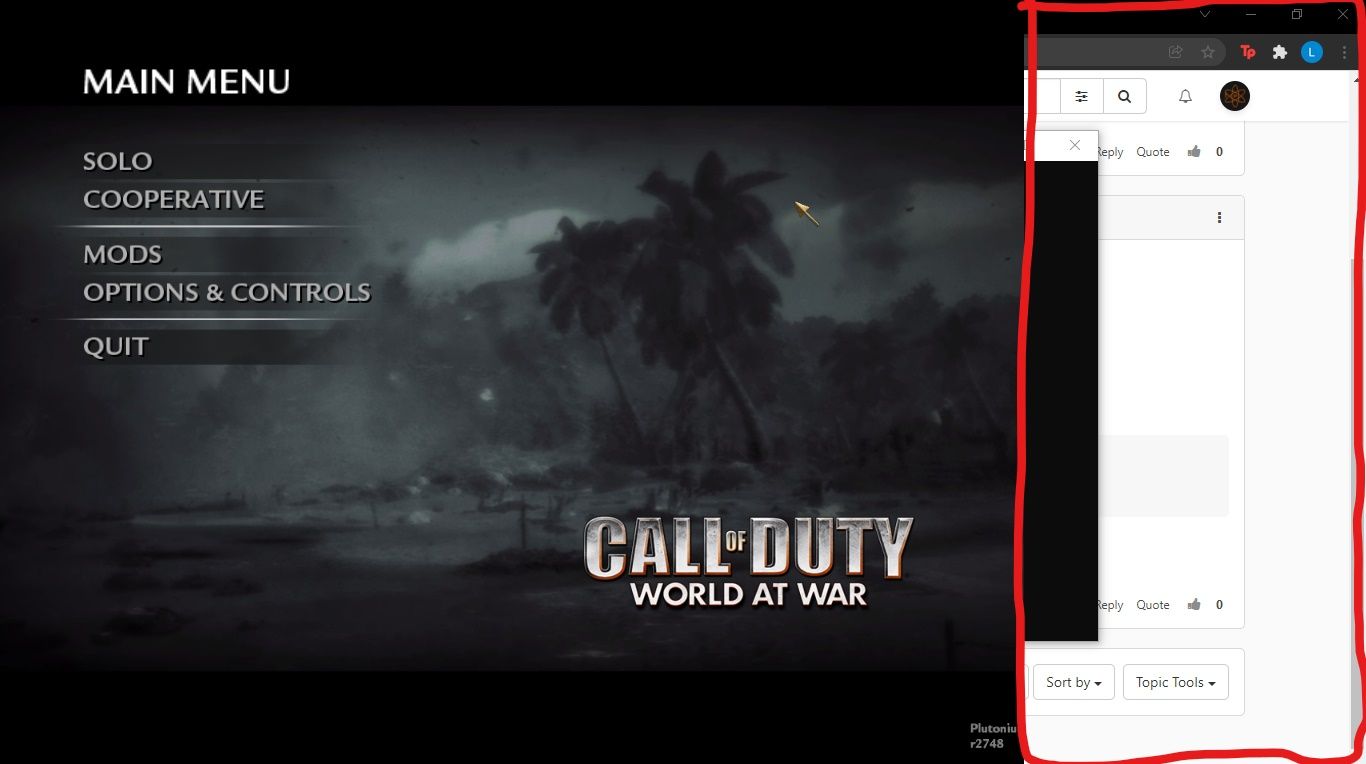
If you can see, there is like a quarter of the screen without the game and when I start playing is the same thing. Hope you can help me.
-
First I wanna thank you for replying. I tried both solutions but any of them fixed the problem. Now that I know that a screenshot could help, I'm gonna show you how it appears on my screen.
If you can see, there is like a quarter of the screen without the game and when I start playing is the same thing. Hope you can help me.
@Luis-Moreno Did you put the same resolution your monitor is actually using?
Also do you have more than 1 monitor? -
I don´t know much about computers or that thing of the "resolution" you´re talking about.
And no, I only have one monitor, its in fact a laptop.
If it helps I play COD Bo2 with this laptop and it runs perfect. -
Bro? can you help me please? I think you are just busy, but when you can, please help.
-
@Luis-Moreno showing a screenshot is always better than words. Since I'm unsure what your issue is I'll give you 2 solutions
1
Make sure your game is closed before doing that.
Go to%localappdata%\Plutonium\storage\t4\players
Open the config file with the notepad to edit it.
plutonium.cfgis for singleplayer/zombies andplutonium_mp.cfgis for multiplayer
Change these 4 dvars to be like below (you can use ctrl+f to search for them)seta r_fullscreen "0" seta r_noborder "1" seta vid_xpos "0" seta vid_ypos "0"Resxt said in Not complete screen when launching World At War README:
%localappdata%\Plutonium\storage\t4\players
I've tried both fixes and the screen doesn't go full screen, all values in both cfg files are correct. Please assist further
-
Same issue with mine. Definitely would be nice if we got an answer on this...
-
Same issue with mine. Definitely would be nice if we got an answer on this...
foolishmexican just change the resolution


Hello! It looks like you're interested in this conversation, but you don't have an account yet.
Getting fed up of having to scroll through the same posts each visit? When you register for an account, you'll always come back to exactly where you were before, and choose to be notified of new replies (either via email, or push notification). You'll also be able to save bookmarks and upvote posts to show your appreciation to other community members.
With your input, this post could be even better 💗
Register Login