Skip to content
  • 0 Unread 0
  • Recent
  • Tags
  • Popular
  • Users
  • Groups
  • Donate
Collapse

Plutonium

  1. Home
  2. BO2 Client Support
  3. What folder do i use

What folder do i use

Scheduled Pinned Locked Moved BO2 Client Support
8 Posts 3 Posters 1.7k Views 1 Watching
  • Oldest to Newest
  • Newest to Oldest
  • Most Votes
Reply
  • Reply as topic
Log in to reply
This topic has been deleted. Only users with topic management privileges can see it.
  • shaad0 Offline
    shaad0 Offline
    shaad0
    wrote on last edited by
    #1

    when trying to start the Bo2 game it tells me to select a folder. I have no idea wich folder to select and any folder i pick is invalid

    😢

    Dss0 1 Reply Last reply
    0
    • shaad0 shaad0

      when trying to start the Bo2 game it tells me to select a folder. I have no idea wich folder to select and any folder i pick is invalid

      😢

      Dss0 Offline
      Dss0 Offline
      Dss0
      Plutonium Staff
      wrote on last edited by
      #2

      shaad0 your bo2 game folder. https://plutonium.pw/docs/install/#t6-black-ops-2

      shaad0 1 Reply Last reply
      0
      • Dss0 Dss0

        shaad0 your bo2 game folder. https://plutonium.pw/docs/install/#t6-black-ops-2

        shaad0 Offline
        shaad0 Offline
        shaad0
        wrote on last edited by
        #3

        Dss0 it wont let me download the torrent file.

        ljave018 Dss0 2 Replies Last reply
        0
        • shaad0 shaad0

          Dss0 it wont let me download the torrent file.

          ljave018 Offline
          ljave018 Offline
          ljave018
          wrote on last edited by
          #4

          shaad0 https://plutonium.pw/docs/install/#t6-black-ops-2
          press the torrent file that you can find at: 3. Download the torrent file.
          once you download torrent file, open it in qBittorrent, set the download to download at the desired folder, and once it says seeding, pause the seeding process, and delete the torrent but let the files remain on the disk.
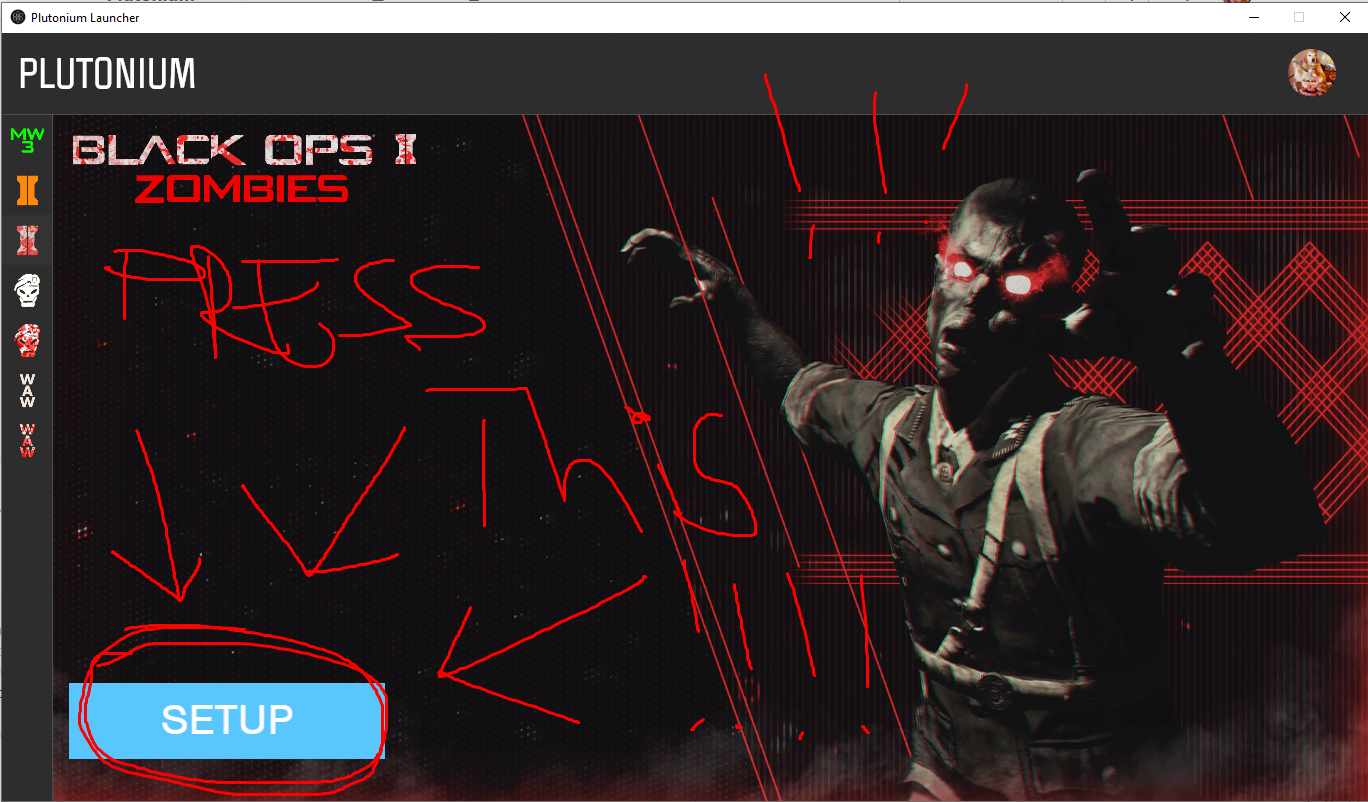
          once you downlaoded that, launch plutonium, choose black ops 2, and press the BIG BLUE SETUP button
          1111.png

          once you've pressed it, choose the directory at which you have installed the game, apply, and launch the game.

          shaad0 1 Reply Last reply
          0
          • shaad0 shaad0

            Dss0 it wont let me download the torrent file.

            Dss0 Offline
            Dss0 Offline
            Dss0
            Plutonium Staff
            wrote on last edited by
            #5

            shaad0 why not?

            1 Reply Last reply
            0
            • ljave018 ljave018

              shaad0 https://plutonium.pw/docs/install/#t6-black-ops-2
              press the torrent file that you can find at: 3. Download the torrent file.
              once you download torrent file, open it in qBittorrent, set the download to download at the desired folder, and once it says seeding, pause the seeding process, and delete the torrent but let the files remain on the disk.
              once you downlaoded that, launch plutonium, choose black ops 2, and press the BIG BLUE SETUP button
              1111.png

              once you've pressed it, choose the directory at which you have installed the game, apply, and launch the game.

              shaad0 Offline
              shaad0 Offline
              shaad0
              wrote on last edited by
              #6

              @velja_zmai 38b486ee-1ee5-4d26-b51a-e5773e422962-image.png this keeps popping up when i try to open the torrent file. Why?

              ljave018 Dss0 2 Replies Last reply
              0
              • shaad0 shaad0

                @velja_zmai 38b486ee-1ee5-4d26-b51a-e5773e422962-image.png this keeps popping up when i try to open the torrent file. Why?

                ljave018 Offline
                ljave018 Offline
                ljave018
                wrote on last edited by
                #7

                shaad0 it says that it's already in the transfer list. You probably have already downloaded the torrent/the game. Where's the directory where you installed the game?

                1 Reply Last reply
                0
                • shaad0 shaad0

                  @velja_zmai 38b486ee-1ee5-4d26-b51a-e5773e422962-image.png this keeps popping up when i try to open the torrent file. Why?

                  Dss0 Offline
                  Dss0 Offline
                  Dss0
                  Plutonium Staff
                  wrote on last edited by
                  #8

                  shaad0 qbittorrent is running in the background and has probably already finished downloading the game. open qbittorrent from the taskbar (bottom right corner) and check where it downloaded the game to.

                  1 Reply Last reply
                  1

                  Hello! It looks like you're interested in this conversation, but you don't have an account yet.

                  Getting fed up of having to scroll through the same posts each visit? When you register for an account, you'll always come back to exactly where you were before, and choose to be notified of new replies (either via email, or push notification). You'll also be able to save bookmarks and upvote posts to show your appreciation to other community members.

                  With your input, this post could be even better 💗

                  Register Login
                  Reply
                  • Reply as topic
                  Log in to reply
                  • Oldest to Newest
                  • Newest to Oldest
                  • Most Votes


                  • Login

                  • Don't have an account? Register

                  • Login or register to search.
                  • First post
                    Last post
                  0
                  • Unread 0
                  • Recent
                  • Tags
                  • Popular
                  • Users
                  • Groups
                  • Donate