Skip to content
  • 0 Unread 0
  • Recent
  • Tags
  • Popular
  • Users
  • Groups
Collapse

Plutonium

  1. Home
  2. BO2 Server Hosting Support
  3. Don't see Dedicated server: Gang gg

Don't see Dedicated server: Gang gg

Scheduled Pinned Locked Moved BO2 Server Hosting Support
4 Posts 3 Posters 305 Views 1 Watching
  • Oldest to Newest
  • Newest to Oldest
  • Most Votes
Reply
  • Reply as topic
Log in to reply
This topic has been deleted. Only users with topic management privileges can see it.
  • DisguisedHNTundefined Offline
    DisguisedHNTundefined Offline
    DisguisedHNT
    wrote on last edited by
    #1

    Did all the settings correctly and getting a heartbeat successful on the command prompt but don't see the server myself.

    Please help

    JezuzLizardundefined 1 Reply Last reply
    0
    • DisguisedHNTundefined DisguisedHNT

      Did all the settings correctly and getting a heartbeat successful on the command prompt but don't see the server myself.

      Please help

      JezuzLizardundefined Offline
      JezuzLizardundefined Offline
      JezuzLizard
      Plutonium Staff
      wrote on last edited by
      #2

      DisguisedHNT You have to have nat loopback on your router enabled to see a server you host locally on your computer on the server list.

      1 Reply Last reply
      0
      • DisguisedHNTundefined Offline
        DisguisedHNTundefined Offline
        DisguisedHNT
        wrote on last edited by
        #3

        So I was able to connect my own computer using Connect localhost:4977. However my brother (on same network) is unable to see the server. My sister (on same network using Ethernet cable) is able to see the server.

        Please help

        1 Reply Last reply
        0
        • Resxtundefined Offline
          Resxtundefined Offline
          Resxt
          Plutonium Staff
          wrote on last edited by
          #4

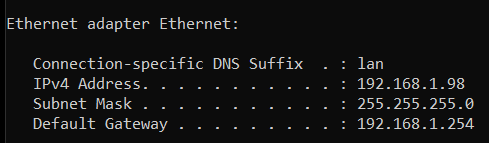
          They can connect using your local IPv4 followed by the port
          You can find your local IPv4 by typing ipconfig in a Windows cmd

          For example with me, people on my network would connect with connect 192.168.1.98:5000
          Also I really recommend using a port that's at least 5000, just to be 100% sure no port conflict will happen
          4e380540-0c60-45b4-8b5a-e7fbcd9962d6-image.png

          1 Reply Last reply
          0

          Hello! It looks like you're interested in this conversation, but you don't have an account yet.

          Getting fed up of having to scroll through the same posts each visit? When you register for an account, you'll always come back to exactly where you were before, and choose to be notified of new replies (either via email, or push notification). You'll also be able to save bookmarks and upvote posts to show your appreciation to other community members.

          With your input, this post could be even better 💗

          Register Login
          Reply
          • Reply as topic
          Log in to reply
          • Oldest to Newest
          • Newest to Oldest
          • Most Votes


          • Login

          • Don't have an account? Register

          • Login or register to search.
          • First post
            Last post
          0
          • Unread 0
          • Recent
          • Tags
          • Popular
          • Users
          • Groups


