Skip to content
  • Recent
  • Tags
  • Popular
  • Users
  • Groups
  • Donate
Collapse

Plutonium

  1. Home
  2. Launcher Support
  3. plutonium game folder

plutonium game folder

Scheduled Pinned Locked Moved Launcher Support
8 Posts 6 Posters 6.9k Views 1 Watching
  • Oldest to Newest
  • Newest to Oldest
  • Most Votes
Reply
  • Reply as topic
Log in to reply
This topic has been deleted. Only users with topic management privileges can see it.
  • Mandatti1undefined Offline
    Mandatti1undefined Offline
    Mandatti1
    wrote on last edited by Mandatti1
    #1

    I'm having a problem, when I do exactly what this tutorial says, (https://plutonium.pw/docs/install/#plutonium-launcher).

    The folder (pluto_t6_full_game) is not created, only the plutonium launcher folder is created in the directory:
    C:\Users\MeuUsuario\AppData\Local\Plutonium.
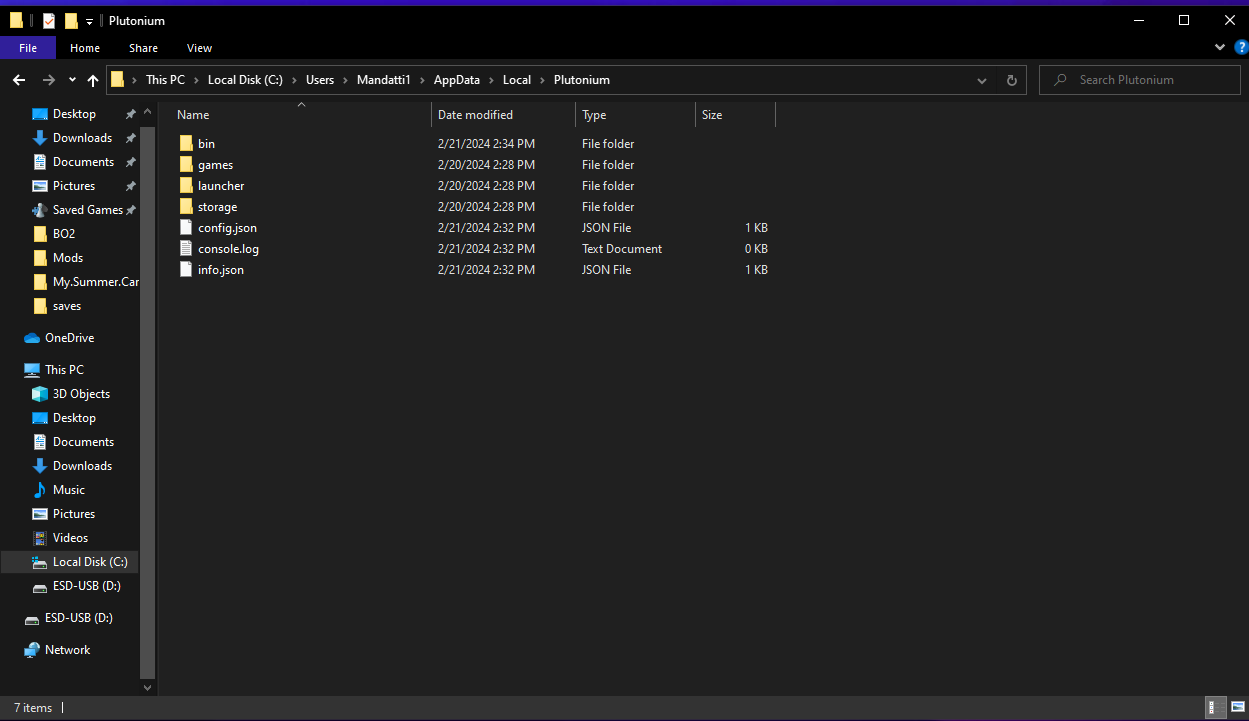
    Screenshot (2).png

    What can I do to resolve it?

    1 Reply Last reply
    0
    • Mandatti1undefined Offline
      Mandatti1undefined Offline
      Mandatti1
      wrote on last edited by
      #2

      I found a way to solve the problem, I didn't have the game purchased, apparently plutonium no longer works without the game, but I managed to find a way haha

      JimmyCapRxundefined Xerxesundefined 2 Replies Last reply
      0
      • Mandatti1undefined Mandatti1

        I found a way to solve the problem, I didn't have the game purchased, apparently plutonium no longer works without the game, but I managed to find a way haha

        JimmyCapRxundefined Offline
        JimmyCapRxundefined Offline
        JimmyCapRx
        wrote on last edited by
        #3

        Mandatti1 just buy it

        1 Reply Last reply
        0
        • Mandatti1undefined Mandatti1

          I found a way to solve the problem, I didn't have the game purchased, apparently plutonium no longer works without the game, but I managed to find a way haha

          Xerxesundefined Offline
          Xerxesundefined Offline
          Xerxes
          Plutonium Staff
          wrote on last edited by
          #4

          Mandatti1 nah, you are just slightly less stupid

          1 Reply Last reply
          0
          • Syninundefined Offline
            Syninundefined Offline
            Synin
            wrote on last edited by
            #5

            Hi Xerxes, just asking what is happening because i download the launcher like 30 min ago and when i want to download the bo2 zombies it says start, and the setup botton does not appear. How can i solve it?

            1 Reply Last reply
            0
            • Xerxesundefined Offline
              Xerxesundefined Offline
              Xerxes
              Plutonium Staff
              wrote on last edited by
              #6

              You have already set-up the game once, to change the folder again click on the cog wheel next to start.

              1 Reply Last reply
              0
              • DeFadaundefined Offline
                DeFadaundefined Offline
                DeFada
                wrote last edited by
                #7

                Hey man, I know this is a pretty old post, but did you ever manage to find a way to solve it? I'm having the same problem, and I can't find any help in the community — the answers always just boil down to "skill issue."

                DirkRockfaceundefined 1 Reply Last reply
                0
                • DeFadaundefined DeFada

                  Hey man, I know this is a pretty old post, but did you ever manage to find a way to solve it? I'm having the same problem, and I can't find any help in the community — the answers always just boil down to "skill issue."

                  DirkRockfaceundefined Offline
                  DirkRockfaceundefined Offline
                  DirkRockface
                  Contributor
                  wrote last edited by
                  #8

                  DeFada

                  1. make sure you have a copy of the game (can be found on steam)
                  2. download the plutonium launcher
                  3. use the "setup" or "game settings" button to point the plutonium launcher to your game folder (usually Program Files(x86)\steam\steamapps\common\Game folder is here)
                  4. Profit!

                  If you are having issues and people are saying "skill issue" then it is probably something simple that is messed up (see the 4 steps above) and can be fixed with more details of your issue / images of the error. Discord can give faster support too.


                  1 Reply Last reply
                  0
                  Reply
                  • Reply as topic
                  Log in to reply
                  • Oldest to Newest
                  • Newest to Oldest
                  • Most Votes


                  • Login

                  • Don't have an account? Register

                  • Login or register to search.
                  • First post
                    Last post
                  0
                  • Recent
                  • Tags
                  • Popular
                  • Users
                  • Groups
                  • Donate


