[ZM] Custom Green Screen Camos For Obs Or Streamlabs
-
This is a way to get any image as camo or even a video using obs Chroma Key feature
STEP 1 :
Get The in-game camo, Im gonna choose a full Magenta Coloured Gun like this :
Colt45 Download
Thomson Download.....
(Other gun camos and include for t5 and t6 will come soon..)-To install them, move the contents of the zip to :
%localappdata%\plutonium\storage\t4\raw\images-After that open the game and see if the camo is looking like this :
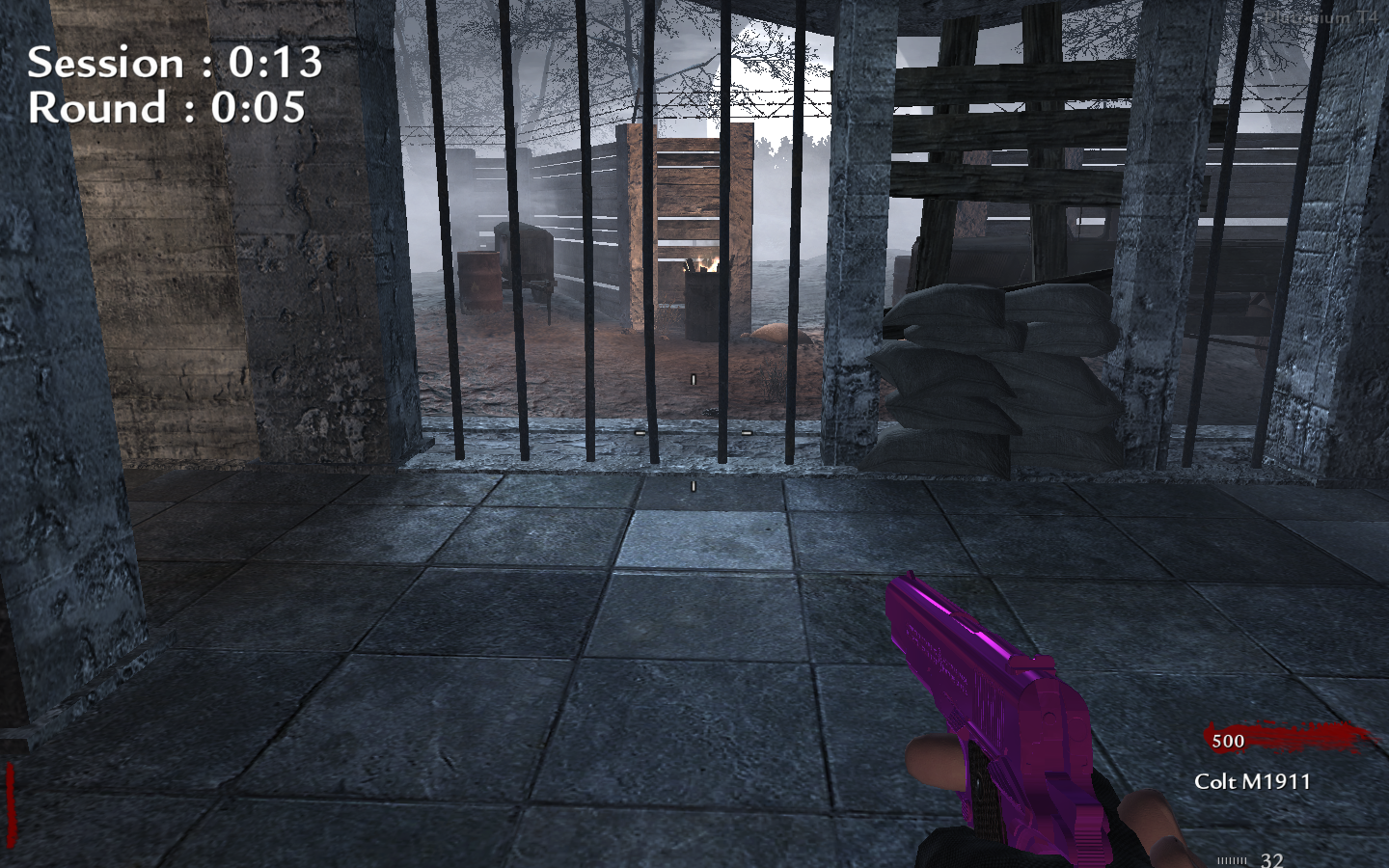
-If it is you are on the right track, Good job!STEP 2 :
Now We gonna deal with obs to change the camo to whatever we want bare with me :
-You need to have some kind of capture like the Game capture in the sources section.
-Next You need to add the photo or video that you want on the gun:
For that add the photo or video underneath the game capture source
and make it fullscreenAfter that it should look like this :
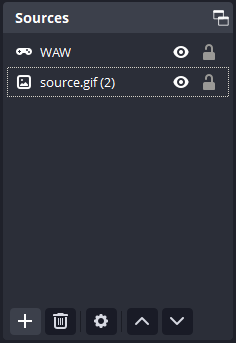
Last Step :
Now We gonna add the Chroma Key filter to the game capture :
-For that Right click the game capture go to filters and add the Chroma Key
-You can copy my settings here :
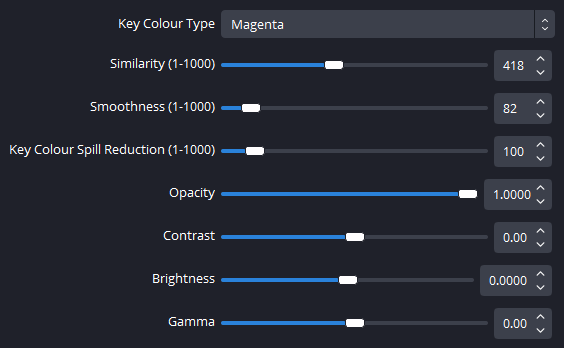
Profit !
Video link of preview : here
-Some stuff to keep in mind :
- This can change the Hud colour if its red.
- The chroma key is not perfect it can mess up some time.
- If you take damage in-game the photo or video is gonna show up in fullscreen in the recording or stream.
- This is mainly for streamers but you can try it .
-
sweat now i can play the shrek movie on my guns


-
This is a way to get any image as camo or even a video using obs Chroma Key feature
STEP 1 :
Get The in-game camo, Im gonna choose a full Magenta Coloured Gun like this :
Colt45 Download
Thomson Download.....
(Other gun camos and include for t5 and t6 will come soon..)-To install them, move the contents of the zip to :
%localappdata%\plutonium\storage\t4\raw\images-After that open the game and see if the camo is looking like this :
-If it is you are on the right track, Good job!STEP 2 :
Now We gonna deal with obs to change the camo to whatever we want bare with me :
-You need to have some kind of capture like the Game capture in the sources section.
-Next You need to add the photo or video that you want on the gun:
For that add the photo or video underneath the game capture source
and make it fullscreenAfter that it should look like this :
Last Step :
Now We gonna add the Chroma Key filter to the game capture :
-For that Right click the game capture go to filters and add the Chroma Key
-You can copy my settings here :
Profit !
Video link of preview : here
-Some stuff to keep in mind :
- This can change the Hud colour if its red.
- The chroma key is not perfect it can mess up some time.
- If you take damage in-game the photo or video is gonna show up in fullscreen in the recording or stream.
- This is mainly for streamers but you can try it .
This post is deleted! -
This post is deleted!

Hello! It looks like you're interested in this conversation, but you don't have an account yet.
Getting fed up of having to scroll through the same posts each visit? When you register for an account, you'll always come back to exactly where you were before, and choose to be notified of new replies (either via email, or push notification). You'll also be able to save bookmarks and upvote posts to show your appreciation to other community members.
With your input, this post could be even better 💗
Register Login