Skip to content
  • 0 Unread 0
  • Recent
  • Tags
  • Popular
  • Users
  • Groups
  • Donate
Collapse

Plutonium

  1. Home
  2. Launcher Support
  3. Plutonium launcher wont launch
Plutonium launcher wont launch

Scheduled Pinned Locked Moved Launcher Support
6 Posts 3 Posters 693 Views 1 Watching
  • Oldest to Newest
  • Newest to Oldest
  • Most Votes
Reply
  • Reply as topic
Log in to reply
This topic has been deleted. Only users with topic management privileges can see it.
  • BuddyBukaroo Offline
    BuddyBukaroo Offline
    BuddyBukaroo
    wrote on last edited by
    #1

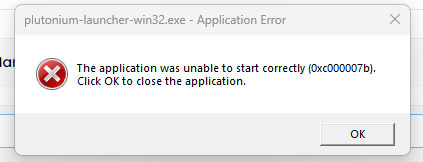
    image_2024-12-16_171732126.png

    wont let me launch your launcher, your launcher.

    lasekjr1 1 Reply Last reply
    0
    • Xerxes Offline
      Xerxes Offline
      Xerxes
      Plutonium Staff
      wrote on last edited by
      #2

      That one usually means you meme'd up your windows by downloading and placing 32bit dll files into places windows expects 64bit ones.

      1 Reply Last reply
      0
      • BuddyBukaroo Offline
        BuddyBukaroo Offline
        BuddyBukaroo
        wrote on last edited by
        #3

        so where can I get the 64 bit versions if this is what it downloaded automatically

        Xerxes 1 Reply Last reply
        0
        • Jinn24 Offline
          Jinn24 Offline
          Jinn24
          wrote on last edited by
          #4

          That"s defintly a posability , At this point I might have to delete everything and reinstall , ohh but where to begin . Thanks

          1 Reply Last reply
          0
          • BuddyBukaroo BuddyBukaroo

            so where can I get the 64 bit versions if this is what it downloaded automatically

            Xerxes Offline
            Xerxes Offline
            Xerxes
            Plutonium Staff
            wrote on last edited by Xerxes
            #5

            BuddyBukaroo

            I don't think you understood what I said, usually this error is caused by the user downloading random dll files off of the internet. Did you do that?

            You can try to repair the files with the following installers.

            Direct X: https://www.microsoft.com/en-us/download/details.aspx?id=35
            Visual C++ 2015: https://www.microsoft.com/en-us/download/details.aspx?id=53840

            1 Reply Last reply
            0
            • BuddyBukaroo Offline
              BuddyBukaroo Offline
              BuddyBukaroo
              wrote on last edited by
              #6

              No i didnt download random files from the web, but ill reinstall that stuff you sent me.

              1 Reply Last reply
              0

              Hello! It looks like you're interested in this conversation, but you don't have an account yet.

              Getting fed up of having to scroll through the same posts each visit? When you register for an account, you'll always come back to exactly where you were before, and choose to be notified of new replies (either via email, or push notification). You'll also be able to save bookmarks and upvote posts to show your appreciation to other community members.

              With your input, this post could be even better 💗

              Register Login
              Reply
              • Reply as topic
              Log in to reply
              • Oldest to Newest
              • Newest to Oldest
              • Most Votes


              • Login

              • Don't have an account? Register

              • Login or register to search.
              • First post
                Last post
              0
              • Unread 0
              • Recent
              • Tags
              • Popular
              • Users
              • Groups
              • Donate
