Skip to content
  • 0 Unread 0
  • Recent
  • Tags
  • Popular
  • Users
  • Groups
Collapse

Plutonium

  1. Home
  2. WAW Modding Support & Discussion
  3. Unable to launch modded zombies maps from the server list

Unable to launch modded zombies maps from the server list

Scheduled Pinned Locked Moved WAW Modding Support & Discussion
4 Posts 3 Posters 539 Views 1 Watching
  • Oldest to Newest
  • Newest to Oldest
  • Most Votes
Reply
  • Reply as topic
Log in to reply
This topic has been deleted. Only users with topic management privileges can see it.
  • TheGreatFrostyundefined Offline
    TheGreatFrostyundefined Offline
    TheGreatFrosty
    wrote on last edited by TheGreatFrosty
    #1

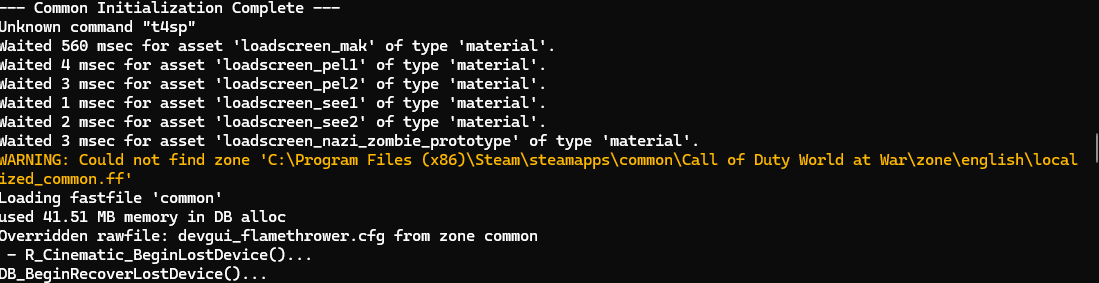
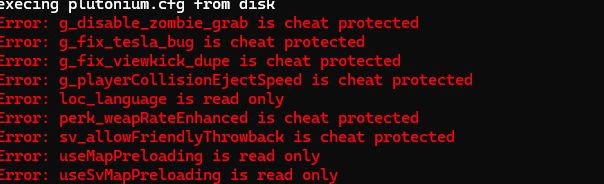
    Basically, I am unable to launch modded zombies maps from the server list. Particularly maps I haven't played yet. When I try, the game crashes and I receive the following errors both in the console and a separate crash report window. I am playing with the steam version downloaded and synced with my plutonium. All files have been verified and both WAW and Plutonium have been updated. I am NOT playing with any pirated material.

    Please advise. Thanks in advance! πŸ™‚

    2f3ad144-72a0-429e-b1fe-7a066bf82575-image.png
    98f3a9dc-385a-4159-a3a0-3e72a47a66fa-image.png

    1 Reply Last reply
    0
    • Xerxesundefined Offline
      Xerxesundefined Offline
      Xerxes
      Plutonium Staff
      wrote on last edited by
      #2

      Should be fixed with the next update, its related to us supporting the vanilla mod path in %appdata%.

      MasterSlickundefined TheGreatFrostyundefined 2 Replies Last reply
      0
      • Xerxesundefined Xerxes

        Should be fixed with the next update, its related to us supporting the vanilla mod path in %appdata%.

        MasterSlickundefined Offline
        MasterSlickundefined Offline
        MasterSlick
        wrote on last edited by
        #3

        Xerxes makes sense! I downloaded plutonium after a fresh reset on PC, and noticed the mod folder being split in to 2 directories. One in the β€œ$$$” folder, and the other in the \storage\t4\ folder. Do you think next update, this issue will be resolved? Because when I try to downloading a map from the server, it goes to the β€œ$$$” folder instead. And the downloading bar I used to get before, doesn’t even show up after the fresh reset! Really appreciate you guys btw <3.

        1 Reply Last reply
        0
        • Xerxesundefined Xerxes

          Should be fixed with the next update, its related to us supporting the vanilla mod path in %appdata%.

          TheGreatFrostyundefined Offline
          TheGreatFrostyundefined Offline
          TheGreatFrosty
          wrote on last edited by
          #4

          Xerxes Great! Thanks for the reply! When will the next update be released?

          1 Reply Last reply
          0

          Hello! It looks like you're interested in this conversation, but you don't have an account yet.

          Getting fed up of having to scroll through the same posts each visit? When you register for an account, you'll always come back to exactly where you were before, and choose to be notified of new replies (either via email, or push notification). You'll also be able to save bookmarks and upvote posts to show your appreciation to other community members.

          With your input, this post could be even better πŸ’—

          Register Login
          Reply
          • Reply as topic
          Log in to reply
          • Oldest to Newest
          • Newest to Oldest
          • Most Votes


          • Login

          • Don't have an account? Register

          • Login or register to search.
          • First post
            Last post
          0
          • Unread 0
          • Recent
          • Tags
          • Popular
          • Users
          • Groups