Skip to content
  • 0 Unread 0
  • Recent
  • Tags
  • Popular
  • Users
  • Groups
  • Donate
Collapse

Plutonium

  1. Home
  2. BO2 Client Support
  3. "This application cannot be run on your PC"

"This application cannot be run on your PC"

Scheduled Pinned Locked Moved BO2 Client Support
16 Posts 6 Posters 3.1k Views 2 Watching
  • Oldest to Newest
  • Newest to Oldest
  • Most Votes
Reply
  • Reply as topic
Log in to reply
This topic has been deleted. Only users with topic management privileges can see it.
  • Mr. Android Mr. Android

    @ONÚRIS Open your start menu and type System and open the program that is shown to you, when the window opens, look for "System type" and tell me what it says please.

    Mine for example:

    08f61840-5c2c-4549-9e95-df10149ea090-image.png

    Please also provide a screenshot the actual error message you get.

    If possible, open your start menu and type winver and press enter, then screenshot the window that opens.

    RedAce1 Offline
    RedAce1 Offline
    RedAce1
    wrote on last edited by
    #4

    @Mr-Android could you explain the installation step-by-step, I think this was due to some error in the installation.

    Mr. Android 1 Reply Last reply
    0
    • RedAce1 RedAce1

      @Mr-Android could you explain the installation step-by-step, I think this was due to some error in the installation.

      Mr. Android Offline
      Mr. Android Offline
      Mr. Android
      Plutonium Admin
      wrote on last edited by Mr. Android
      #5

      @ONÚRIS
      Instructions:

      • Place piry.exe in the folder you want Plutonium to install to and then open it. I strongly advise this folder location C:/Games/Call of Duty Black Ops II (If you don't have these folders create them).
      • DO NOT RUN PIRY DIRECTLY FROM THE DOWNLOADS FOLDER, IT WILL NOT WORK!
      • To launch Plutonium run the game via t6rmp.exe or t6rzm.exe from your Black Ops 2 game folder.

      Are you trying to open piry.exe? Or are you trying to open t6rmp.exe?

      RedAce1 1 Reply Last reply
      0
      • Mr. Android Mr. Android

        @ONÚRIS
        Instructions:

        • Place piry.exe in the folder you want Plutonium to install to and then open it. I strongly advise this folder location C:/Games/Call of Duty Black Ops II (If you don't have these folders create them).
        • DO NOT RUN PIRY DIRECTLY FROM THE DOWNLOADS FOLDER, IT WILL NOT WORK!
        • To launch Plutonium run the game via t6rmp.exe or t6rzm.exe from your Black Ops 2 game folder.

        Are you trying to open piry.exe? Or are you trying to open t6rmp.exe?

        RedAce1 Offline
        RedAce1 Offline
        RedAce1
        wrote on last edited by
        #6

        @Mr-Android thanks, I'm trying to open t6rmp.exe

        1 Reply Last reply
        0
        • Mr. Android Offline
          Mr. Android Offline
          Mr. Android
          Plutonium Admin
          wrote on last edited by
          #7

          Can you screenshot your BO2 folder for me? Like this:
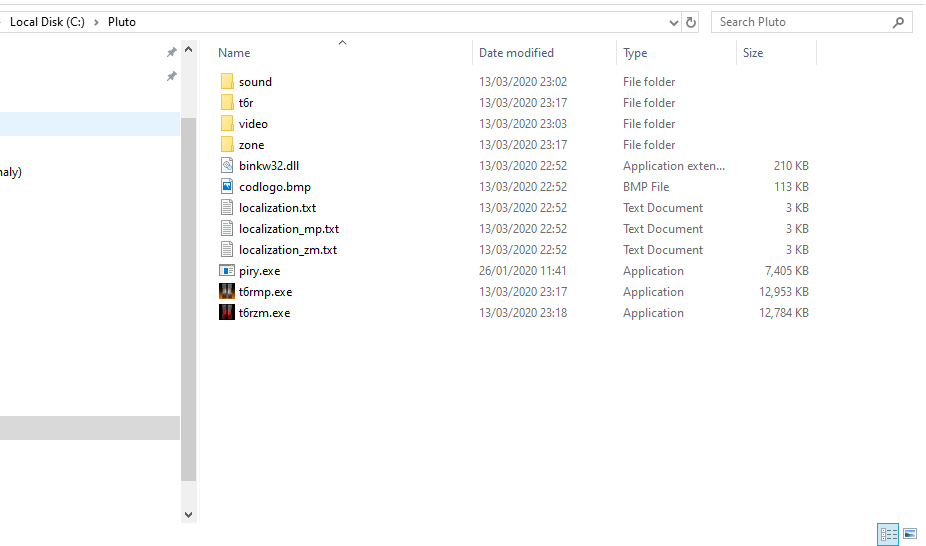
          21cffed7-24f8-4897-bebc-61166308cb8a-image.png

          RedAce1 2 Replies Last reply
          0
          • Mr. Android Mr. Android

            Can you screenshot your BO2 folder for me? Like this:
            21cffed7-24f8-4897-bebc-61166308cb8a-image.png

            RedAce1 Offline
            RedAce1 Offline
            RedAce1
            wrote on last edited by RedAce1
            #8

            @Mr-Android I deleted the folder but it was like yours, but during installation there was an error downloading sound files.

            Mr. Android 1 Reply Last reply
            0
            • Mr. Android Mr. Android

              Can you screenshot your BO2 folder for me? Like this:
              21cffed7-24f8-4897-bebc-61166308cb8a-image.png

              RedAce1 Offline
              RedAce1 Offline
              RedAce1
              wrote on last edited by
              #9

              @Mr-Android I will reinstall the game

              1 Reply Last reply
              0
              • RedAce1 RedAce1

                @Mr-Android I deleted the folder but it was like yours, but during installation there was an error downloading sound files.

                Mr. Android Offline
                Mr. Android Offline
                Mr. Android
                Plutonium Admin
                wrote on last edited by
                #10

                @ONÚRIS OK - that can happen if the connection drops slightly.

                Here what you need to do.

                1. Create a new folder called Games on your C:\ Drive.
                2. Place piry.exe inside it.
                3. Run piry.exe as administrator.
                4. Let it go to 100%
                5. If there are no errors, then run t6rmp.exe
                6. if piry.exe gave errors, then close piry.exe and reopen it and try again.

                You may have to close and reopen piry.exe roughly 5 times to not get any errors. Don't worry though, piry doesn't download files it already downloaded so running it again should be faster. It will still take some time as it verifies the files are correct before skipping them.

                RedAce1 yajat 2 Replies Last reply
                0
                • Mr. Android Mr. Android

                  @ONÚRIS OK - that can happen if the connection drops slightly.

                  Here what you need to do.

                  1. Create a new folder called Games on your C:\ Drive.
                  2. Place piry.exe inside it.
                  3. Run piry.exe as administrator.
                  4. Let it go to 100%
                  5. If there are no errors, then run t6rmp.exe
                  6. if piry.exe gave errors, then close piry.exe and reopen it and try again.

                  You may have to close and reopen piry.exe roughly 5 times to not get any errors. Don't worry though, piry doesn't download files it already downloaded so running it again should be faster. It will still take some time as it verifies the files are correct before skipping them.

                  RedAce1 Offline
                  RedAce1 Offline
                  RedAce1
                  wrote on last edited by
                  #11

                  @Mr-Android Thank you very much.

                  yajat 1 Reply Last reply
                  0
                  • Mr. Android Mr. Android

                    @ONÚRIS OK - that can happen if the connection drops slightly.

                    Here what you need to do.

                    1. Create a new folder called Games on your C:\ Drive.
                    2. Place piry.exe inside it.
                    3. Run piry.exe as administrator.
                    4. Let it go to 100%
                    5. If there are no errors, then run t6rmp.exe
                    6. if piry.exe gave errors, then close piry.exe and reopen it and try again.

                    You may have to close and reopen piry.exe roughly 5 times to not get any errors. Don't worry though, piry doesn't download files it already downloaded so running it again should be faster. It will still take some time as it verifies the files are correct before skipping them.

                    yajat Offline
                    yajat Offline
                    yajat
                    wrote on last edited by
                    #12

                    @Mr-Android it still shows can't run on ur pc

                    1 Reply Last reply
                    0
                    • RedAce1 RedAce1

                      @Mr-Android Thank you very much.

                      yajat Offline
                      yajat Offline
                      yajat
                      wrote on last edited by
                      #13

                      @ONÚRIS what did u do ?

                      1 Reply Last reply
                      0
                      • Username0o0 Offline
                        Username0o0 Offline
                        Username0o0
                        wrote on last edited by
                        #14

                        yajat did you put piry.exe in drive c in a folder

                        tylaka 1 Reply Last reply
                        0
                        • Username0o0 Username0o0

                          yajat did you put piry.exe in drive c in a folder

                          tylaka Offline
                          tylaka Offline
                          tylaka
                          wrote on last edited by tylaka
                          #15

                          yajat Are you on a 64 bit computer

                          1 Reply Last reply
                          0
                          • Kal_ Offline
                            Kal_ Offline
                            Kal_
                            wrote on last edited by
                            #16
                            This post is deleted!
                            1 Reply Last reply
                            0

                            Hello! It looks like you're interested in this conversation, but you don't have an account yet.

                            Getting fed up of having to scroll through the same posts each visit? When you register for an account, you'll always come back to exactly where you were before, and choose to be notified of new replies (either via email, or push notification). You'll also be able to save bookmarks and upvote posts to show your appreciation to other community members.

                            With your input, this post could be even better 💗

                            Register Login
                            Reply
                            • Reply as topic
                            Log in to reply
                            • Oldest to Newest
                            • Newest to Oldest
                            • Most Votes


                            • Login

                            • Don't have an account? Register

                            • Login or register to search.
                            • First post
                              Last post
                            0
                            • Unread 0
                            • Recent
                            • Tags
                            • Popular
                            • Users
                            • Groups
                            • Donate