Skip to content
  • 0 Unread 0
  • Recent
  • Tags
  • Popular
  • Users
  • Groups
Collapse

Plutonium

  1. Home
  2. BO2 Server Hosting Support
  3. Port Fowarding

Port Fowarding

Scheduled Pinned Locked Moved BO2 Server Hosting Support
9 Posts 2 Posters 927 Views 1 Watching
  • Oldest to Newest
  • Newest to Oldest
  • Most Votes
Reply
  • Reply as topic
Log in to reply
This topic has been deleted. Only users with topic management privileges can see it.
  • Madelynnn_undefined Offline
    Madelynnn_undefined Offline
    Madelynnn_
    wrote on last edited by
    #1

    Hii, i'm having issues with port fowarding for PlutoT6 server
    My router is asking me to use a port wich is >16384 or something but the server ask 4976 or 4977 what should i do ?
    Cheers

    Dss0undefined 1 Reply Last reply
    0
    • Madelynnn_undefined Madelynnn_

      Hii, i'm having issues with port fowarding for PlutoT6 server
      My router is asking me to use a port wich is >16384 or something but the server ask 4976 or 4977 what should i do ?
      Cheers

      Dss0undefined Offline
      Dss0undefined Offline
      Dss0
      Plutonium Staff
      wrote on last edited by
      #2

      Madelynnn_ you're most likely trying to set a pre-defined rule on the router but it should also be possible to create a custom forwarding rule.

      1 Reply Last reply
      0
      • Madelynnn_undefined Offline
        Madelynnn_undefined Offline
        Madelynnn_
        wrote on last edited by
        #3

        No idea sir, just telling me to use something above 16348

        5095dccc-0b83-4e59-9562-9493d928e8a8-image.png

        Dss0undefined 1 Reply Last reply
        0
        • Madelynnn_undefined Madelynnn_

          No idea sir, just telling me to use something above 16348

          5095dccc-0b83-4e59-9562-9493d928e8a8-image.png

          Dss0undefined Offline
          Dss0undefined Offline
          Dss0
          Plutonium Staff
          wrote on last edited by
          #4

          Madelynnn_ needs to be udp btw. that is a very strange looking router interface. Just set your server's port to 16348 or anything above then, you can change the port in the startup batch file.

          1 Reply Last reply
          0
          • Madelynnn_undefined Offline
            Madelynnn_undefined Offline
            Madelynnn_
            wrote on last edited by
            #5

            I did it (glad) had to ask a stock ipv4, but now my game doesnt want to start anymore with server cmd running 😞
            5e99f9a4-95c1-417e-b37d-7cf3bc1d3da9-image.png

            Dss0undefined 1 Reply Last reply
            0
            • Madelynnn_undefined Madelynnn_

              I did it (glad) had to ask a stock ipv4, but now my game doesnt want to start anymore with server cmd running 😞
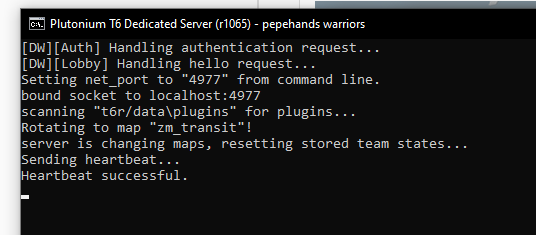
              5e99f9a4-95c1-417e-b37d-7cf3bc1d3da9-image.png

              Dss0undefined Offline
              Dss0undefined Offline
              Dss0
              Plutonium Staff
              wrote on last edited by
              #6

              Madelynnn_ so you managed to forward 4977? If you run game and server on the same pc you have to start the game first and server second.

              1 Reply Last reply
              0
              • Madelynnn_undefined Offline
                Madelynnn_undefined Offline
                Madelynnn_
                wrote on last edited by
                #7

                Yes sir, and but can i ask if there is a way to close/restart the server ?
                Forgot to change some settings

                Dss0undefined 1 Reply Last reply
                0
                • Madelynnn_undefined Madelynnn_

                  Yes sir, and but can i ask if there is a way to close/restart the server ?
                  Forgot to change some settings

                  Dss0undefined Offline
                  Dss0undefined Offline
                  Dss0
                  Plutonium Staff
                  wrote on last edited by
                  #8

                  Madelynnn_ you just close the window and restart the server. There is no command to reload settings.

                  1 Reply Last reply
                  0
                  • Madelynnn_undefined Offline
                    Madelynnn_undefined Offline
                    Madelynnn_
                    wrote on last edited by
                    #9

                    Seems like everything is fixed, thank's for ur help sir

                    6b567ab3-e9b8-4f38-9453-0223ca83b337-image.png

                    1 Reply Last reply
                    0

                    Hello! It looks like you're interested in this conversation, but you don't have an account yet.

                    Getting fed up of having to scroll through the same posts each visit? When you register for an account, you'll always come back to exactly where you were before, and choose to be notified of new replies (either via email, or push notification). You'll also be able to save bookmarks and upvote posts to show your appreciation to other community members.

                    With your input, this post could be even better 💗

                    Register Login
                    Reply
                    • Reply as topic
                    Log in to reply
                    • Oldest to Newest
                    • Newest to Oldest
                    • Most Votes


                    • Login

                    • Don't have an account? Register

                    • Login or register to search.
                    • First post
                      Last post
                    0
                    • Unread 0
                    • Recent
                    • Tags
                    • Popular
                    • Users
                    • Groups

