tipsybun Thank you for the warning. Try re‑converting using a third‑party program, or wait for a new update. You don’t necessarily have to use DDS; TGA or PNG would also work.

Darkness105
@Darkness105
Posts
-
[Release] IwI Universal Tool — IWI/DDS converter, IWD/IPAK & Explorer thumbnails -
[Release] IwI Universal Tool — IWI/DDS converter, IWD/IPAK & Explorer thumbnails_3rick Glad to hear that.
-
[Release] IwI Universal Tool — IWI/DDS converter, IWD/IPAK & Explorer thumbnailsFaZe Flick No, bro, only Windows 10 / 11.
Maybe I’ll bring a CLI for Linux. -
[Release] IwI Universal Tool — IWI/DDS converter, IWD/IPAK & Explorer thumbnailsWhat is it?
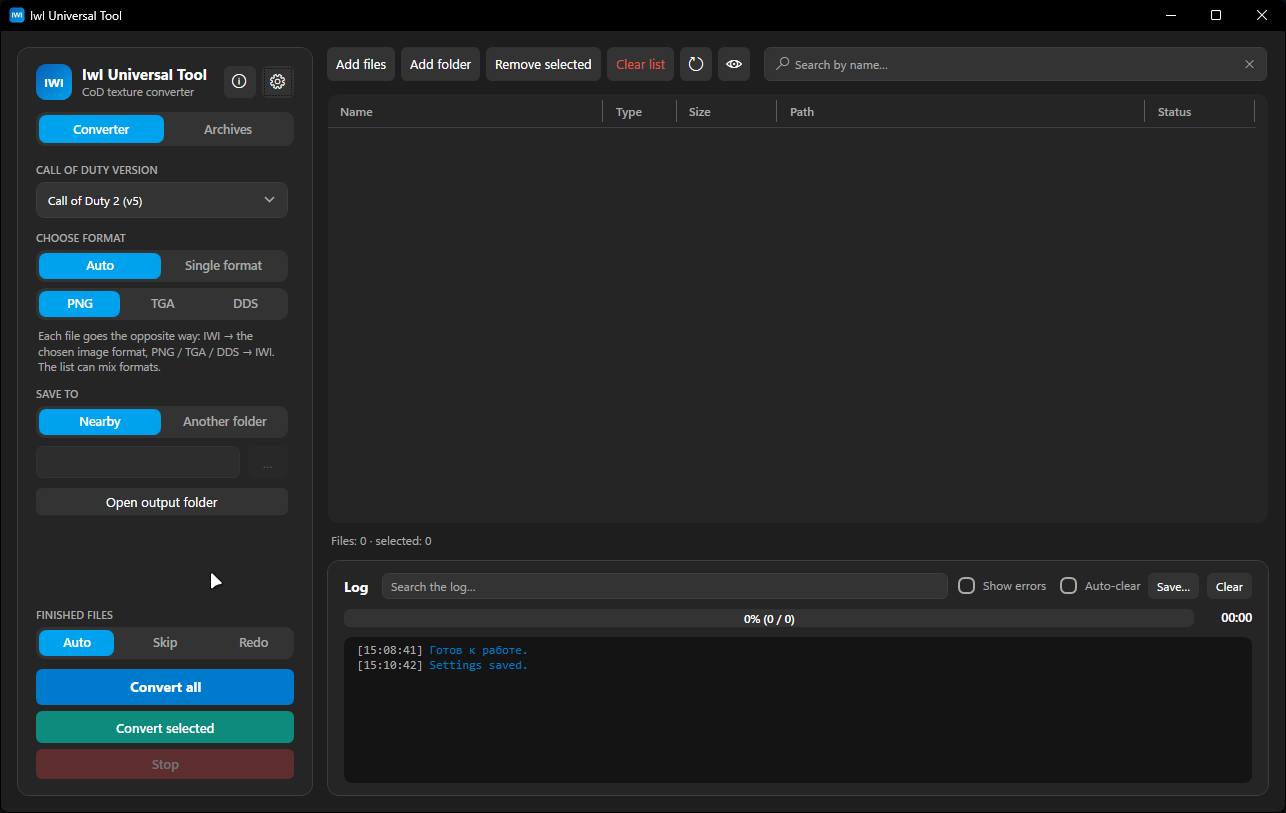
A Windows utility for Call of Duty textures: preview, conversion, packing/unpacking
IWD and IPAK archives, and Explorer thumbnails for .iwi/.vtf.Features
- Preview IWI, DDS, PNG, TGA, VTF (zoom, alpha, format/mip info)
- Convert PNG/TGA/DDS
 IWI and DDS (DXT1/3/5, BC5, R8)
- Work with IWD (ZIP) and IPAK (Black Ops 2)
- Replace textures inside archives
- Explorer thumbnails for .iwi and .vtf
- Hotkeys, including mouse buttons
- IWD recompression that never grows the archive
Supported games / IWI versions
- CoD2 — v5
- CoD4 / WaW / MW2 — v6
- MW2 / MW3 — v8-9
- Black Ops 1 — v13
- Black Ops 2 — v27 (IPAK, BC5, R8, mipmaps)
Download
https://github.com/Rastishka225/IwIUniversalTool/releases/latestSource (MIT)
https://github.com/Rastishka225/IwIUniversalToolRequirements
- Windows 10/11 x64
- .NET 10 Desktop Runtime for Explorer thumbnails
(the app offers the download link)
Screenshot
Notes
- No game assets are included — use your own game files.
- The EXE is unsigned, so SmartScreen may warn.
-
Timer for Power-Ups#include maps\_utility; #include common_scripts\utility; #include maps\_zombiemode_utility; init() { map_name = getdvar("mapname"); if(map_name != "nazi_zombie_prototype") { thread powerup_timer_overlay(); iprintln("Powerup timers enabled on: " + map_name); } else { iprintln("Powerup timers disabled on Nacht der Untoten"); } } powerup_timer_overlay() { level.powerup_timer_hud = []; level endon ("disconnect"); for(i = 0; i < 2; i++) { level.powerup_timer_hud[i] = create_simple_hud(); level.powerup_timer_hud[i].foreground = true; level.powerup_timer_hud[i].sort = 3; level.powerup_timer_hud[i].hidewheninmenu = false; level.powerup_timer_hud[i].alignX = "center"; level.powerup_timer_hud[i].alignY = "bottom"; level.powerup_timer_hud[i].horzAlign = "center"; level.powerup_timer_hud[i].vertAlign = "bottom"; level.powerup_timer_hud[i].x = -32 + (i * 15); level.powerup_timer_hud[i].y = level.powerup_timer_hud[i].y - 20; level.powerup_timer_hud[i].alpha = 1; level.powerup_timer_hud[i].fontscale = 1.2; level.powerup_timer_hud[i].glowcolor = (1, 1, 1); level.powerup_timer_hud[i].glowalpha = 0.8; level.powerup_timer_hud[i].archived = true; level.powerup_timer_hud[i].alpha = 0; } while(true) { if(level.zombie_vars["zombie_powerup_point_doubler_on"] == true) { time_left = int(level.zombie_vars["zombie_powerup_point_doubler_time"] + 0.5); level.powerup_timer_hud[0] SetValue(time_left); level.powerup_timer_hud[0].alpha = 1; } else { level.powerup_timer_hud[0].alpha = 0; } if(level.zombie_vars["zombie_powerup_insta_kill_on"] == true) { time_left = int(level.zombie_vars["zombie_powerup_insta_kill_time"] + 0.5); level.powerup_timer_hud[1] SetValue(time_left); level.powerup_timer_hud[1].alpha = 1; } else { level.powerup_timer_hud[1].alpha = 0; } if(level.zombie_vars["zombie_powerup_point_doubler_on"] == true && level.zombie_vars["zombie_powerup_insta_kill_on"] == true) { level.powerup_timer_hud[0].x = -24; level.powerup_timer_hud[1].x = 24; } else if(level.zombie_vars["zombie_powerup_point_doubler_on"] == true && level.zombie_vars["zombie_powerup_insta_kill_on"] == false) { level.powerup_timer_hud[0].x = 0; } else if(level.zombie_vars["zombie_powerup_insta_kill_on"] == true && level.zombie_vars["zombie_powerup_point_doubler_on"] == false) { level.powerup_timer_hud[1].x = 0; } wait(0.05); } }This code adds a timer to the bonus if you need to know exactly what time it ends.
(only Insta-kill and Double Points are displayed.)
(All maps will display a timer, except Nacht der Untoten, because it already includes)
Tutorial
- Go to the plutonium folder C:\Users\YOU_NAME\AppData\Local\Plutonium\storage\t4\raw\scripts\sp
- Create a text document and name it whatever you want, but replace the extension of this .txt with this .gsc
- We enter my code in the notepad
- And go in and check it's done
-
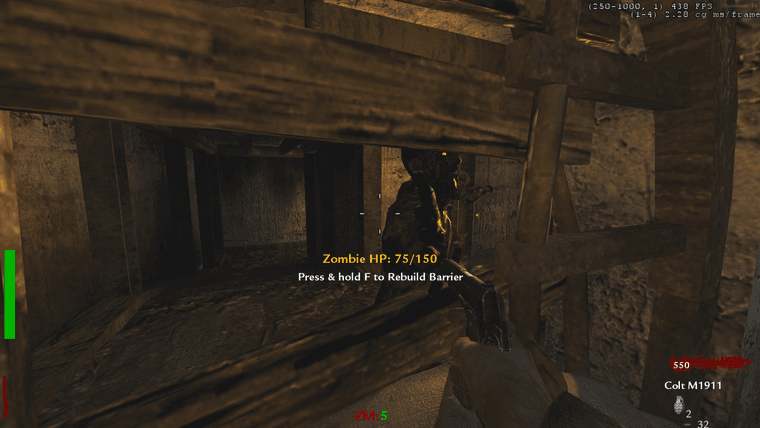
Health Zombie Indicator + Zombie Counterwell, if you create your own server, then all players will have it.
-
Health Zombie Indicator + Zombie Counter(
#include maps\_utility;
#include common_scripts\utility;
#include maps\_zombiemode_utility;

init()
{
    thread onConnect();
}

onConnect()
{
    for(;;)
    {
        level waittill( "connecting", player );
        player thread zombiesleft_hud();
		player thread zombie_health_hud();
    }
}

                                                            ///////////////////////////////////////////////////////////
                                                            ////////////////////////COUNTER ZM/////////////////////////
                                                            ///////////////////////////////////////////////////////////

zombiesleft_hud()
{
	Remaining = create_simple_hud(); //Hud Zombie Value
	Remaining.horzAlign = "center";
	Remaining.vertAlign = "bottom";
	Remaining.alignX = "left";
	Remaining.alignY = "bottom";
	Remaining.y = -5;
	Remaining.x = 0;
	Remaining.foreground = 1;
	Remaining.fontscale = 1.5;
	Remaining.alpha = 0;
	Remaining.color = ( 0, 255, 0  );

	ZombiesLeft = create_simple_hud(); //Hud Zombie Text
	ZombiesLeft.horzAlign = "center";
	ZombiesLeft.vertAlign = "bottom";
	ZombiesLeft.alignX = "left";
	ZombiesLeft.alignY = "bottom";
	ZombiesLeft.y = -5;
	ZombiesLeft.x = -29;
	ZombiesLeft.foreground = 1;
	ZombiesLeft.fontscale = 1.5;
	ZombiesLeft.alpha = 0;
	ZombiesLeft.color = (0.7, 0, 0);
	ZombiesLeft SetText("ZM:");

	thread fade_in(Remaining, 1, 0.5);
	thread fade_in(ZombiesLeft, 1, 0.5);

	while(1)
	{
		remainingZombies = get_enemy_count() + level.zombie_total;
		Remaining SetValue(remainingZombies);

		if(remainingZombies == 0 )
		{
			Remaining SetText("Waiting...");
			thread fade_out(Remaining, 0, 0.5);
			thread fade_out(ZombiesLeft, 0, 0.5);
			while(1)
			{
				remainingZombies = get_enemy_count() + level.zombie_total;
				if(remainingZombies != 0 )
				{
					thread fade_in(Remaining, 1, 0.5);
					thread fade_in(ZombiesLeft, 1, 0.5);
					break;
				}
				wait 0.5;
			}
		}
		wait 0.5;
	}
}

fade_in(hudElem, targetAlpha, duration)
{
	steps = 10;
	stepTime = duration / steps;
	for(i = 0; i <= steps; i++)
	{
		hudElem.alpha = i * (targetAlpha / steps);
		wait stepTime;
	}
	hudElem.alpha = targetAlpha;
}

fade_out(hudElem, targetAlpha, duration)
{
	steps = 10;
	startAlpha = hudElem.alpha;
	stepTime = duration / steps;
	for(i = 0; i <= steps; i++)
	{
		hudElem.alpha = startAlpha - i * ((startAlpha - targetAlpha) / steps);
		wait stepTime;
	}
	hudElem.alpha = targetAlpha;
}

                                                        ////////////////////////////////////////////////////////////////////
                                                        ////////////////////////VIEWER ZOMBIE HP////////////////////////////
                                                        ////////////////////////////////////////////////////////////////////

zombie_health_hud()
{
    level endon("game_ended");
    self endon("disconnect");

	health_hud = NewHudElem();
	health_hud.alignX = "center";
	health_hud.alignY = "middle";
	health_hud.horzAlign = "center";
	health_hud.vertAlign = "middle";
	health_hud.y = 50;
	health_hud.alpha = 0;
	health_hud.fontScale = 1.4;
	health_hud.color = (1, 0.8, 0);
	health_hud.hidewheninmenu = true;

	health_bar = NewHudElem();
	health_bar.alignX = "center";
	health_bar.alignY = "middle";
	health_bar.horzAlign = "center";
	health_bar.vertAlign = "middle";
	health_bar.y = 80;
	health_bar.x = -75;
	health_bar.alpha = 0;
	health_bar.width = 150;
	health_bar.height = 12;
	health_bar.foreground = 1;
	health_bar.hidewheninmenu = true;
	health_bar.color = (0, 1, 0);

	last_target = undefined;

	while(1)
	{
		zombie = self get_zombie_in_crosshair();
		if(isDefined(zombie) && isAlive(zombie))
		{
			if(!isDefined(last_target) || zombie != last_target)
			{
				health_hud FadeOverTime(0.3);
				health_hud.alpha = 1;
				health_bar FadeOverTime(0.3);
				health_bar.alpha = 1;
				last_target = zombie;
			}
			health = zombie.health;
			if(isDefined(zombie.maxhealth))
				max_health = zombie.maxhealth;
			else
				max_health = 150;
			enemy_type = "Enemy";
			if(isDefined(zombie.model) && (zombie.model == "zombie_dog" || zombie.classname == "actor_zombie_dog"))
				enemy_type = "Hellhound";
			else if(isDefined(zombie.is_zombie))
				enemy_type = "Zombie";
			health_hud SetText(enemy_type + " HP: " + health + "/" + max_health);
			health_hud.alpha = 1;

			health_percent = health / max_health;
			if(health_percent > 0.5)
				health_bar.color = (0, 1, 0);
			else if(health_percent > 0.25)
				health_bar.color = (1, 1, 0);
			else
				health_bar.color = (1, 0, 0);

			health_bar.width = int(150 * health_percent);
			health_bar.alpha = 1;
		}
		else
		{
			if(isDefined(last_target))
			{
				health_hud FadeOverTime(0.3);
				health_hud.alpha = 0;
				health_bar FadeOverTime(0.3);
				health_bar.alpha = 0;
				last_target = undefined;
			}
		}
		wait 0.05;
	}
}

get_zombie_in_crosshair()
{
    self endon("death");

    start = self.origin + (0,0,60);
    end = start + AnglesToForward(self.angles) * 1000;

    trace = BulletTrace(start, end, true, self);

    if(!isDefined(trace["entity"]))
        return undefined;

    entity = trace["entity"];

    if(!isDefined(entity))
        return undefined;

    distance = Distance(self.origin, entity.origin);
    if(distance > 400)
        return undefined;

    return entity;
}
This script shows the health status of zombies and, of course, hellhounds, etc. (When aiming at a zombie or a dog.)
(If you want to turn off the zombie hp indicator, just comment in line 16 and then it will not be displayed.)
Этот скрипт показывает состояние здоровья зомби и конечно же, адских гончих и т.д. (когда наводишь прицел на зомби или на собаку.)
(Если хотите выкл индикатор здоровье зомби то просто закоментируйте в 16 строке и тогда не будет отображаться.)
//player thread zombie_health_hud();Tutorial
- Go to the plutonium folder C:\Users\YOU_NAME\AppData\Local\Plutonium\storage\t4\raw\scripts\sp
- Create a text document and name it whatever you want, but replace the extension of this .txt with this .gsc
- We enter my code in the notepad
- And we check if you did everything right.
Руководство
- Заходим в папку plutonium C:\Users\YOU_NAME\AppData\Local\Plutonium\storage\t4\raw\scripts\sp
- Создаем текстовый документ и называем его как хотите, но заменяем расширение это .txt на .gsc
- Вставляем мой код в блокнот
- И проверяем, все ли вы сделали правильно.