@joustindomenech sure!
 undefined
qnda
@qnda
Posts
-
question -
Music Chill@Mr-MaPSaBino
Hi m8, I have a chill playlist where you can listen to lofi, chill remixes and more. I'll leave you the link here if you want to give it a listen: https://open.spotify.com/playlist/3EU7U2IK5g9zQ9cpnIWiXb?si=6f156b7809ec42cb -
JOINING TO GAME SESSION LOADINGedward-cirria
You can also try by typing the command in the Console:
connect your public ip.Have you checked that the firewall rules are also correct?
-
JOINING TO GAME SESSION LOADINGedward-cirria Try to check if your local IP has changed by going to CMD and running the ipconfig command and then check if it matches the one in the port forwarding rules in your router. I had the same problem as you and I solved it as one day the modem restarted due to power failure and once it was reset my IP had changed.
-
UPNP discovery timed out.EDIT: It resolved itself after about ten days from the update. I have not yet discovered the cause, but it reassures me that now I no longer have any problems.
-
UPNP discovery timed out.@lResxt
As usual, things only happen to me, I'm too unlucky.
I will try to solve this problem and if I find the solution I will post it here, in case someone else needs it.
Thank you so much for taking the time to answer my problem, I really appreciate it. -
UPNP discovery timed out.@lResxt
I can wait for an admin to reply.
Have you received reports from other users with this problem? -
UPNP discovery timed out.@lResxt
I have verified that the IP is correct and I do not use any antivirus outside of Windows Defender.
I took the screenshot of the ports as HannesC asked me for it.
However I think it is a problem of the new Plutonium update as before this update everything was working perfectly.
But I'm not able to host Custom Games yet and don't know how to fix. -
UPNP discovery timed out.HannesC
Yeah, i've done that as well. I think is a Plutonium problem because before this update, I didn't have any problems whatsoever.btw, this is my port forwading on my modem (i've partially covered the IP)

Then, this is my windows firewall rules:
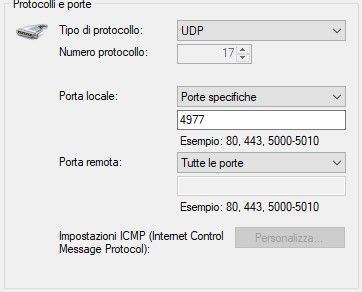
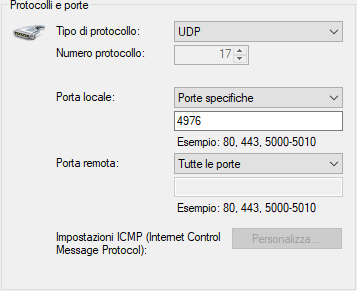
-
UPNP discovery timed out.HannesC i've already port forwarded because i know that's necessary to play custom games with friends, but it doesn't work anyway.
-
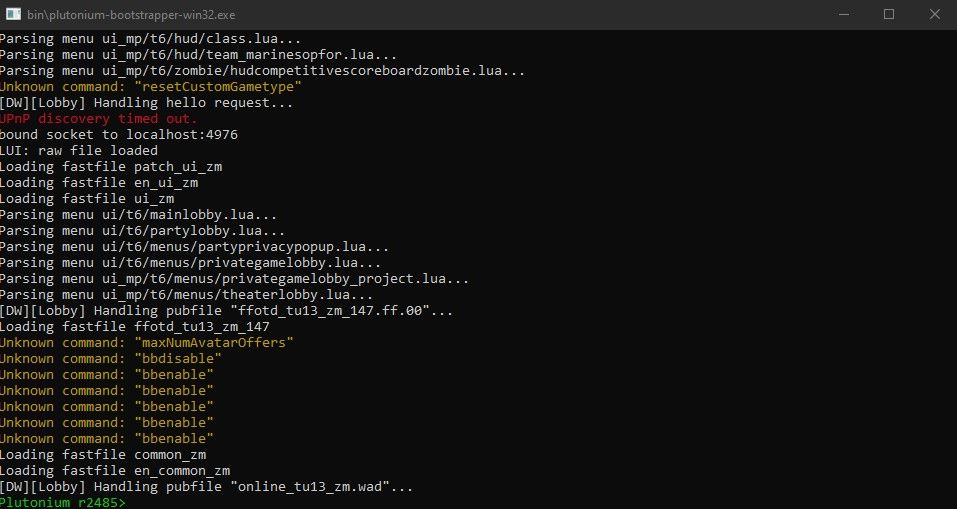
UPNP discovery timed out.Hi guys, i have a problem with the r2485 plutonium update, the game says that my upnp is disabled even tho i was able to play with my friends before this update. What i need to do to fix this problem?
This is what my bootstrapper says when i start the game (the red error is related to the upnp):
-
[Release] [Zombies] Share Mystery box & Perks in Mysterybox@dontknowletsplay Perfect, my friends and I love this mod, and for that we wanted to thank you for making it work so well!
-
[Release] [Zombies] Share Mystery box & Perks in Mysterybox@dontknowletsplay
I also tested this other version and it works just as well as the previous one.
What changes between this and the one called Plutonium_T6_shared_magicbox.gsc?
Which of the two do you suggest me to use? -
[Release] [Zombies] Share Mystery box & Perks in Mysterybox@dontknowletsplay I have tested the updated version and everything looks perfect. I played a game on Town, without the 'Unmovable Magic Box', spending 200k points and everything went great. No problems with graphics or features, the mod works great. I used the Plutonium_T6_shared_magicbox.gsc file.
I will continue to test on other maps and with more players and will let you know if I run into any problems.
thanks again for making this mod better and better. -
[Release] [Zombies] Share Mystery box & Perks in Mysterybox@dontknowletsplay It's amazing how quickly you solved this bug. You are really a great developer. Tomorrow as soon as I can, I will test it and report any problems.
-
[Release] [Zombies] Share Mystery box & Perks in MysteryboxGreat, I hope you can fix this mod because my friends and I love it. If you need anything, let me know, I will try my best.
-
[Release] [Zombies] Share Mystery box & Perks in Mysterybox@dontknowletsplay
I did some experiments on this mod and discovered the probable cause of the weapon skin overlap bug and also a possible solution (although it may turn out unfair).The cause is the return of the box to the first place it spawned at the start of the game. In other words, for example on Town, if the mystery box is spawned next to the Double Tap, when the teddy bear comes out and the box will respawn next to the Quick Revive, nothing happens, but when the teddy bear comes out again and it will come back again next to the Double Tap, it will start to bug.
A possible solution to this problem is to use a mod menu and to use the 'Unmovable Mystery Box' function, so that the crate never moves and triggers the bug.
Unfortunately I am not a programmer and I have no experience with the gsc language, but I hope I have been of help anyway.
-
[Release] [Zombies] Share Mystery box & Perks in Mysteryboxhi guys, since i installed the mod after some time the mystery boxes start to bug and overlap the weapon skins, without understanding which weapon i am taking. happens to me on all maps. moreover, when the box goes with the teddy bear, it does not change position but respawns on the same position. are there any updates on this mod?