got this resolved, plutonium forums changes the file name when downloading which can cause issues when it comes to files that have to match character for character like pap, something to keep in mind for anyone else who wants to use the files above
viperfan
@viperfan
Posts
-
[Release] [ZM] [MP] Project Paradox | A Complete Texture Overhaul | 2025 -
[Release] [ZM] [MP] Project Paradox | A Complete Texture Overhaul | 2025C0NFU510N try these -
~-gcamo_zombies_col.iwi
camo_code_nml.iwi
camo_zombies_nml.iwi
~~-gcamo_zombies_spc-rgb&~-rc~9a2e3000.iwi
~-gcamo_code_spc.iwithe two i sent originally are the main color and specular maps for pap which should have worked, but these above are all the textures tied to the pap camo like the bump maps and extra spec map. if this still doesn't load id be curious to find out why, youre welcome to add my discord @ viperfan
-
[Release] [ZM] [MP] The Rapture | A Complete Texture Overhaul | 2026GhostRider01250 much love brotha thank you

-
[Release] [ZM] [MP] Project Paradox | A Complete Texture Overhaul | 2025C0NFU510N what texture quality is your game set to? try these, they should load on any setting -
~~-gcamo_zombies_spc-rgb&~-rc~9a2e3000.iwi
~-gcamo_zombies_col.iwialso downloading from the forums changes the name of the file, make sure theyre named "~~-gcamo_zombies_spc-rgb&~-rc~9a2e3000.iwi" and "~-gcamo_zombies_col.iwi" in the images folder
-
[Release] [ZM] [MP] Project Paradox | A Complete Texture Overhaul | 2025C0NFU510N here you go, actually looks quite nice ingame, definitely a solid request. drop these into your images folder. tranzit pap texture is shared between tranzit, die rise, and nuketown so it will appear on those maps as well
~~-gcamo_zombies_spc-rgb&~-rc~9a2e3000.iwi
~-gcamo_zombies_col.iwi -
[Release] [ZM] [MP] Project Paradox | A Complete Texture Overhaul | 2025Zolyode did you have any textures in your images folder prior? it could be an issue with bo2's reflection maps that get applied to textures for something like the handle which is meant to be mostly obscured, try testing it without the reflection / bump maps by taking out ~~-gmtl_t6_wpn_knife_base_spc~9c97c3e4.iwi or mtl_t6_wpn_knife_base_nml.iwi to see if that fixes it
-
[Release] [ZM] [MP] The Rapture | A Complete Texture Overhaul | 2026This is a remake & reimagining of T5 ZM and MP built from scratch to elevate and refine every aspect of the game with the goal of creating a new experience entirely, while being made around a cohesive horror theme that preserves the games authentic, core feel. Everything is done client side, with no scripts or external mods needed so that online functionality can stay intact. Included is the following:
-
Rebuilt main menu for ZM & MP with custom logo, background, smoke, and music. Rebuilt interrogation menu with new textures, lighting, TV screens, player model, and music. Transparent glass map select screen, custom zombie map thumbnails, with the OST version of “Damned” for ZM music.
-
Every single map overhauled and reimagined from the ground up, each with their own map-specific horror theme while staying true to the respective map's original aesthetic:
- Kino Mausoleum | Five Apocalypse | Incursion Ascension | Iron Lung COTD | Nacht der Verlorenen | Desolated Moon | Incinerated Shang | Wooden Verrückt | Consumed Snow Numa | Petrified Der Riese
- Kino Mausoleum | Five Apocalypse | Incursion Ascension | Iron Lung COTD | Nacht der Verlorenen | Desolated Moon | Incinerated Shang | Wooden Verrückt | Consumed Snow Numa | Petrified Der Riese
-
Every weapon, piece of equipment, throwable, melee, attachment, scope, and reticle all have custom handmade, modified, upscaled, or already made unique textures across campaign, multiplayer & zombies, while also having unique handmade gloves, arms, and player models for every character in MP / ZM.
-
Every respective zombie map contains custom fire, smoke, muzzle flash, bullets, explosions, skyboxes, blood, water, traps, box & bear, PaP & perk machines, perk bottles, power up lighting, power switch, ground / wall / environmental / prop textures, weapon chalk, barrier wood, windows, foliage, map lighting, lightning, fog, ambience, portraits, zombie models, hellhounds, monkeys, nova crawlers, pentagon thief, cosmonaut, napalm zombie, & george textures.
-
Custom made font for the entire game, which adds native DualSense controller icon and glyph support. Every HUD icon has been redone from scratch, with other HUD elements including: Neon glyph perk & power-up icons, HD crosshair, round counter tally marks, electrocution screen, teleport screen, game over screen, custom hit direction, recolored hint dialogue prompts, handmade mouse cursor, handmade loading icons, DOOM 2016-style map exit cutscene with MyHouse.wad's "Change and Evolve" as interrogation music & The Caretaker's "B6 - My heart will stop in joy" x "FNAF 1 Main Menu" as press any key screen music.
Download
Screenshots
Main Menu

Multiplayer Menu

Interrogation Menu

Map Selection

Box / Bear

Player Models / View Arms

Perk Machines

Perk Bottles

Perk Icons

Equipment Icons

Font / DualSense Icons

AK-74u - After Death

PaP - Fallen World

M1911 - Kill Confirmed

FN FAL - Howling Dawn

L96A1 - Dragon Lore

Thompson - Afterlife

RPK - Abyss

SPAS-12 - Incineration

Python - Porcelain

Ballistic Knife - Obsidian Shards

Commando - Stacked Deck

Galil - Londo Ruined

FAMAS - Aperture

M14 - Illuminati

PM63 - Symbiotic

MPL - Skeletal

Spectre - Runic Storm

MP5K - Neon Roses

Double Barrel - Sovngarde

Stakeout - Hyper Beast

M1897 Trench Gun - Exorcist

Olympia - Hieroglyph

Kar98k - Art of War

Arisaka - Arasaka

M1 Carbine - Icarus

Gewehr 43 - Infected

Dragunov - Serrated

BAR - Lapis Lazuli

HK21 - Scarlet Rot

CZ-75 - Ebony & Ivory

China Lake - Brimstone

M72 LAW - Chernobyl

Crossbow - Incantation

Ray Gun - Jaded

Wave Gun - Interstellar

Wunderwaffe - Equilibrium

Winter's Howl - Cryoslept

Thundergun - Wall of Flesh

Scavenger - Carnage

V-R11 - Lazarus

Death Machine - Slaughter

Baby Gun - Lullaby

Parabolic Knife - Fade

Bowie Knife - Gilded Blackstone

QED - Schrödinger

Gersh Device - Thy Flesh Consumed

Cymbal Monkey - Jigsaw

Bouncing Betty - Poltergeist

Nesting Dolls - Still Life

This is an AIO compilation made for those looking for a unique & handcrafted experience pushed to its absolute limits. As the sequel to my T6 project, I wanted to approach T5 in a way that transforms the experience into feeling like an entirely new game within itself, while making it easily accessible to any and all audiences. This project features a blend of high quality assets made by various Plutonium users, my own edited versions of those textures, with the majority being custom handmade assets built from scratch to be in line with the central theme of the project. Credit to all the users below whose work is included in this project:
Reealithy | FaZe Flick | Zeymex | SSC | oJumpy | RainingZombies | frosty704 | Mr_Spicy
Thanks for viewing! Check out Project Paradox here
The Rapture Has Come
-
-
[Release] [ZM] [MP] Project Paradox | A Complete Texture Overhaul | 2025oPulsy much appreciated brotha it means a ton, thank you n everyone else who has shown huge support for this project thus far as this was a deep passion project of mine for the time i was making it, still needa finish up the pack for bo1 which has been nearly done for awhile now but trying to break through on being able to change the main menu music for bo1 which turned into a crazy deep rabbit hole but gonna get it figured out for sure
-
[Release] [ZM] [MP] Project Paradox | A Complete Texture Overhaul | 2025power_duck23 much luv brotha

-
[Release] [ZM] [MP] Project Paradox | A Complete Texture Overhaul | 2025LAZZATEDAGRABBA just tried to add you but says username is invalid, feel free to add me @ viperfan and i can walk you through it
-
[Release] [ZM] [MP] Project Paradox | A Complete Texture Overhaul | 2025@ShitBoxLuck did you have anything in your images folder prior to installing this? looks like a texture overlap of the vanilla file with the modified one being loaded simultaneously
-
[Release] [ZM] [MP] Project Paradox | A Complete Texture Overhaul | 2025Flirty all of the perk icons are the iwi's that start with specialty_ and i believe every menu file starts with menu_zm
-
[Release] [ZM] [MP] Project Paradox | A Complete Texture Overhaul | 2025roombound swapping the main localization language files to be japanese gives that exact font, see my post above for the files & how to install it
-
[Release] [ZM] [MP] Project Paradox | A Complete Texture Overhaul | 2025DokRitzenReiter here are the files for the japanese font, i've always installed them from just replacing the 3 files in the root of the bo2 folder but i'm sure its possible to do it thru the plutonium directory, make a backup of your original files and put the modified ones in to be able to seamlessly swap between english & japanese
-
[Release] [ZM] [MP] Project Paradox | A Complete Texture Overhaul | 2025zYoshi appreciate you brotha

-
[Release] [ZM] [MP] Project Paradox | A Complete Texture Overhaul | 2025homuhomu_ i just looked through and it seems the original skybox file for tranzit was named incorrectly when i updated this project last so i just corrected that now. this is the correct file which you can drop into your \images\ folder here - zm_transit_haze_ft.iwi. you can delete the other one that has the keywords tranzit_haze in it, i just updated this in the google drive aswell, thank you for catching that
-
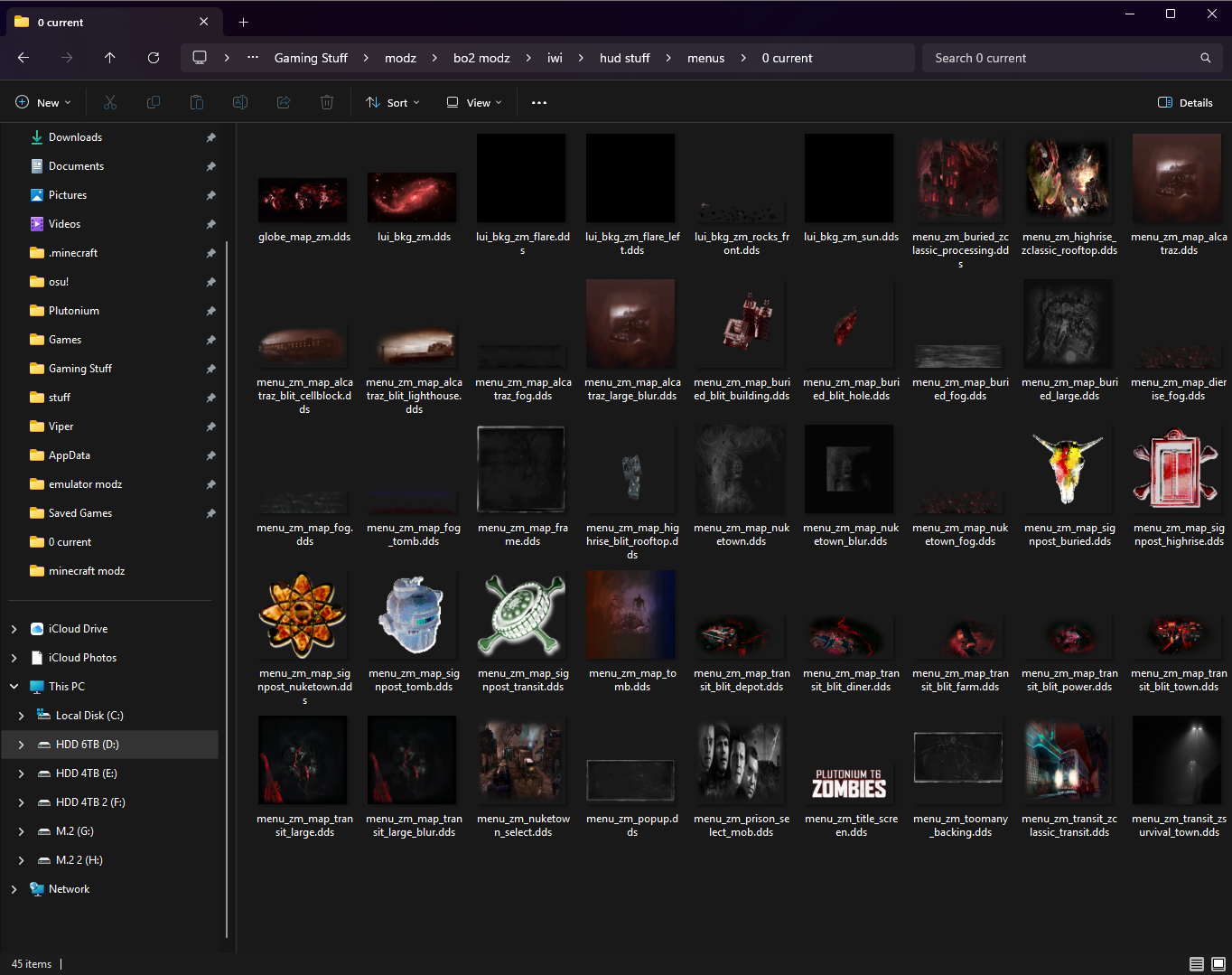
[Release] [ZM] [MP] Project Paradox | A Complete Texture Overhaul | 2025MissGuila this should be all of the files used for the menus which is mainly just title image, background, globe, sun, floating rocks, map lobby thumbnails, map backgrounds, map icons & some extra smaller stuff
-
[Release] [ZM] [MP] Project Paradox | A Complete Texture Overhaul | 2025atrixx32 this is interesting too, are you on win10 or 11? its strange to me that you had problems with loading any map in general because different issues seem to vary between different people that have them, you are the only one who has reported nothing being able to load with the textures where 2 people had issues loading x map and a couple others had problems with only ezz servers, does having any skybox textures in your images folder cause it to break? or only specific ones? curious on what is causing that aswell, since there are no other reports of sky textures causing issues. feel free to add me on discord @ viperfan if you would like n we can try to get to the bottom of whats causing that issue for you
-
[Release] [ZM] [MP] Project Paradox | A Complete Texture Overhaul | 2025zPqwell yeah i've been getting some reports that specifically the ezz servers have some kind of problem with textures but only for certain people, it isn't a conflict with the iwi files provided by ezz's server files after testing, i wish i was able to replicate this issue myself to see if it is just a file causing an issue, but for other people and myself it works fine so i'm not too sure. i've noticed it to be common for happening in people on windows 10, but i remember you saying you was on windows 11 on discord so maybe its not that, just trying to find some kind of pattern between the people who are having issues with it
-
[Release] [ZM] [MP] Project Paradox | A Complete Texture Overhaul | 2025atrixx32 SolarPanel1 did either of you guys have textures present in your images folder prior to installing this project ? is the steam version of bo2 being used ? it should work fine right out of the box, there's been no prior reports of people having issues except for the one dude above who had a conflict with another mod he was using, so my theory is it could be that. i would recommend take all of the files out of images in quarters, and see if you can narrow down to what specifically is causing it, as texture files shouldn't cause a crash unless one goes above ~22mb