 [RELEASE] Black Ops 2 Mod Switcher - No More Manual Script File Hell!
Yo Plutonium Squad! 
-Tired of being that guy who accidentally mixed Cool zombies scripts with other mod scripts and broke everything? 
-You installed some sick zombie scripts and now you want to return to vanilla, but now you have to manually hunt down and delete hundreds of .gsc and .iwi files? 🫠
-Your mods folder won't load correctly because some GSC script in your scripts/ folder is conflicting with it, and some mods require vanilla scripts to work properly? 
-Fed up with copying tons of files every time you want to switch from one mod to another that uses GSC files?
-RIP to your weekend because you spent 3 hours untangling script conflicts instead of actually playing? 
Well, those days are OVER! 
Why Your Squad Needs This:
| Problem |
Solution |
 "Bruh I mixed 3 different zombie mods and now my game won't start" "Bruh I mixed 3 different zombie mods and now my game won't start" |
 Clean switching - no more frankenstein mods! Clean switching - no more frankenstein mods! |
 "My mods folder won't load because some GSC is conflicting" "My mods folder won't load because some GSC is conflicting" |
Keeps scripts/images separate from each mod! |
 "This mod needs vanilla scripts but I have modded ones" "This mod needs vanilla scripts but I have modded ones" |
Easy switch back to clean vanilla files! |
| "I lost my original files and can't go back to vanilla without reinstalling" |
Keeps everything organized in separate folders |
 "It takes me forever to manually delete all these .gsc files" "It takes me forever to manually delete all these .gsc files" |
3 seconds and you're done! |
| 🤬 "I accidentally mixed script files and now nothing works" |
Never touches your original files! |
 ️ "My t6 folder looks like a nuclear wasteland" ️ "My t6 folder looks like a nuclear wasteland" |
Clean, organized structure |
 Perfect For:
- 🧟 Zombie Modders - Switch between different zombie experiences instantly
 MP Enthusiasts - Jump from bot matches to custom multiplayer mods
 Custom Map Players - Different scripts for different maps
 Mod Developers - Test different versions without file management hell
 Lazy Gamers - Because ain't nobody got time for manual copying
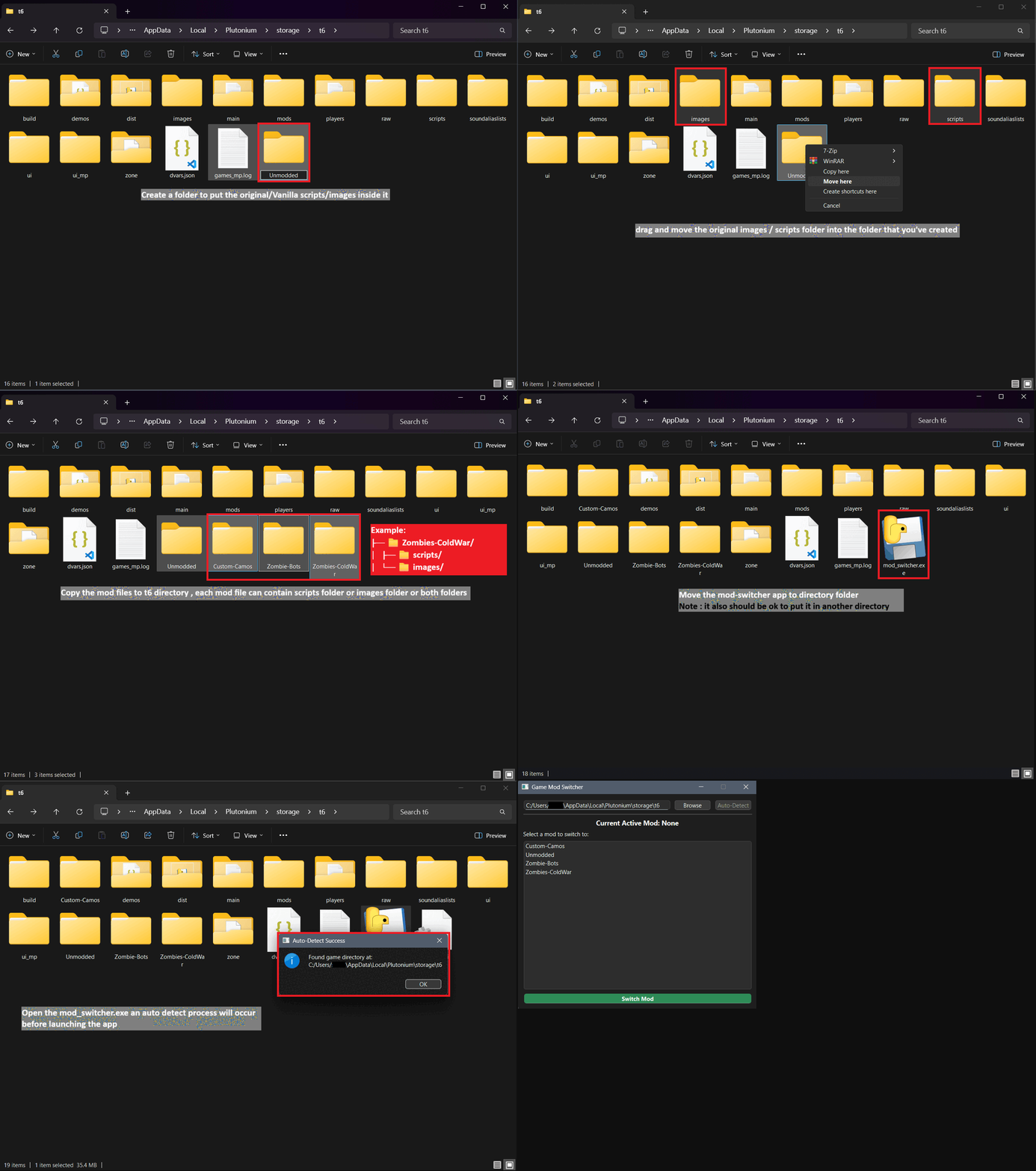
 How It Works (It's Dummy Proof):
Your folder structure will look clean AF:
📂 %localappdata%/Plutonium/storage/t6/ :
├── 🔧 mod_switcher.exe          ← Place the app here
├── 📁 scripts/                  ← Active mod files
├── 📁 images/                   ← Active mod files
├── 📁 Original/                 ← Your vanilla/original files ⭐
│   ├── 📁 scripts/
│   └── 📁 images/
├── 📁 ColdWar-Zombies/         ← Your first mod
│   ├── 📁 scripts/
│   └── 📁 images/
├── 📁 Zombies-Bots/            ← Your second mod
│   ├── 📁 scripts/
│   └── 📁 images/
├── 📁 Custom-Maps/              ← Your third mod
│   ├── 📁 scripts/
│   └── 📁 images/
├── 📁 demos/
├── 📁 main/
├── 📁 mods/
└── 📁 ... (other game folders)
The app automatically:
 Finds your Plutonium installation (no manual browsing through AppData hell)
- ️ Lists all your mods in a clean interface
- Switches everything safely without breaking anything
 Remembers your settings for next time
- Shows which mod is currently active
Installation (Easier Than a Nuketown Spawn Kill):
Step 1: Download
 Download mod_switcher.exe from GitHub
(It's literally one file - no sketchy installer BS)
Step 2: Setup
- Put
mod_switcher.exe in your %localappdata%/Plutonium/storage/t6/ folder
- IMPORTANT: Create a backup folder of your vanilla files first! (Name it
Vanilla, Original, whatever)
- Put each of your mods in separate folders
Step 3: Dominate
- Run the .exe
- Select your mod
- Click "Switch"
- GG EZ
 ️ Pro Tips From a Fellow BO2 Addict:
 ALWAYS backup your vanilla files first! Trust me on this one...
 Don't put mods in the
 raw folder - the app ignores it (for good reason)- Name your mod folders clearly -
Zombie-Maps-Pack instead of asdjkhasd123
- Game must be closed when switching (obviously)
 Run as admin if you get permission errors
 Community Shoutouts:
Big thanks to the Plutonium devs for keeping BO2 alive and the modding community for creating awesome content!
This tool is 100% open source - check the code, modify it, make it better! It's made by the community, for the community.
 Found a Bug? Got Ideas?
Drop them in the GitHub Issues or reply here!
I'm always looking to improve this tool and add new features.
Possible future features:
- Auto-backup creation
 Mod usage statistics
- Custom themes
 Direct mod downloading from popular sources
 Screenshots:
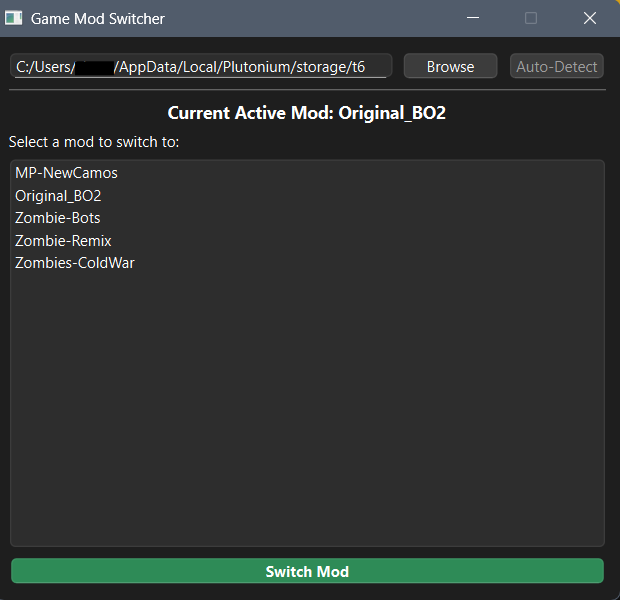
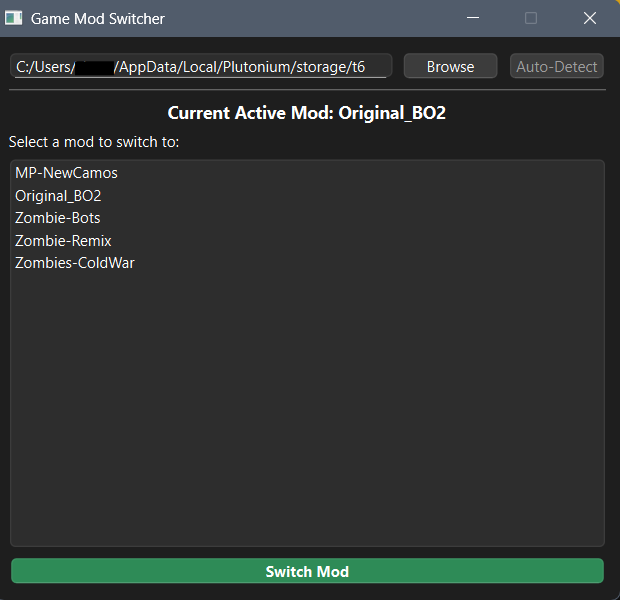
Clean, simple interface - just select and switch!
TL;DR:
Stop being a caveman copying files manually. Download this, switch mods in 3 seconds, go back to fragging. Your future self will thank you.
May your hitmarkers be headshots and your mod switches be instant!
P.S. - If this saved you from another 2AM "why is my game broken" session, drop a  on GitHub and spread the word! Let's make the whole community's life easier.
Happy Gaming!
Links:
 ️
️




 ️
️