Skip to content
  • 0 Unread 0
  • Recent
  • Tags
  • Popular
  • Users
  • Groups
  • Donate
Collapse

Plutonium

  1. Home
  2. MW3 Server Hosting Support
  3. Please I need help

Please I need help

Scheduled Pinned Locked Moved MW3 Server Hosting Support
17 Posts 3 Posters 1.7k Views 1 Watching
  • Oldest to Newest
  • Newest to Oldest
  • Most Votes
Reply
  • Reply as topic
Log in to reply
This topic has been deleted. Only users with topic management privileges can see it.
  • Yosmany Offline
    Yosmany Offline
    Yosmany
    wrote on last edited by
    #4
    This post is deleted!
    1 Reply Last reply
    0
    • Kalitos Kalitos

      Yosmany https://forum.plutonium.pw/topic/29329/gsc-to-remove-chat-in-mw3-and-bo2/5

      Yosmany Offline
      Yosmany Offline
      Yosmany
      wrote on last edited by
      #5

      Kalitos Could you provide me with the GSC already compiled to remove the chat, I'm not a programmer, it's for Iw5 and BO2

      1 Reply Last reply
      0
      • Resxt Offline
        Resxt Offline
        Resxt
        Plutonium Staff
        wrote on last edited by
        #6

        There's no need to compile and no need to be a programmer to do any of this

        Yosmany 1 Reply Last reply
        0
        • Resxt Resxt

          There's no need to compile and no need to be a programmer to do any of this

          Yosmany Offline
          Yosmany Offline
          Yosmany
          wrote on last edited by
          #7

          Resxt said in Please I need help:

          There's no need to compile and no need to be a programmer to do any of this

          Could you tell me how I can remove the chat from the rooms with the lin you gave me, I downloaded the .zip of that page, what do I do with it?

          1 Reply Last reply
          0
          • Resxt Offline
            Resxt Offline
            Resxt
            Plutonium Staff
            wrote on last edited by
            #8

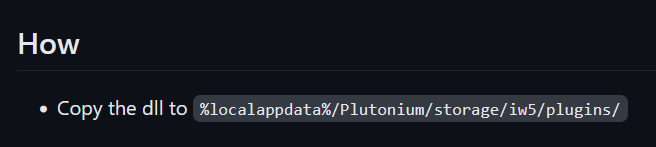
            0c5d3897-4d0c-4fc4-bc15-a14ca2819d70-image.png

            Yosmany 1 Reply Last reply
            0
            • Resxt Resxt

              0c5d3897-4d0c-4fc4-bc15-a14ca2819d70-image.png

              Yosmany Offline
              Yosmany Offline
              Yosmany
              wrote on last edited by
              #9

              Resxt said in Please I need help:

              0c5d3897-4d0c-4fc4-bc15-a14ca2819d70-image.png

              Excuse me again, but there is no dll in that tablet, if you have it, could you send it to me here?

              Resxt 1 Reply Last reply
              0
              • Yosmany Yosmany

                Resxt said in Please I need help:

                0c5d3897-4d0c-4fc4-bc15-a14ca2819d70-image.png

                Excuse me again, but there is no dll in that tablet, if you have it, could you send it to me here?

                Resxt Offline
                Resxt Offline
                Resxt
                Plutonium Staff
                wrote on last edited by
                #10

                Yosmany https://github.com/diamante0018/DisablePlutoChat/releases

                Yosmany 1 Reply Last reply
                0
                • Resxt Resxt

                  Yosmany https://github.com/diamante0018/DisablePlutoChat/releases

                  Yosmany Offline
                  Yosmany Offline
                  Yosmany
                  wrote on last edited by
                  #11

                  Resxt said in Please I need help:

                  Yosmany https://github.com/diamante0018/DisablePlutoChat/releases

                  Sorry again, that dll didn't work for me, could you help me with some GSC that can be used to remove the chat?

                  Kalitos 1 Reply Last reply
                  0
                  • Yosmany Yosmany

                    Resxt said in Please I need help:

                    Yosmany https://github.com/diamante0018/DisablePlutoChat/releases

                    Sorry again, that dll didn't work for me, could you help me with some GSC that can be used to remove the chat?

                    Kalitos Offline
                    Kalitos Offline
                    Kalitos
                    wrote on last edited by Kalitos
                    #12

                    Yosmany You need to copy the dll into the "%localappdata%/Plutonium/storage/iw5/plugins/" folder on your server, then in your cfg file set "sv_enableGameChat 0", then reboot your server, if the dll loads correctly, chat should not be available on your server.

                    Yosmany 1 Reply Last reply
                    1
                    • Kalitos Kalitos

                      Yosmany You need to copy the dll into the "%localappdata%/Plutonium/storage/iw5/plugins/" folder on your server, then in your cfg file set "sv_enableGameChat 0", then reboot your server, if the dll loads correctly, chat should not be available on your server.

                      Yosmany Offline
                      Yosmany Offline
                      Yosmany
                      wrote on last edited by
                      #13

                      Kalitos said in Please I need help:

                      Yosmany You need to copy the dll into the "%localappdata%/Plutonium/storage/iw5/plugins/" folder on your server, then in your cfg file set "sv_enableGameChat 0", then reboot your server, if the dll loads correctly, chat should not be available on your server.

                      Thanks for your attention, the dll worked for me

                      Yosmany 1 Reply Last reply
                      1
                      • Yosmany Yosmany

                        Kalitos said in Please I need help:

                        Yosmany You need to copy the dll into the "%localappdata%/Plutonium/storage/iw5/plugins/" folder on your server, then in your cfg file set "sv_enableGameChat 0", then reboot your server, if the dll loads correctly, chat should not be available on your server.

                        Thanks for your attention, the dll worked for me

                        Yosmany Offline
                        Yosmany Offline
                        Yosmany
                        wrote on last edited by
                        #14

                        Yosmany said in Please I need help:

                        Kalitos said in Please I need help:

                        Yosmany You need to copy the dll into the "%localappdata%/Plutonium/storage/iw5/plugins/" folder on your server, then in your cfg file set "sv_enableGameChat 0", then reboot your server, if the dll loads correctly, chat should not be available on your server.

                        Thanks for your attention, the dll worked for me

                        good again and excuse me again, could you help me also remove the chat from the BO2 rooms

                        Kalitos 1 Reply Last reply
                        0
                        • Yosmany Yosmany

                          Yosmany said in Please I need help:

                          Kalitos said in Please I need help:

                          Yosmany You need to copy the dll into the "%localappdata%/Plutonium/storage/iw5/plugins/" folder on your server, then in your cfg file set "sv_enableGameChat 0", then reboot your server, if the dll loads correctly, chat should not be available on your server.

                          Thanks for your attention, the dll worked for me

                          good again and excuse me again, could you help me also remove the chat from the BO2 rooms

                          Kalitos Offline
                          Kalitos Offline
                          Kalitos
                          wrote on last edited by Kalitos
                          #15

                          Yosmany You need to copy the dll to "%localappdata%/Plutonium/storage/t6/plugins/" folder on your server, then copy this code to a file and save it as muteplayers.gsc and copy the file to "%localappdata%/Plutonium/ storage/t6/scripts/mp", then restart your server, if the dll loads correctly, the chat should no longer be available.

                          init()
                          {
                               onPlayerSay(::callbackPlayerSay);
                          }
                          
                          callbackPlayerSay(text, mode)
                          {
                              // mode == 0 -> all
                              // mode == 1 -> team
                              // self -> player that sent the message
                              
                              
                              // returning `false` will hide the message, anything else will not
                          
                              self tell("You are not allowed to type in the chat");
                              return false;
                              
                          }
                          
                          Yosmany 1 Reply Last reply
                          0
                          • Kalitos Kalitos

                            Yosmany You need to copy the dll to "%localappdata%/Plutonium/storage/t6/plugins/" folder on your server, then copy this code to a file and save it as muteplayers.gsc and copy the file to "%localappdata%/Plutonium/ storage/t6/scripts/mp", then restart your server, if the dll loads correctly, the chat should no longer be available.

                            init()
                            {
                                 onPlayerSay(::callbackPlayerSay);
                            }
                            
                            callbackPlayerSay(text, mode)
                            {
                                // mode == 0 -> all
                                // mode == 1 -> team
                                // self -> player that sent the message
                                
                                
                                // returning `false` will hide the message, anything else will not
                            
                                self tell("You are not allowed to type in the chat");
                                return false;
                                
                            }
                            
                            Yosmany Offline
                            Yosmany Offline
                            Yosmany
                            wrote on last edited by
                            #16

                            Kalitos said in Please I need help:

                            Yosmany You need to copy the dll to "%localappdata%/Plutonium/storage/t6/plugins/" folder on your server, then copy this code to a file and save it as muteplayers.gsc and copy the file to "%localappdata%/Plutonium/ storage/t6/scripts/mp", then restart your server, if the dll loads correctly, the chat should no longer be available.

                            init()
                            {
                                 onPlayerSay(::callbackPlayerSay);
                            }
                            
                            callbackPlayerSay(text, mode)
                            {
                                // mode == 0 -> all
                                // mode == 1 -> team
                                // self -> player that sent the message
                                
                                
                                // returning `false` will hide the message, anything else will not
                            
                                self tell("You are not allowed to type in the chat");
                                return false;
                                
                            }
                            

                            Good, look when I put the dll you told me in the address you gave me, you don't raise the server for me

                            Kalitos 1 Reply Last reply
                            0
                            • Yosmany Yosmany

                              Kalitos said in Please I need help:

                              Yosmany You need to copy the dll to "%localappdata%/Plutonium/storage/t6/plugins/" folder on your server, then copy this code to a file and save it as muteplayers.gsc and copy the file to "%localappdata%/Plutonium/ storage/t6/scripts/mp", then restart your server, if the dll loads correctly, the chat should no longer be available.

                              init()
                              {
                                   onPlayerSay(::callbackPlayerSay);
                              }
                              
                              callbackPlayerSay(text, mode)
                              {
                                  // mode == 0 -> all
                                  // mode == 1 -> team
                                  // self -> player that sent the message
                                  
                                  
                                  // returning `false` will hide the message, anything else will not
                              
                                  self tell("You are not allowed to type in the chat");
                                  return false;
                                  
                              }
                              

                              Good, look when I put the dll you told me in the address you gave me, you don't raise the server for me

                              Kalitos Offline
                              Kalitos Offline
                              Kalitos
                              wrote on last edited by
                              #17

                              Yosmany does not start the server? What error do you get in the console? a picture would help

                              1 Reply Last reply
                              0

                              Hello! It looks like you're interested in this conversation, but you don't have an account yet.

                              Getting fed up of having to scroll through the same posts each visit? When you register for an account, you'll always come back to exactly where you were before, and choose to be notified of new replies (either via email, or push notification). You'll also be able to save bookmarks and upvote posts to show your appreciation to other community members.

                              With your input, this post could be even better 💗

                              Register Login
                              Reply
                              • Reply as topic
                              Log in to reply
                              • Oldest to Newest
                              • Newest to Oldest
                              • Most Votes


                              • Login

                              • Don't have an account? Register

                              • Login or register to search.
                              • First post
                                Last post
                              0
                              • Unread 0
                              • Recent
                              • Tags
                              • Popular
                              • Users
                              • Groups
                              • Donate