Rendering issues
-
GPUDriverD3D11::CreateTexture, unable to create texture
GPUDriverD3D11::CreateTexture, unable to create shader resource view for texture.
GPUDriverD3D11::CreateRenderBuffer, unable to create render target
I get these when i open pluto iw5 launcher. ive went through, and i meet the requirements to play, can i have help? -
Download this file https://drive.google.com/file/d/1fTzQtshdqhoUziaHpwxUY7gN0BidStnR/view?usp=sharing
Run it
Click "Edit List..."
Click the three dots right of the "enter a process or folder name" field and select "plutonium-launcher-win32.exe" located in "C:\Users\al\AppData\Local\Plutonium\bin"
tick the "force warp" checkbox and select "11_0" from the "feature level limit" dropdown menu
hit ok and try launching the plutonium launcher -
ill try it, thanks
-
Download this file https://drive.google.com/file/d/1fTzQtshdqhoUziaHpwxUY7gN0BidStnR/view?usp=sharing
Run it
Click "Edit List..."
Click the three dots right of the "enter a process or folder name" field and select "plutonium-launcher-win32.exe" located in "C:\Users\al\AppData\Local\Plutonium\bin"
tick the "force warp" checkbox and select "11_0" from the "feature level limit" dropdown menu
hit ok and try launching the plutonium launcherHannesC It didnt work, i folllowed each step and i still get the error message? if possible, please read through what you said, make sure its correct and get back to me
-
2 people did the exact same steps and got it right, plus I've tested it myself. You're doing something wrong
-
Can you screenshot your dxcpl window after you've performed these steps?
-
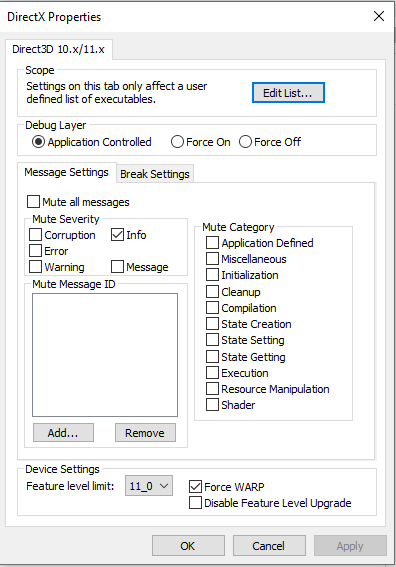
-
Click edit list and screenshot
-
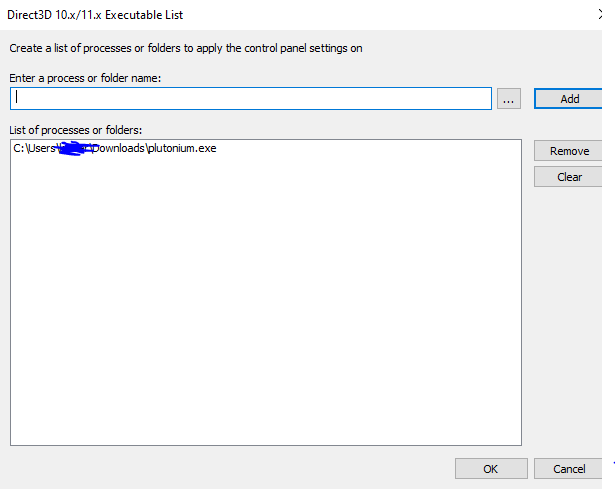
-
ohhh shit, my bad
-
Bruh, why'd you add the pluto.exe? Double check what I said above. Remove pluto.exe from the list
HannesC how do i locate the file you said? all i can find is pluto.exe
-
Go to %localappdata%/Plutonium/bin. You'll see the plutonium-launcher exe, select that
-
Im having a little trouble finding the folder
-
Google how to show hidden folders. When you're done,it should be easy navigating inside C drive, then users, your name, appdata, local, plutonium, bin, select the plutonium-launcher-win32.exe
-
Everything is working now, thank you so much for your help
-
Ahhh finally I can go watch this series. No problem, have fun!


Hello! It looks like you're interested in this conversation, but you don't have an account yet.
Getting fed up of having to scroll through the same posts each visit? When you register for an account, you'll always come back to exactly where you were before, and choose to be notified of new replies (either via email, or push notification). You'll also be able to save bookmarks and upvote posts to show your appreciation to other community members.
With your input, this post could be even better 💗
Register Login