Skip to content
  • 0 Unread 0
  • Recent
  • Tags
  • Popular
  • Users
  • Groups
  • Donate
Collapse

Plutonium

  1. Home
  2. MW3 Client Support
  3. Rendering issues

Rendering issues

Scheduled Pinned Locked Moved MW3 Client Support
18 Posts 3 Posters 1.4k Views
  • Oldest to Newest
  • Newest to Oldest
  • Most Votes
Reply
  • Reply as topic
Log in to reply
This topic has been deleted. Only users with topic management privileges can see it.
  • LightzDark Offline
    LightzDark Offline
    LightzDark
    wrote on last edited by
    #1

    GPUDriverD3D11::CreateTexture, unable to create texture
    GPUDriverD3D11::CreateTexture, unable to create shader resource view for texture.
    GPUDriverD3D11::CreateRenderBuffer, unable to create render target
    I get these when i open pluto iw5 launcher. ive went through, and i meet the requirements to play, can i have help?

    1 Reply Last reply
    0
    • HannesC Offline
      HannesC Offline
      HannesC
      Plutonium Staff
      wrote on last edited by Dss0
      #2

      Download this file https://drive.google.com/file/d/1fTzQtshdqhoUziaHpwxUY7gN0BidStnR/view?usp=sharing
      Run it
      Click "Edit List..."
      Click the three dots right of the "enter a process or folder name" field and select "plutonium-launcher-win32.exe" located in "C:\Users\al\AppData\Local\Plutonium\bin"
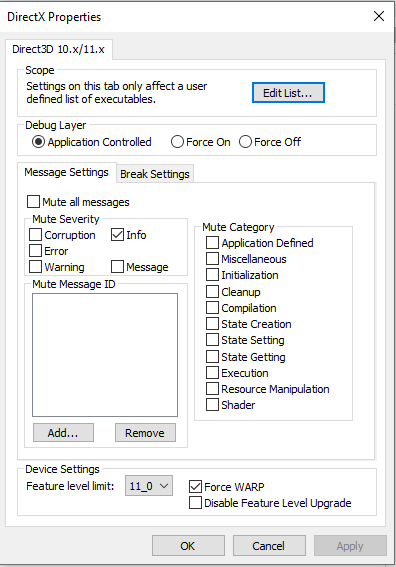
      tick the "force warp" checkbox and select "11_0" from the "feature level limit" dropdown menu
      hit ok and try launching the plutonium launcher

      LightzDark 1 Reply Last reply
      0
      • LightzDark Offline
        LightzDark Offline
        LightzDark
        wrote on last edited by
        #3

        ill try it, thanks

        1 Reply Last reply
        0
        • HannesC HannesC

          Download this file https://drive.google.com/file/d/1fTzQtshdqhoUziaHpwxUY7gN0BidStnR/view?usp=sharing
          Run it
          Click "Edit List..."
          Click the three dots right of the "enter a process or folder name" field and select "plutonium-launcher-win32.exe" located in "C:\Users\al\AppData\Local\Plutonium\bin"
          tick the "force warp" checkbox and select "11_0" from the "feature level limit" dropdown menu
          hit ok and try launching the plutonium launcher

          LightzDark Offline
          LightzDark Offline
          LightzDark
          wrote on last edited by
          #4

          HannesC It didnt work, i folllowed each step and i still get the error message? if possible, please read through what you said, make sure its correct and get back to me

          1 Reply Last reply
          0
          • HannesC Offline
            HannesC Offline
            HannesC
            Plutonium Staff
            wrote on last edited by
            #5

            2 people did the exact same steps and got it right, plus I've tested it myself. You're doing something wrong

            1 Reply Last reply
            0
            • HannesC Offline
              HannesC Offline
              HannesC
              Plutonium Staff
              wrote on last edited by
              #6

              Can you screenshot your dxcpl window after you've performed these steps?

              1 Reply Last reply
              0
              • LightzDark Offline
                LightzDark Offline
                LightzDark
                wrote on last edited by
                #7

                yes.PNG

                1 Reply Last reply
                0
                • HannesC Offline
                  HannesC Offline
                  HannesC
                  Plutonium Staff
                  wrote on last edited by
                  #8

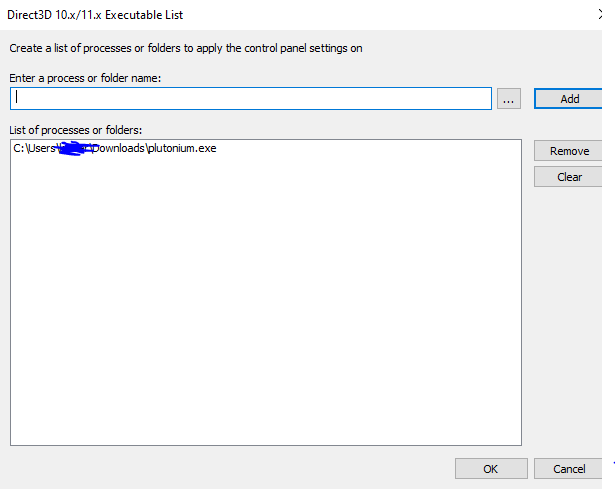
                  Click edit list and screenshot

                  1 Reply Last reply
                  0
                  • LightzDark Offline
                    LightzDark Offline
                    LightzDark
                    wrote on last edited by
                    #9

                    yes 3.PNG

                    1 Reply Last reply
                    0
                    • HannesC Offline
                      HannesC Offline
                      HannesC
                      Plutonium Staff
                      wrote on last edited by
                      #10

                      Bruh, why'd you add the pluto.exe? Double check what I said above. Remove pluto.exe from the list

                      LightzDark 1 Reply Last reply
                      0
                      • LightzDark Offline
                        LightzDark Offline
                        LightzDark
                        wrote on last edited by
                        #11

                        ohhh shit, my bad

                        1 Reply Last reply
                        0
                        • HannesC HannesC

                          Bruh, why'd you add the pluto.exe? Double check what I said above. Remove pluto.exe from the list

                          LightzDark Offline
                          LightzDark Offline
                          LightzDark
                          wrote on last edited by
                          #12

                          HannesC how do i locate the file you said? all i can find is pluto.exe

                          1 Reply Last reply
                          0
                          • HannesC Offline
                            HannesC Offline
                            HannesC
                            Plutonium Staff
                            wrote on last edited by
                            #13

                            Go to %localappdata%/Plutonium/bin. You'll see the plutonium-launcher exe, select that

                            1 Reply Last reply
                            0
                            • LightzDark Offline
                              LightzDark Offline
                              LightzDark
                              wrote on last edited by
                              #14

                              Im having a little trouble finding the folder

                              1 Reply Last reply
                              0
                              • HannesC Offline
                                HannesC Offline
                                HannesC
                                Plutonium Staff
                                wrote on last edited by
                                #15

                                Google how to show hidden folders. When you're done,it should be easy navigating inside C drive, then users, your name, appdata, local, plutonium, bin, select the plutonium-launcher-win32.exe

                                1 Reply Last reply
                                0
                                • LightzDark Offline
                                  LightzDark Offline
                                  LightzDark
                                  wrote on last edited by
                                  #16

                                  Everything is working now, thank you so much for your help

                                  1 Reply Last reply
                                  0
                                  • HannesC Offline
                                    HannesC Offline
                                    HannesC
                                    Plutonium Staff
                                    wrote on last edited by
                                    #17

                                    Ahhh finally I can go watch this series. No problem, have fun!

                                    1 Reply Last reply
                                    0
                                    • JXSupremo Offline
                                      JXSupremo Offline
                                      JXSupremo
                                      wrote on last edited by
                                      #18

                                      Why isn't the link working, it keeps on saying page not found and i am copying and pasting it?

                                      1 Reply Last reply
                                      0

                                      Hello! It looks like you're interested in this conversation, but you don't have an account yet.

                                      Getting fed up of having to scroll through the same posts each visit? When you register for an account, you'll always come back to exactly where you were before, and choose to be notified of new replies (either via email, or push notification). You'll also be able to save bookmarks and upvote posts to show your appreciation to other community members.

                                      With your input, this post could be even better 💗

                                      Register Login
                                      Reply
                                      • Reply as topic
                                      Log in to reply
                                      • Oldest to Newest
                                      • Newest to Oldest
                                      • Most Votes


                                      • Login

                                      • Don't have an account? Register

                                      • Login or register to search.
                                      • First post
                                        Last post
                                      0
                                      • Unread 0
                                      • Recent
                                      • Tags
                                      • Popular
                                      • Users
                                      • Groups
                                      • Donate