Skip to content
  • 0 Unread 0
  • Recent
  • Tags
  • Popular
  • Users
  • Groups
  • Donate
Collapse

Plutonium

  1. Home
  2. BO1 Client Support
  3. PLEASE HELP, ERROR, BO1 CRASH WHEN LANCHING

PLEASE HELP, ERROR, BO1 CRASH WHEN LANCHING

Scheduled Pinned Locked Moved BO1 Client Support
40 Posts 19 Posters 22.4k Views 3 Watching
  • Oldest to Newest
  • Newest to Oldest
  • Most Votes
Reply
  • Reply as topic
Log in to reply
This topic has been deleted. Only users with topic management privileges can see it.
  • Hadi77KSA Hadi77KSA

    Driver Method

    Press Win+R, write this: dxdiag, press Ok, select Display in the window that opens, then look at the Device section for your device name and manufacturer. After you determine those, update your graphics drivers.

    • https://www.nvidia.com/drivers/
    • https://www.amd.com/drivers/
    • https://downloadcenter.intel.com/
    • OEM website of your device

    CFG Method

    1. Press Win+R and paste this path: %localappdata%\Plutonium\storage\t5
    2. Open the players folder (create it if it doesn’t exist)
    3. Place the .cfg files from the following link into the players folder https://mega.nz/folder/9ksUkSrA#TRYDTvno7hW_khFlJCB7mg

    STIVENC30 Offline
    STIVENC30 Offline
    STIVENC30
    wrote on last edited by
    #16

    Hadi77KSA Thank you very much for solving my problem.
    I had these error codes:
    Exception Code: 0xC0000005
    Exception Address: 0x0071F125

    1 Reply Last reply
    0
    • SuperiorPotatoe SuperiorPotatoe referenced this topic on
    • Hadi77KSA Hadi77KSA referenced this topic on
    • Hadi77KSA Hadi77KSA

      Driver Method

      Press Win+R, write this: dxdiag, press Ok, select Display in the window that opens, then look at the Device section for your device name and manufacturer. After you determine those, update your graphics drivers.

      • https://www.nvidia.com/drivers/
      • https://www.amd.com/drivers/
      • https://downloadcenter.intel.com/
      • OEM website of your device

      CFG Method

      1. Press Win+R and paste this path: %localappdata%\Plutonium\storage\t5
      2. Open the players folder (create it if it doesn’t exist)
      3. Place the .cfg files from the following link into the players folder https://mega.nz/folder/9ksUkSrA#TRYDTvno7hW_khFlJCB7mg
      Shalancito Offline
      Shalancito Offline
      Shalancito
      wrote on last edited by
      #17

      Hadi77KSA
      You helped me a lot, I was able to solve my problem, I thank you very much, greetings 👊🏻

      1 Reply Last reply
      0
      • Hadi77KSA Hadi77KSA referenced this topic on
      • Hadi77KSA Hadi77KSA referenced this topic on
      • Hadi77KSA Hadi77KSA

        Driver Method

        Press Win+R, write this: dxdiag, press Ok, select Display in the window that opens, then look at the Device section for your device name and manufacturer. After you determine those, update your graphics drivers.

        • https://www.nvidia.com/drivers/
        • https://www.amd.com/drivers/
        • https://downloadcenter.intel.com/
        • OEM website of your device

        CFG Method

        1. Press Win+R and paste this path: %localappdata%\Plutonium\storage\t5
        2. Open the players folder (create it if it doesn’t exist)
        3. Place the .cfg files from the following link into the players folder https://mega.nz/folder/9ksUkSrA#TRYDTvno7hW_khFlJCB7mg
        lio_x1 Offline
        lio_x1 Offline
        lio_x1
        wrote on last edited by
        #18

        Hadi77KSA SAVED MY LIFE THANK YOU KING!

        1 Reply Last reply
        0
        • Hadi77KSA Hadi77KSA referenced this topic on
        • Hadi77KSA Hadi77KSA

          Driver Method

          Press Win+R, write this: dxdiag, press Ok, select Display in the window that opens, then look at the Device section for your device name and manufacturer. After you determine those, update your graphics drivers.

          • https://www.nvidia.com/drivers/
          • https://www.amd.com/drivers/
          • https://downloadcenter.intel.com/
          • OEM website of your device

          CFG Method

          1. Press Win+R and paste this path: %localappdata%\Plutonium\storage\t5
          2. Open the players folder (create it if it doesn’t exist)
          3. Place the .cfg files from the following link into the players folder https://mega.nz/folder/9ksUkSrA#TRYDTvno7hW_khFlJCB7mg
          Deezy_F32 Offline
          Deezy_F32 Offline
          Deezy_F32
          wrote on last edited by
          #19

          Hadi77KSA Thank you 😊 it worked!

          1 Reply Last reply
          0
          • artsko Offline
            artsko Offline
            artsko
            wrote on last edited by
            #20

            it doen't work only for zombi. help plzzzzzzzz

            Hadi77KSA 1 Reply Last reply
            0
            • artsko artsko

              it doen't work only for zombi. help plzzzzzzzz

              Hadi77KSA Offline
              Hadi77KSA Offline
              Hadi77KSA
              Contributor
              wrote on last edited by
              #21

              artsko you might be facing a different crash if these don’t work for you. Please make a separate topic thread with screenshots of the error message and the terminal window showing the "exception address".

              1 Reply Last reply
              0
              • artsko Offline
                artsko Offline
                artsko
                wrote on last edited by
                #22

                Thank you for your reply.
                I'm completely unfamiliar with Plutonium and the forum.
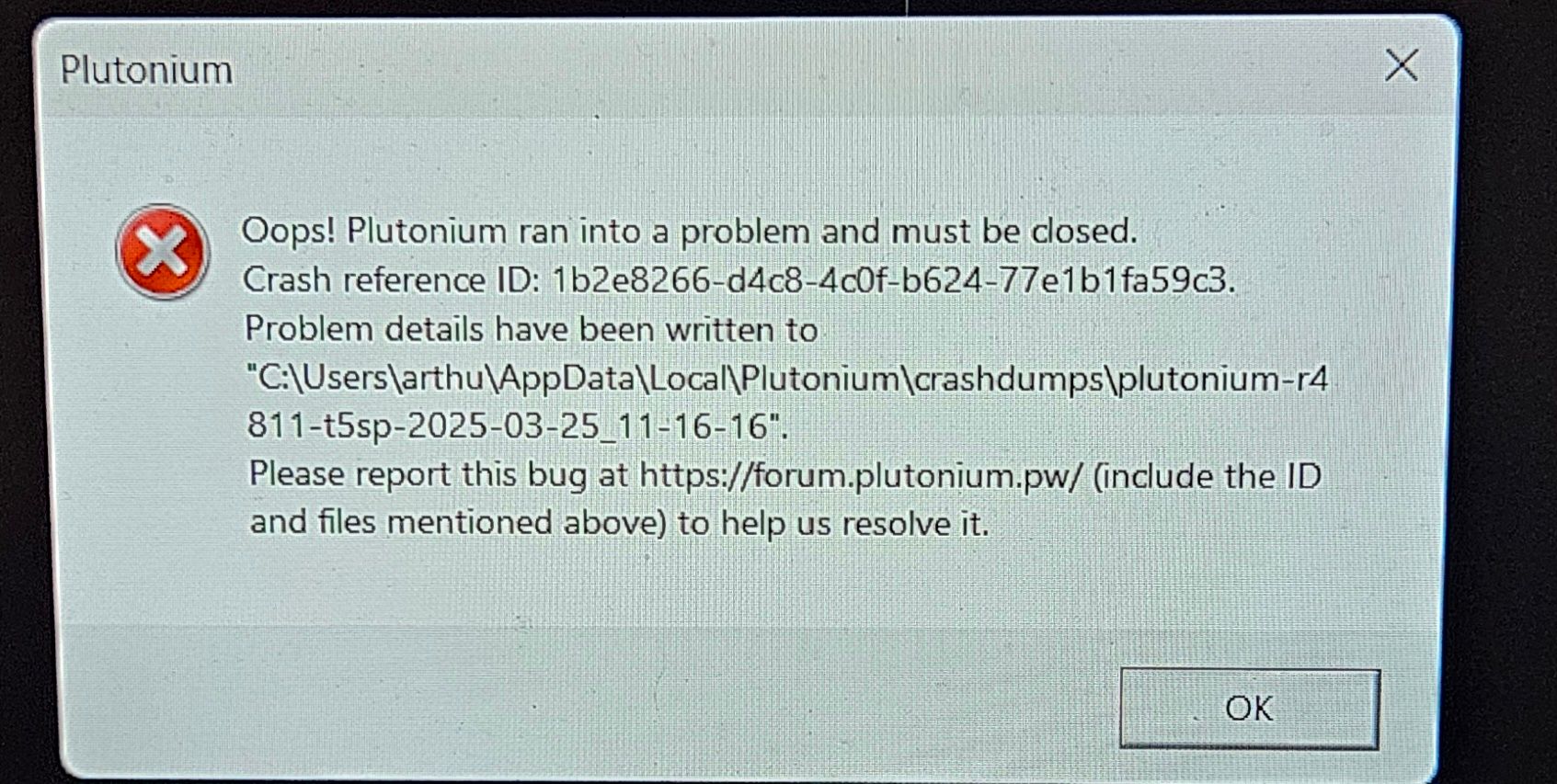
                My problem is that yesterday I tried to download BO1, but when I started the game, a message appeared (see attachment).
                So I looked at what you wrote above regarding the "players" folder. I did the manipulation by creating the folder that didn't exist in my system. I was then able to launch the game in multiplayer, but the zombie still doesn't work and gives me the same error message.
                What I don't understand is that a friend downloaded the same game file as me, and everything works without changing anything.
                Could you help me?
                Oh yes, and what is this: the terminal window showing the "exception address"?

                Thanks!20250325_231618.jpg

                Hadi77KSA 1 Reply Last reply
                0
                • artsko artsko

                  Thank you for your reply.
                  I'm completely unfamiliar with Plutonium and the forum.
                  My problem is that yesterday I tried to download BO1, but when I started the game, a message appeared (see attachment).
                  So I looked at what you wrote above regarding the "players" folder. I did the manipulation by creating the folder that didn't exist in my system. I was then able to launch the game in multiplayer, but the zombie still doesn't work and gives me the same error message.
                  What I don't understand is that a friend downloaded the same game file as me, and everything works without changing anything.
                  Could you help me?
                  Oh yes, and what is this: the terminal window showing the "exception address"?

                  Thanks!20250325_231618.jpg

                  Hadi77KSA Offline
                  Hadi77KSA Offline
                  Hadi77KSA
                  Contributor
                  wrote on last edited by
                  #23

                  artsko

                  Oh yes, and what is this: the terminal window showing the "exception address"?

                  It’s the window that opens when you press play. See the window behind the error message:
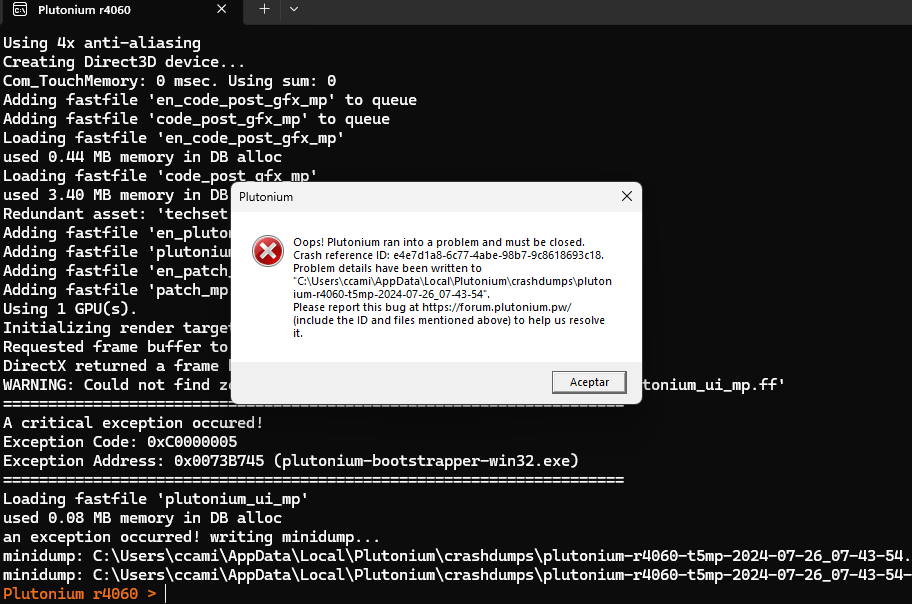
                  img

                  Could you also provide a screenshot of the storage\t5\players folder?

                  1 Reply Last reply
                  0
                  • artsko Offline
                    artsko Offline
                    artsko
                    wrote on last edited by
                    #24

                    I didn't have players so I created it and put the folders that you advice. And after this multiplayer worked but not zombi.
                    and when I will see the error code. I have 2 : Exception Code: 0xC0000005 Exception Address: 0x0073B745 plutonium

                    Hadi77KSA 1 Reply Last reply
                    0
                    • artsko artsko

                      I didn't have players so I created it and put the folders that you advice. And after this multiplayer worked but not zombi.
                      and when I will see the error code. I have 2 : Exception Code: 0xC0000005 Exception Address: 0x0073B745 plutonium

                      Hadi77KSA Offline
                      Hadi77KSA Offline
                      Hadi77KSA
                      Contributor
                      wrote on last edited by
                      #25

                      artsko that exception address isn’t the one I’m used to for zombies. Please provide screenshots of the terminal and the players directory.

                      1 Reply Last reply
                      0
                      • artsko Offline
                        artsko Offline
                        artsko
                        wrote on last edited by
                        #26

                        In the end, the game works perfectly. I don't know what modification made it work.
                        I uninstalled all the Plutonium files from my PC, redownloaded everything, and added the folders you listed to Players, removing my profile picture (I don't know if that's related).
                        Thank you so much for your help!

                        1 Reply Last reply
                        0
                        • DirkRockface DirkRockface referenced this topic on
                        • Hadi77KSA Hadi77KSA referenced this topic on
                        • Hadi77KSA Hadi77KSA referenced this topic on
                        • Hadi77KSA Hadi77KSA referenced this topic on
                        • Hadi77KSA Hadi77KSA referenced this topic on
                        • Hadi77KSA Hadi77KSA referenced this topic on
                        • Hadi77KSA Hadi77KSA referenced this topic on
                        • IDKMAAN1 IDKMAAN1 referenced this topic on
                        • Hadi77KSA Hadi77KSA referenced this topic on
                        • Hadi77KSA Hadi77KSA

                          Driver Method

                          Press Win+R, write this: dxdiag, press Ok, select Display in the window that opens, then look at the Device section for your device name and manufacturer. After you determine those, update your graphics drivers.

                          • https://www.nvidia.com/drivers/
                          • https://www.amd.com/drivers/
                          • https://downloadcenter.intel.com/
                          • OEM website of your device

                          CFG Method

                          1. Press Win+R and paste this path: %localappdata%\Plutonium\storage\t5
                          2. Open the players folder (create it if it doesn’t exist)
                          3. Place the .cfg files from the following link into the players folder https://mega.nz/folder/9ksUkSrA#TRYDTvno7hW_khFlJCB7mg
                          joshcool909 Offline
                          joshcool909 Offline
                          joshcool909
                          wrote on last edited by
                          #27

                          Hadi77KSA It didnt work, still showing the error

                          Hadi77KSA 1 Reply Last reply
                          0
                          • joshcool909 joshcool909

                            Hadi77KSA It didnt work, still showing the error

                            Hadi77KSA Offline
                            Hadi77KSA Offline
                            Hadi77KSA
                            Contributor
                            wrote on last edited by
                            #28

                            joshcool909 either your specs are too weak or you’re facing a different exception address than the ones my comment fix. I don’t have other suggestions for the exception addresses in this thread.

                            joshcool909 1 Reply Last reply
                            0
                            • joshcool909 Offline
                              joshcool909 Offline
                              joshcool909
                              wrote on last edited by
                              #29
                              This post is deleted!
                              1 Reply Last reply
                              0
                              • Hadi77KSA Hadi77KSA

                                joshcool909 either your specs are too weak or you’re facing a different exception address than the ones my comment fix. I don’t have other suggestions for the exception addresses in this thread.

                                joshcool909 Offline
                                joshcool909 Offline
                                joshcool909
                                wrote on last edited by
                                #30

                                Hadi77KSA What are specs? And how can I check if they're weak or not?

                                Hadi77KSA 1 Reply Last reply
                                0
                                • joshcool909 joshcool909

                                  Hadi77KSA What are specs? And how can I check if they're weak or not?

                                  Hadi77KSA Offline
                                  Hadi77KSA Offline
                                  Hadi77KSA
                                  Contributor
                                  wrote on last edited by
                                  #31

                                  joshcool909 system specifications, i.e. the hardware components. I’d say to use a website that compares hardware components between your specs and the game’s minimum requirements as listed on the Steam page of the game.

                                  joshcool909 1 Reply Last reply
                                  0
                                  • joshcool909 Offline
                                    joshcool909 Offline
                                    joshcool909
                                    wrote on last edited by
                                    #32
                                    This post is deleted!
                                    1 Reply Last reply
                                    0
                                    • Hadi77KSA Hadi77KSA

                                      joshcool909 system specifications, i.e. the hardware components. I’d say to use a website that compares hardware components between your specs and the game’s minimum requirements as listed on the Steam page of the game.

                                      joshcool909 Offline
                                      joshcool909 Offline
                                      joshcool909
                                      wrote on last edited by
                                      #33

                                      Hadi77KSA Everything looks good to me, i got 8 gig ram and bo2 runs perfectly fine

                                      1 Reply Last reply
                                      0
                                      • Hadi77KSA Hadi77KSA referenced this topic on
                                      • carrington Offline
                                        carrington Offline
                                        carrington
                                        wrote on last edited by
                                        #34

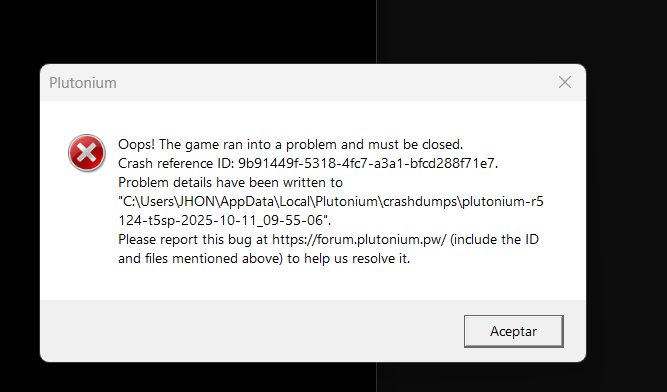
                                        Hello friends, I get the following error code, and the only thing I did was reset the PC to factory settings, but now I get this error, but BO2 does enter correctly. What doesn't work is BO1, despite many methods I've tried, it doesn't want to work.

                                        I speak Spanish, but they respond faster if I speak English. I look forward to your response.
                                        Captura de pantalla 2025-10-11 095517.png

                                        1 Reply Last reply
                                        0
                                        • Hadi77KSA Hadi77KSA

                                          Driver Method

                                          Press Win+R, write this: dxdiag, press Ok, select Display in the window that opens, then look at the Device section for your device name and manufacturer. After you determine those, update your graphics drivers.

                                          • https://www.nvidia.com/drivers/
                                          • https://www.amd.com/drivers/
                                          • https://downloadcenter.intel.com/
                                          • OEM website of your device

                                          CFG Method

                                          1. Press Win+R and paste this path: %localappdata%\Plutonium\storage\t5
                                          2. Open the players folder (create it if it doesn’t exist)
                                          3. Place the .cfg files from the following link into the players folder https://mega.nz/folder/9ksUkSrA#TRYDTvno7hW_khFlJCB7mg
                                          lakiiii27 Offline
                                          lakiiii27 Offline
                                          lakiiii27
                                          wrote on last edited by
                                          #35

                                          Hadi77KSA said in PLEASE HELP, ERROR, BO1 CRASH WHEN LANCHING:

                                          %localappdata%\Plutonium\storage\t5

                                          thaaaaaaanksss

                                          1 Reply Last reply
                                          0

                                          Hello! It looks like you're interested in this conversation, but you don't have an account yet.

                                          Getting fed up of having to scroll through the same posts each visit? When you register for an account, you'll always come back to exactly where you were before, and choose to be notified of new replies (either via email, or push notification). You'll also be able to save bookmarks and upvote posts to show your appreciation to other community members.

                                          With your input, this post could be even better 💗

                                          Register Login
                                          Reply
                                          • Reply as topic
                                          Log in to reply
                                          • Oldest to Newest
                                          • Newest to Oldest
                                          • Most Votes


                                          • 1
                                          • 2
                                          • Login

                                          • Don't have an account? Register

                                          • Login or register to search.
                                          • First post
                                            Last post
                                          0
                                          • Unread 0
                                          • Recent
                                          • Tags
                                          • Popular
                                          • Users
                                          • Groups
                                          • Donate