Skip to content
  • 0 Unread 0
  • Recent
  • Tags
  • Popular
  • Users
  • Groups
  • Donate
Collapse

Plutonium

  1. Home
  2. Launcher Support
  3. Not up-to-date and error

Not up-to-date and error

Scheduled Pinned Locked Moved Launcher Support
errorfailed
8 Posts 5 Posters 3.8k Views 2 Watching
  • Oldest to Newest
  • Newest to Oldest
  • Most Votes
Reply
  • Reply as topic
Log in to reply
This topic has been deleted. Only users with topic management privileges can see it.
  • HelloBlocks Offline
    HelloBlocks Offline
    HelloBlocks
    wrote on last edited by
    #1

    alt text
    so my friend and I downloaded Pluto this day from the official page.

    It Worked perfect for me, but when My Friend tried to launch the launcher got this.

    He Downloaded from same place as me, and installed all of the redist carpet. What is wrong?
    alt text
    he also got this and We don't know what to do. Help?

    1 Reply Last reply
    0
    • V3rTicaL Offline
      V3rTicaL Offline
      V3rTicaL
      wrote on last edited by
      #2

      Exactly the same thing happens to me, I formatted the pc and it didn't work either, from one moment to the next it stopped working, a week playing and yesterday I couldn't get in later in the afternoon.

      sorry for my English

      baraa dalwan 1 Reply Last reply
      1
      • HannesC Offline
        HannesC Offline
        HannesC
        Plutonium Staff
        wrote on last edited by
        #3

        HelloBlocks V3rTicaL Try deleting both the launchers, the original one as well as the .new one and redownloading it from http://cdn.plutonium.pw/updater/plutonium.exe. Run it as admin.

        HelloBlocks Plutonium.exe should automatically update the client files once you run it, but if it still stays on "Out of Date" error for whatever reason, you could try manually deleting the %localappdata%/Plutonium folder and running the launcher again.

        V3rTicaL 1 Reply Last reply
        3
        • NamelessZ3RO Offline
          NamelessZ3RO Offline
          NamelessZ3RO
          wrote on last edited by
          #4
          This post is deleted!
          1 Reply Last reply
          0
          • HannesC HannesC

            HelloBlocks V3rTicaL Try deleting both the launchers, the original one as well as the .new one and redownloading it from http://cdn.plutonium.pw/updater/plutonium.exe. Run it as admin.

            HelloBlocks Plutonium.exe should automatically update the client files once you run it, but if it still stays on "Out of Date" error for whatever reason, you could try manually deleting the %localappdata%/Plutonium folder and running the launcher again.

            V3rTicaL Offline
            V3rTicaL Offline
            V3rTicaL
            wrote on last edited by
            #5

            HannesC I still have the same problem, I pass from one moment to another, I delete the appdatalocal files and now I skip this
            Captura de pantalla 2020-11-06 122640.png
            Captura de pantalla 2020-11-06 122719.png

            1 Reply Last reply
            0
            • HannesC Offline
              HannesC Offline
              HannesC
              Plutonium Staff
              wrote on last edited by
              #6

              Not sure, tried adding pluto to exclusions and making sure firewall isn't blocking it? Follow this and if this doesn't fix it either, try a VPN.

              1 Reply Last reply
              0
              • V3rTicaL Offline
                V3rTicaL Offline
                V3rTicaL
                wrote on last edited by
                #7

                The files shown in the video I deleted them to do everything from scratch, now the plutonium file does not start and cannot update, it was fine for me, I pass from one moment to another.

                1 Reply Last reply
                0
                • V3rTicaL V3rTicaL

                  Exactly the same thing happens to me, I formatted the pc and it didn't work either, from one moment to the next it stopped working, a week playing and yesterday I couldn't get in later in the afternoon.

                  sorry for my English

                  baraa dalwan Offline
                  baraa dalwan Offline
                  baraa dalwan
                  wrote on last edited by
                  #8

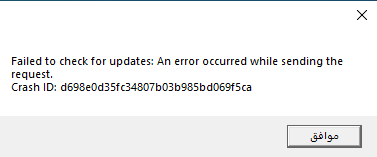
                  Wait, I was getting a similar problem but I was able to go in when I downloaded and started my vpn eror.png 2020-11-07.png
                  1 Reply Last reply
                  1

                  Hello! It looks like you're interested in this conversation, but you don't have an account yet.

                  Getting fed up of having to scroll through the same posts each visit? When you register for an account, you'll always come back to exactly where you were before, and choose to be notified of new replies (either via email, or push notification). You'll also be able to save bookmarks and upvote posts to show your appreciation to other community members.

                  With your input, this post could be even better 💗

                  Register Login
                  Reply
                  • Reply as topic
                  Log in to reply
                  • Oldest to Newest
                  • Newest to Oldest
                  • Most Votes


                  • Login

                  • Don't have an account? Register

                  • Login or register to search.
                  • First post
                    Last post
                  0
                  • Unread 0
                  • Recent
                  • Tags
                  • Popular
                  • Users
                  • Groups
                  • Donate