Skip to content
  • 0 Unread 0
  • Recent
  • Tags
  • Popular
  • Users
  • Groups
  • Donate
Collapse

Plutonium

  1. Home
  2. BO2 Server Hosting Support
  3. My own server wont appear in the server list

My own server wont appear in the server list

Scheduled Pinned Locked Moved BO2 Server Hosting Support
17 Posts 5 Posters 1.8k Views 1 Watching
  • Oldest to Newest
  • Newest to Oldest
  • Most Votes
Reply
  • Reply as topic
Log in to reply
This topic has been deleted. Only users with topic management privileges can see it.
  • Dario_KD Offline
    Dario_KD Offline
    Dario_KD
    wrote on last edited by
    #1

    My friends are able to see the server and join but it wont show up on my pc

    matheusz 1 Reply Last reply
    1
    • HannesC Offline
      HannesC Offline
      HannesC
      Plutonium Staff
      wrote on last edited by
      #2

      Are you running the server on the same machine you're playing on? You won't see it if your router doesn't support NAT loopback, however you can join your server by direct connecting through the console.

      connect localhost:port

      1 Reply Last reply
      0
      • Dario_KD Offline
        Dario_KD Offline
        Dario_KD
        wrote on last edited by
        #3

        I just turned on the support for NAT loopback in the ppp0.1 gateway (my port is also connected through this gateway), even after doing that nothing works, not even connecting through the console

        1 Reply Last reply
        0
        • Dario_KD Offline
          Dario_KD Offline
          Dario_KD
          wrote on last edited by
          #4

          HannesC

          Cahz 1 Reply Last reply
          0
          • Dario_KD Dario_KD

            HannesC

            Cahz Offline
            Cahz Offline
            Cahz
            VIP
            wrote on last edited by
            #5

            Dario_KD You don't need to turn on NAT loopback... you need to just open console and type
            connect localhost:port or connect 127.0.0.1:port

            1 Reply Last reply
            0
            • Dss0 Offline
              Dss0 Offline
              Dss0
              Plutonium Staff
              wrote on last edited by
              #6

              or

              connect 192.168.x.x:port
              

              or

              connect wanip:port
              
              1 Reply Last reply
              0
              • Dario_KD Offline
                Dario_KD Offline
                Dario_KD
                wrote on last edited by Dario_KD
                #7

                "port" being the number? or literally the word?

                1 Reply Last reply
                0
                • HannesC Offline
                  HannesC Offline
                  HannesC
                  Plutonium Staff
                  wrote on last edited by
                  #8

                  4976 or 4977, whichever port you specified.

                  1 Reply Last reply
                  0
                  • Dario_KD Dario_KD

                    My friends are able to see the server and join but it wont show up on my pc

                    matheusz Offline
                    matheusz Offline
                    matheusz
                    wrote on last edited by
                    #9

                    Dario_KD soso

                    1 Reply Last reply
                    0
                    • Dario_KD Offline
                      Dario_KD Offline
                      Dario_KD
                      wrote on last edited by Dario_KD
                      #10

                      None of those work, If I open the game first and then the server it wont show up on my friends list, neither does in mine

                      When I use these commands this shows up: "Joining game session..." but nothing loads

                      Dss0 1 Reply Last reply
                      0
                      • Dario_KD Dario_KD

                        None of those work, If I open the game first and then the server it wont show up on my friends list, neither does in mine

                        When I use these commands this shows up: "Joining game session..." but nothing loads

                        Dss0 Offline
                        Dss0 Offline
                        Dss0
                        Plutonium Staff
                        wrote on last edited by
                        #11

                        Dario_KD the server will run on port 4977 as the game already uses 4976. Make sure 4977 is forwarded in your router.

                        1 Reply Last reply
                        0
                        • Dario_KD Offline
                          Dario_KD Offline
                          Dario_KD
                          wrote on last edited by
                          #12

                          When I use these commands ati first it shows up: "Joining game session..." but nothing loads

                          Dss0 1 Reply Last reply
                          0
                          • Dario_KD Dario_KD

                            When I use these commands ati first it shows up: "Joining game session..." but nothing loads

                            Dss0 Offline
                            Dss0 Offline
                            Dss0
                            Plutonium Staff
                            wrote on last edited by
                            #13

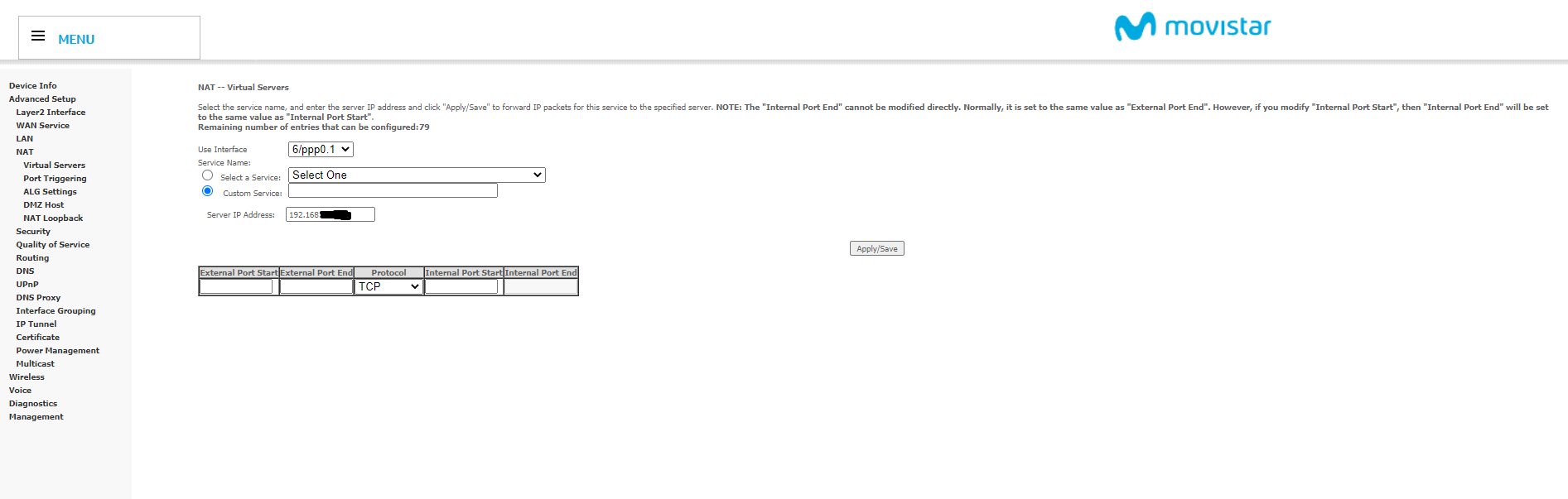
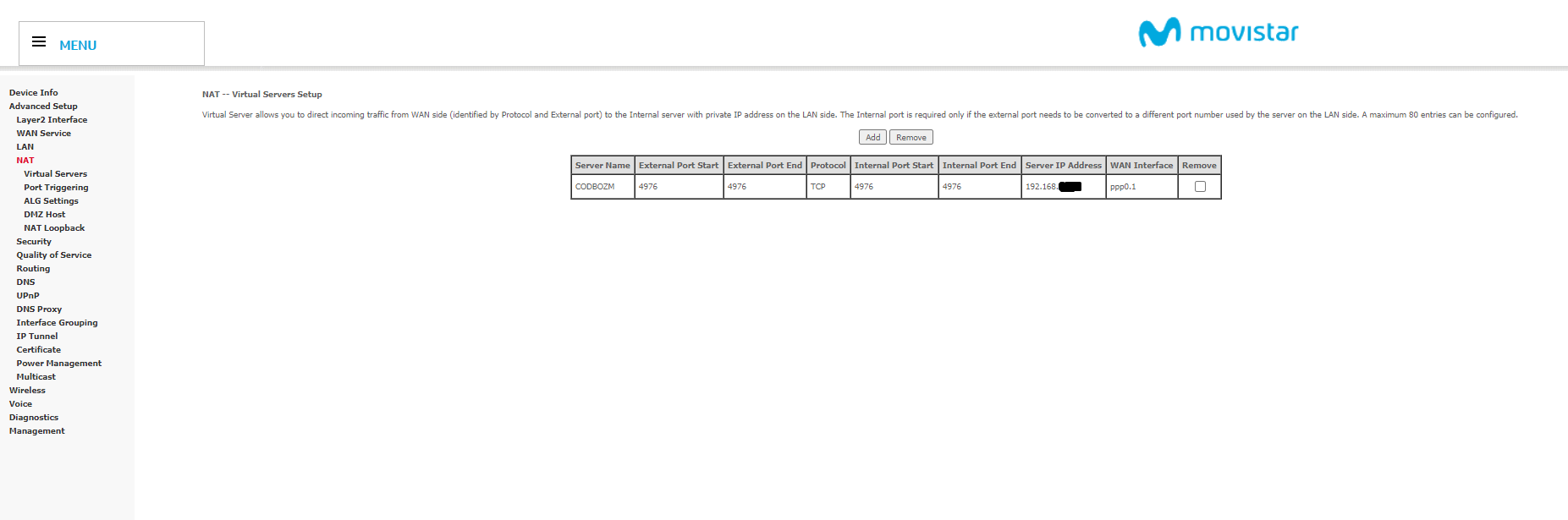
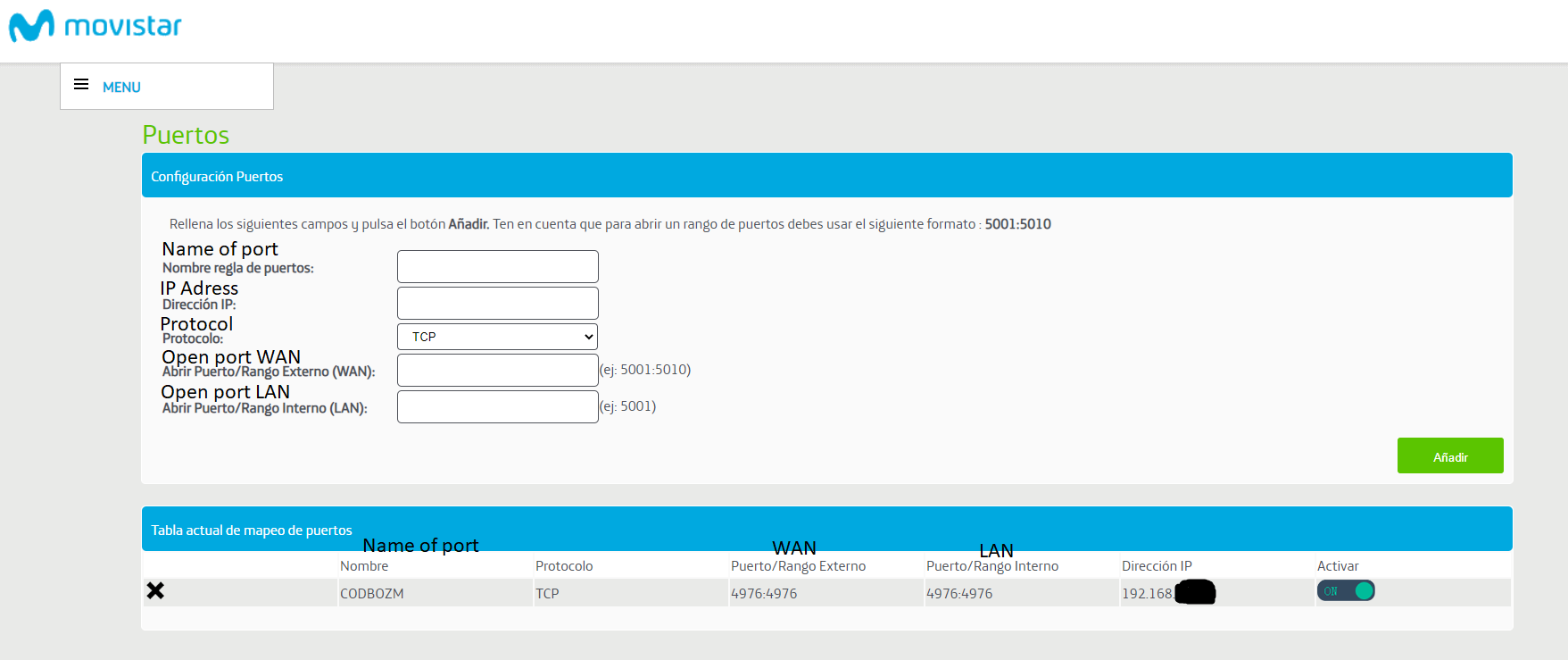
                            Dario_KD post a screenshot of your port forwarding settings.

                            1 Reply Last reply
                            0
                            • Dario_KD Offline
                              Dario_KD Offline
                              Dario_KD
                              wrote on last edited by Dario_KD
                              #14

                              3.png 2.png 1.png

                              All I found related to ports

                              I also just opened the 4977 port and still it doesnt show up

                              1 Reply Last reply
                              0
                              • Dario_KD Offline
                                Dario_KD Offline
                                Dario_KD
                                wrote on last edited by
                                #15

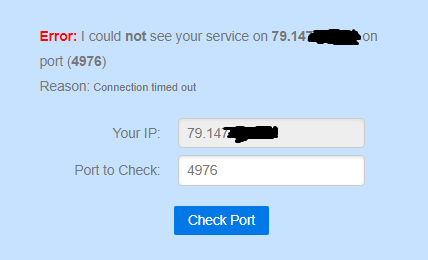
                                Also whenever I check a port in "https://canyouseeme.org/" none work4.png

                                Dss0 1 Reply Last reply
                                0
                                • Dario_KD Dario_KD

                                  Also whenever I check a port in "https://canyouseeme.org/" none work4.png

                                  Dss0 Offline
                                  Dss0 Offline
                                  Dss0
                                  Plutonium Staff
                                  wrote on last edited by
                                  #16

                                  Dario_KD because you need to open port 4977 for udp traffic, not tcp.

                                  1 Reply Last reply
                                  0
                                  • Dario_KD Offline
                                    Dario_KD Offline
                                    Dario_KD
                                    wrote on last edited by
                                    #17

                                    Worked, thanks a lot 🙂

                                    1 Reply Last reply
                                    0

                                    Hello! It looks like you're interested in this conversation, but you don't have an account yet.

                                    Getting fed up of having to scroll through the same posts each visit? When you register for an account, you'll always come back to exactly where you were before, and choose to be notified of new replies (either via email, or push notification). You'll also be able to save bookmarks and upvote posts to show your appreciation to other community members.

                                    With your input, this post could be even better 💗

                                    Register Login
                                    Reply
                                    • Reply as topic
                                    Log in to reply
                                    • Oldest to Newest
                                    • Newest to Oldest
                                    • Most Votes


                                    • Login

                                    • Don't have an account? Register

                                    • Login or register to search.
                                    • First post
                                      Last post
                                    0
                                    • Unread 0
                                    • Recent
                                    • Tags
                                    • Popular
                                    • Users
                                    • Groups
                                    • Donate