Plutonium failed to check for updates
-

When i try to start plutonium this error pop's up. I can click OK and then everything works normal until i want to join a server in MW3. When i join a server it tells me to update Plutonium.
I also already downloaded the newest .exe from the website. -
-
like i said i already installed the newest version of plutonium
-
-
and i'm still getting the same error message
MyNameJeff0 try changing your dns servers https://www.windowscentral.com/how-change-your-pcs-dns-settings-windows-10
-
I changed my DNS to Cloudflare but i still get the same error
-
Try a VPN then.
-
-
i tried it with an VPN an it's still the same..
MyNameJeff0 you already re-downloaded the launcher from here? https://cdn.plutonium.pw/updater/plutonium.exe
Which antivirus software do you use? -
Yes i do have re-downloaded the launcher from your link. i use BullGuard as antivirus but when i launch Plutonium i deactivate any kind of antivirus.
-
Yes i do have re-downloaded the launcher from your link. i use BullGuard as antivirus but when i launch Plutonium i deactivate any kind of antivirus.
MyNameJeff0 said in Plutonium failed to check for updates:
BullGuard
it might still be blocking the connection tho. Try uninstalling it or turn off the firewall feature if it has one.
-
Okay, i deinstalled BullGuard and it's still not working, slowly I'm giving up hope. Can you tell me where you save all the Plutonium files on pc? for example somewhere in AppData. Maybe it will work if i delete all those files and reinstall Plutonium completely
-
Okay, i deinstalled BullGuard and it's still not working, slowly I'm giving up hope. Can you tell me where you save all the Plutonium files on pc? for example somewhere in AppData. Maybe it will work if i delete all those files and reinstall Plutonium completely
MyNameJeff0 %localappdata%/Plutonium
-
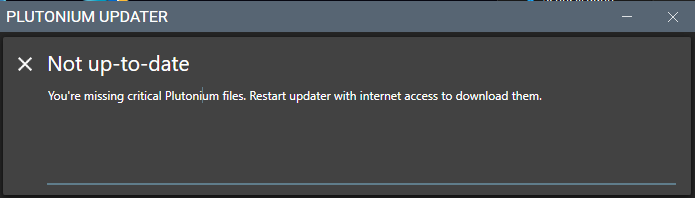 okay i deleted everything, i sadly still get the same error code and after pressing OK i get this message and nothing happens. And yes i have internet access
 -
anyone know something i could do now?
-
VPN should've definitely worked, which vpn did you try? Use a different one. Also do note you have to use system wide vpns and not your browser extension ones.
-
i tried it with Windscribe and NordVPN and i'm still getting the same error message. :c



Hello! It looks like you're interested in this conversation, but you don't have an account yet.
Getting fed up of having to scroll through the same posts each visit? When you register for an account, you'll always come back to exactly where you were before, and choose to be notified of new replies (either via email, or push notification). You'll also be able to save bookmarks and upvote posts to show your appreciation to other community members.
With your input, this post could be even better 💗
Register Login