Skip to content
  • 0 Unread 0
  • Recent
  • Tags
  • Popular
  • Users
  • Groups
  • Donate
Collapse

Plutonium

  1. Home
  2. Launcher Support
  3. total reinstallation of the launcher

total reinstallation of the launcher

Scheduled Pinned Locked Moved Launcher Support
10 Posts 2 Posters 2.3k Views 1 Watching
  • Oldest to Newest
  • Newest to Oldest
  • Most Votes
Reply
  • Reply as topic
Log in to reply
This topic has been deleted. Only users with topic management privileges can see it.
  • grumi Offline
    grumi Offline
    grumi
    wrote on last edited by
    #1

    due to the errors that I have had and of which I have not obtained a solution I have decided to uninstall the launcher completely, but what is uninstall the launcher, delete the .exe and what is in %appdata%? I need help please.

    1 Reply Last reply
    0
    • hnlk Offline
      hnlk Offline
      hnlk
      wrote on last edited by
      #2

      grumi Yes, go to Windows Key and start typing '%localappdata%', navigate to the 'Plutonium' folder then Delete. Once you delete that folder you're good to go.

      grumi 1 Reply Last reply
      0
      • hnlk hnlk

        grumi Yes, go to Windows Key and start typing '%localappdata%', navigate to the 'Plutonium' folder then Delete. Once you delete that folder you're good to go.

        grumi Offline
        grumi Offline
        grumi
        wrote on last edited by
        #3

        hnlk thanks, but I have done this several times and it does not solve my error, more info about my problem:
        https://forum.plutonium.pw/topic/11074/launcher-dont-works?_=1622070023176

        hnlk 1 Reply Last reply
        0
        • grumi grumi

          hnlk thanks, but I have done this several times and it does not solve my error, more info about my problem:
          https://forum.plutonium.pw/topic/11074/launcher-dont-works?_=1622070023176

          hnlk Offline
          hnlk Offline
          hnlk
          wrote on last edited by
          #4

          grumi So you're using the copy of BO2 (T6) & Plutonium Launcher / Updater provided from the guide whilst removing the old Plutonium folder in %localappdata%?

          I think it's pretty dang important to be using their copy of the game, if not, the one installed off of steam. Are you using your own copy thru steam? Is your client pointed to your steamapps folder?

          grumi 1 Reply Last reply
          0
          • hnlk hnlk

            grumi So you're using the copy of BO2 (T6) & Plutonium Launcher / Updater provided from the guide whilst removing the old Plutonium folder in %localappdata%?

            I think it's pretty dang important to be using their copy of the game, if not, the one installed off of steam. Are you using your own copy thru steam? Is your client pointed to your steamapps folder?

            grumi Offline
            grumi Offline
            grumi
            wrote on last edited by
            #5

            hnlk I am using the copy that is in the forum, in the installation guide of the game.

            1 Reply Last reply
            0
            • grumi Offline
              grumi Offline
              grumi
              wrote on last edited by
              #6

              I'm going to install mw3 to definitely check if it's the launcher or the game itself, although I'm pretty sure it's the launcher that's giving errors.

              hnlk 1 Reply Last reply
              0
              • grumi grumi

                I'm going to install mw3 to definitely check if it's the launcher or the game itself, although I'm pretty sure it's the launcher that's giving errors.

                hnlk Offline
                hnlk Offline
                hnlk
                wrote on last edited by
                #7

                grumi Yeah, try and install MW3 (IW5) and test that, it should work fine... I took another look, have you tried disabling the firewall like Dss0 mentioned? You should disable Windows Firewall on all switches (Domain, Private, Public all off) while you are running your Plutonium updater. There is a very strong possibility that when you are installing the necessary files, it's stopping the client from doing that. You'll also want to keep it off while you run the game!

                grumi 1 Reply Last reply
                0
                • hnlk hnlk

                  grumi Yeah, try and install MW3 (IW5) and test that, it should work fine... I took another look, have you tried disabling the firewall like Dss0 mentioned? You should disable Windows Firewall on all switches (Domain, Private, Public all off) while you are running your Plutonium updater. There is a very strong possibility that when you are installing the necessary files, it's stopping the client from doing that. You'll also want to keep it off while you run the game!

                  grumi Offline
                  grumi Offline
                  grumi
                  wrote on last edited by
                  #8

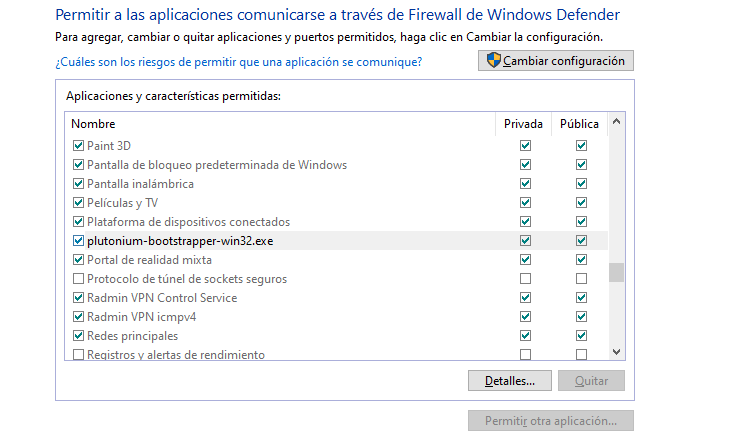
                  hnlk What do you mean by disabling the firewall, should I have the options unchecked, or disable it from windows defender? pared de fuego haha.PNG
                  hnlk 1 Reply Last reply
                  0
                  • grumi grumi

                    hnlk What do you mean by disabling the firewall, should I have the options unchecked, or disable it from windows defender? pared de fuego haha.PNG

                    hnlk Offline
                    hnlk Offline
                    hnlk
                    wrote on last edited by
                    #9

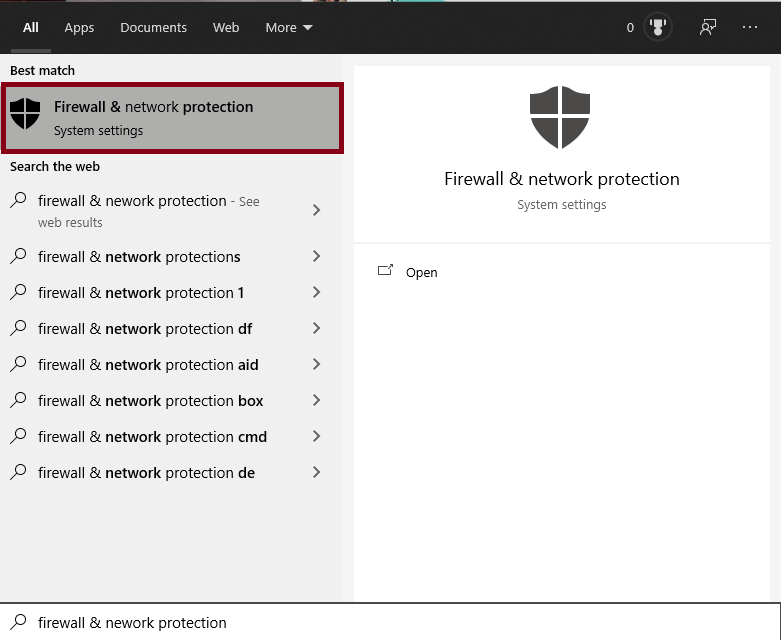
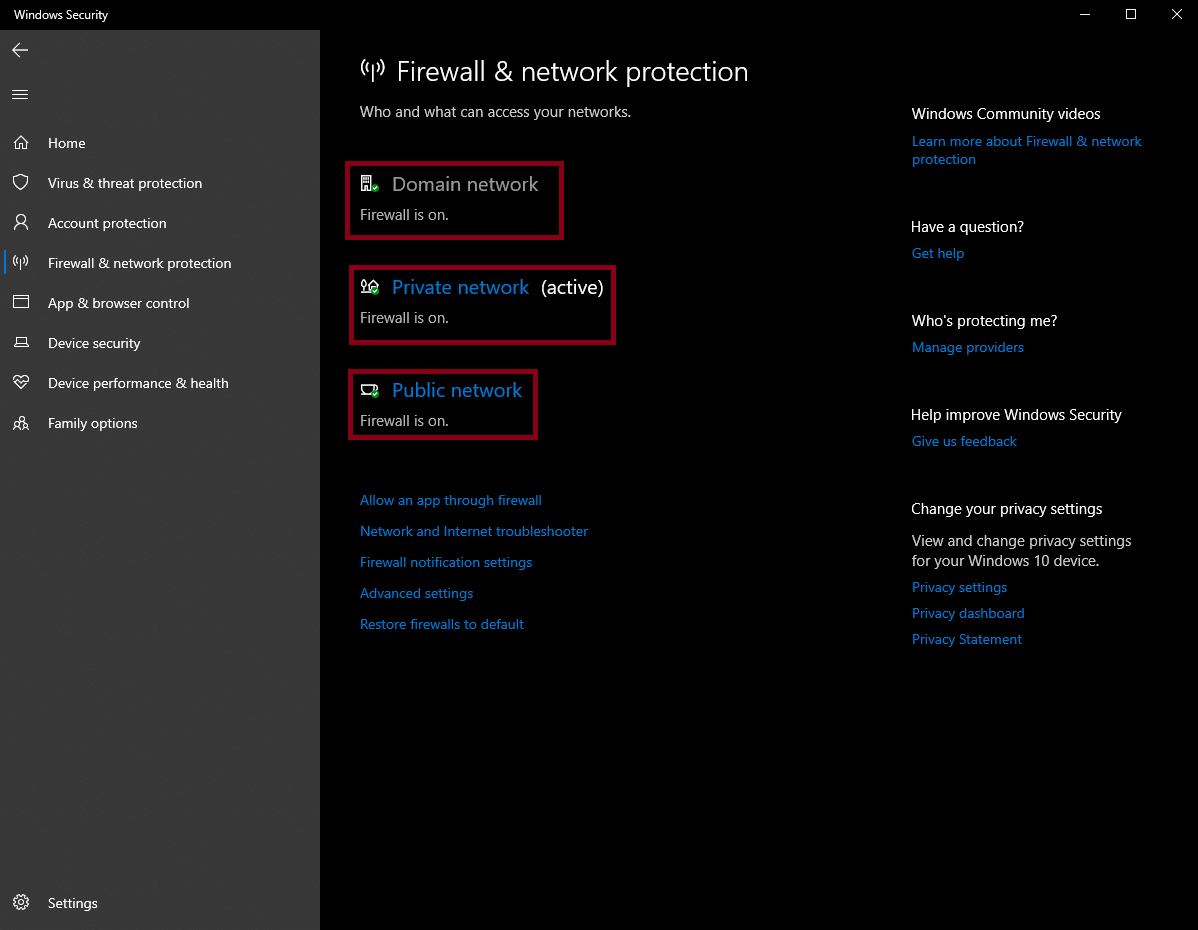
                    grumi 2.png 3.png

                    • Open up 'Firewall & network protection'

                    • Go down the list; 'Domain network' turn off. 'Private network' turn off. 'Public network' turn off.

                    It should then allow you to install the Plutonium files / update them without issue. Try and do a reinstall of the client after that.

                    grumi 1 Reply Last reply
                    0
                    • hnlk hnlk

                      grumi 2.png 3.png

                      • Open up 'Firewall & network protection'

                      • Go down the list; 'Domain network' turn off. 'Private network' turn off. 'Public network' turn off.

                      It should then allow you to install the Plutonium files / update them without issue. Try and do a reinstall of the client after that.

                      grumi Offline
                      grumi Offline
                      grumi
                      wrote on last edited by
                      #10

                      hnlk ok, thank you very much, I will try it tomorrow, hopefully it will work!

                      1 Reply Last reply
                      0

                      Hello! It looks like you're interested in this conversation, but you don't have an account yet.

                      Getting fed up of having to scroll through the same posts each visit? When you register for an account, you'll always come back to exactly where you were before, and choose to be notified of new replies (either via email, or push notification). You'll also be able to save bookmarks and upvote posts to show your appreciation to other community members.

                      With your input, this post could be even better 💗

                      Register Login
                      Reply
                      • Reply as topic
                      Log in to reply
                      • Oldest to Newest
                      • Newest to Oldest
                      • Most Votes


                      • Login

                      • Don't have an account? Register

                      • Login or register to search.
                      • First post
                        Last post
                      0
                      • Unread 0
                      • Recent
                      • Tags
                      • Popular
                      • Users
                      • Groups
                      • Donate